

You are running Google Ads. You are getting clicks. But something still feels off — your numbers do not quite add up, your Smart Bidding seems confused, and you are not sure which ads are actually bringing in customers.
The problem might not be your ads at all. It might be what happens after the click.
Enhanced conversion Google Ads is one of the most powerful — and most overlooked — features available to advertisers today. It helps Google see the full picture of what your ads are actually doing, so your campaigns can get smarter, spend better, and deliver real results.
In this article, we will break down exactly what enhanced conversions are, how they work, why they matter more than ever in 2026, and how to get started — all in plain, simple language.
What Is Enhanced Conversion in Google Ads?
Let’s start simple.
When someone clicks your ad and then buys something or fills out a form on your website, that is called a conversion. Tracking those conversions tells Google which ads are working so it can show them to more of the right people.
The problem is, standard conversion tracking relies on cookies — small pieces of data that browsers store on a person’s device. And cookies are becoming less and less reliable. Browsers like Safari and Firefox block third-party cookies by default. People switch from their phone to their laptop mid-shopping trip. Ad blockers get in the way. The result? A chunk of your real conversions simply goes missing from your data.
That is where enhanced conversion in Google Ads steps in.
Enhanced conversions work by using first-party data — information your customers willingly give you, like their email address or phone number when they check out or fill out a form. Your website takes that data, scrambles it using a secure process called SHA-256 hashing (think of it like turning a name into an unreadable secret code), and sends the coded version to Google. Google then tries to match that code to a signed-in Google account and connect the conversion back to the original ad click.
The result? More accurate data, smarter bidding, and a much clearer picture of what your ads are actually doing for your business.
Why Does This Matter So Much Right Now?
We are living through a big shift in how the internet handles privacy. Third-party cookies — the old backbone of digital ad tracking — are being phased out. Privacy laws like GDPR and CCPA are stricter than ever. Browsers are locking things down.
For advertisers, this creates a real problem. Without reliable tracking, Google’s automated bidding system — which uses your conversion data to make decisions — starts flying blind. It does not know when to bid high or low, who to target, or which searches are most likely to result in a sale.
Standard tracking tools can miss 5 to 15 percent of real conversions, especially when users switch devices or browse in private mode. That may not sound like a lot, but if you are spending $2,000 a month on ads and missing 10% of your conversions, you are making optimization decisions based on incomplete information — and likely wasting a meaningful chunk of that budget as a result.
Enhanced conversions close that gap. They give Google a second signal — one that works even when cookies fail — so your campaigns can optimize based on what is actually happening, not just what the cookie could see.
If you want your Google Ads conversion tracking to be truly accurate, enhanced conversions are no longer optional. They are essential.
The Two Types of Enhanced Conversions (And the Big 2026 Change)
Until recently, Google split enhanced conversions into two separate tools:
Enhanced Conversions for Web was designed for businesses that track conversions directly on their website — like a purchase confirmation page or a thank-you page after a form submission. When a customer completed a purchase and entered their email, your site would hash that email and send it to Google along with the conversion event.
Enhanced Conversions for Leads was built for businesses with longer sales cycles — think B2B companies, law firms, medical practices, or any business where a lead fills out a form today but does not become a paying customer until days or weeks later. The lead’s hashed data gets sent to Google upfront, and when they eventually convert (offline conversion, over the phone, or through a CRM), you upload that match so Google can tie the sale back to the original ad.
Running both meant two separate setups, two different configurations, and a lot of confusion about which one applied to your business — especially if you do both e-commerce and lead generation.
That is all changing in 2026.
Starting in April 2026, Google began accepting user-provided data from multiple sources at the same time — your website tag, Data Manager, and API connections can all send data simultaneously. No more choosing just one method.
Then in June 2026, Google is combining both enhanced conversion types into a single, unified feature with one simple on/off switch. No more picking between “for web” and “for leads.” No more wrestling with which implementation method to choose. One toggle, one setup, and Google handles the rest — including automatically deduplicating data if the same conversion comes in through more than one channel.
Existing users will be migrated automatically. No action is needed to stay active. But it is still smart to review your setup and make sure everything is running cleanly.
How Enhanced Conversions Actually Help Your Campaigns
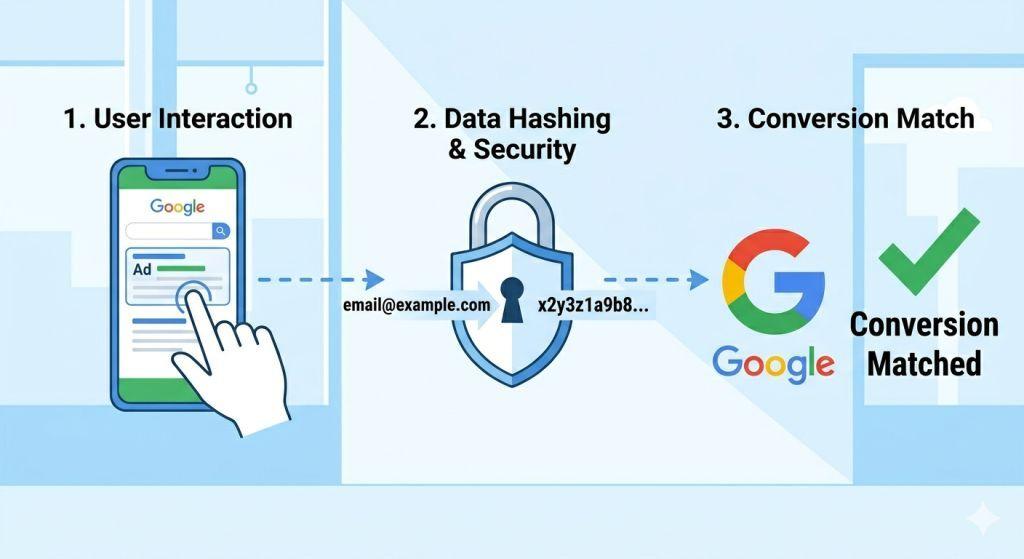
Here is the practical impact — the reasons this feature should be near the top of your priority list.
Better bidding decisions. Google’s Smart Bidding strategies — like Target CPA (cost per acquisition) and Target ROAS (return on ad spend) — rely entirely on conversion data to make decisions. The more complete and accurate that data is, the better Google can bid on your behalf. Enhanced conversions give Smart Bidding more fuel to work with, which typically leads to lower costs and higher conversion rates over time.
Recovered lost conversions. Every conversion that goes untracked is a vote that never gets counted. When you run enhanced conversions, Google can recover conversions that standard cookie tracking missed — like the customer who clicked your ad on their phone during lunch and then bought on their laptop at home that evening. Those recovered conversions feed directly back into your bidding model.
Cross-device attribution. People rarely complete a purchase on the same device they used to first discover your brand. Enhanced conversions help Google connect the dots across devices by matching hashed customer data to a signed-in Google account, regardless of which device that person is using at any given moment.
Privacy-safe by design. The SHA-256 hashing process is a one-way street — Google cannot reverse-engineer the hash back into a readable email address. Your customer’s personal data stays protected, and you stay compliant with modern privacy regulations.
How to Get Started With Enhanced Conversions
Setting up enhanced conversions does not require you to be a tech wizard, but it does require a few steps done correctly.
Here is the basic process:
- Log in to your Google Ads account and go to Tools & Settings, then click on Conversions under the Measurement section.
- Select the conversion action you want to enhance — such as a purchase or form submission.
- Scroll to the Enhanced Conversions section and turn it on.
- Accept Google’s Customer Data Terms. This step is required. Without it, the feature will not activate even if the toggle is switched on.
- Choose your implementation method — Google Tag, Google Tag Manager, or the API. (After June 2026, this choice goes away and all methods work together.)
- Map your data fields — tell Google where on your page to find the customer’s email, phone number, or address.
- Test your setup using Google Tag Manager’s Preview Mode or the Diagnostics tab in Google Ads to confirm that hashed data is being sent correctly.
If this feels like a lot, you are not alone. Many small business owners find the technical side of Google Ads setup tricky, which is exactly why working with a team that specializes in PPC management for small business can make a big difference. A good PPC manager will not only set up enhanced conversions correctly — they will make sure your entire tracking stack is clean, accurate, and working together.
What to Check After You Set It Up
Once enhanced conversions are live, give your campaigns a few weeks to stabilize. Then compare your before-and-after numbers:
- Did your conversion count go up?
- Did your cost per conversion go down?
- Did your ROAS improve?
These are the signals that enhanced conversions are doing their job. You can also check the Conversion Diagnostics tab in Google Ads to see if your enhanced conversions are firing correctly and what your match rate looks like. A higher match rate means more of your conversions are being successfully attributed back to ad clicks.
Is This Feature Right for Your Business?
The short answer is: almost certainly yes.
Whether you run an online store, a service business, a medical practice, or a B2B company, enhanced conversions help Google understand your customers better. And when Google understands your customers better, your ads get shown to more of the right people at the right time.
If you are investing money in Google Ads and not using enhanced conversions, you are essentially asking Google to make decisions with one hand tied behind its back.
The 2026 updates make the setup simpler than ever. There has never been a better time to turn this feature on. And if you want expert guidance tailored to your business, a team focused on search engine marketing for small business can help you build a tracking setup that actually supports your growth goals.
For more technical detail straight from Google, the Google Ads Help Center guide on enhanced conversions is a great free resource to bookmark.
Final Thoughts
Enhanced conversion Google Ads is not a nice-to-have anymore — it is a must-have for any advertiser who wants accurate data, smarter bidding, and better returns in a world where cookies are disappearing fast.
The concept is simple: give Google better data, and Google will do a better job spending your budget. The 2026 unification makes setup easier than ever, and the payoff — recovered conversions, improved attribution, and stronger campaign performance — is very real.
Turn it on, check your tracking, and watch your campaigns finally start performing the way they were always supposed to.