
What Are Google Ads Lead Form Extensions?
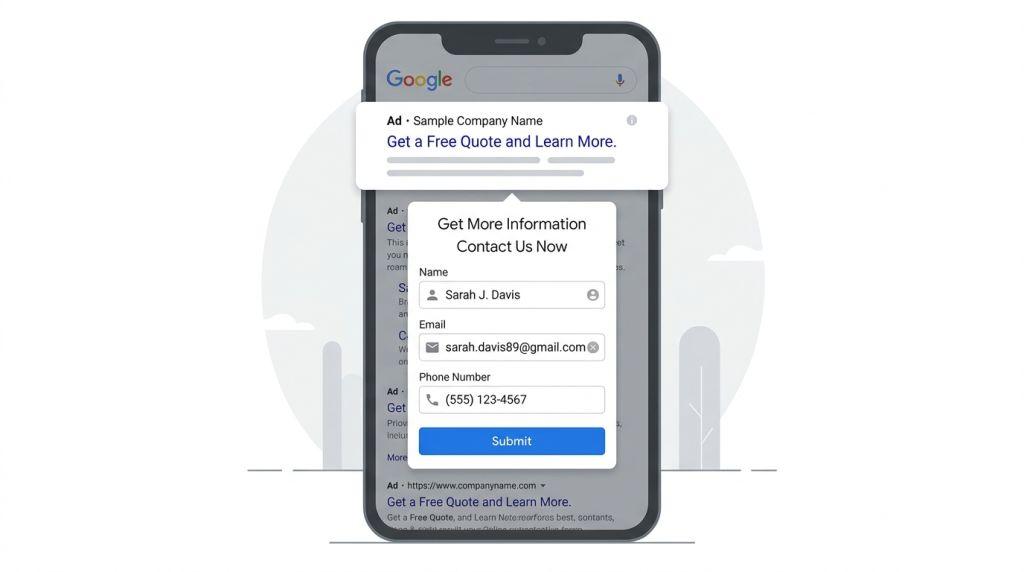
Google Ads Lead Form Extensions – Imagine you’re shopping online and see an ad for something you like. Instead of clicking the ad and waiting for a whole new webpage to load, what if you could fill out a quick form right there in the ad? That’s exactly what Google Ads lead form extensions do!
Google Ads lead form extensions are special tools that let people share their information directly from an advertisement. Think of it like a little form that pops up right in the ad itself. Instead of asking customers to click and go to a different website, the form is already there, ready to use. This makes it super easy for people to show interest in your business without leaving Google.
These helpful tools are also called “lead form assets” now. A lead is simply a person who is interested in what your business sells. Google renamed these extensions to “assets” a few years ago, but many people still call them lead form extensions. Both names mean the same thing!
Why Are Lead Form Extensions So Helpful?
Let’s say you run a business that sells something awesome. You want people to contact you or learn more about what you offer. With Google Ads lead form extensions, that’s much easier!
Here’s why they’re so great:
1. No Extra Clicks Needed – People don’t have to leave Google to fill out a form. They can do it right where they are! This is really important because many people don’t want to click away and wait for a new page to load. Lead form extensions save them time, and they’re more likely to fill out the form.
2. Google Remembers Information – If someone is logged into their Google account, Google can automatically fill in their name, email, and phone number on your form. They just have to click one button to send their information to you! How cool is that?
3. More People Fill Out Forms – Because it’s so easy, more people actually complete your forms. More completed forms means more people interested in your business!
4. Works on Phones – Today, lots of people use their phones to search the internet. Lead form extensions work great on phones. This is super important because it makes it simple for people to reach out to you while they’re on the go.
5. Reach People at the Perfect Time – When someone searches for something you sell, your ad shows up. That’s the perfect moment to ask for their information because they’re already thinking about what you offer!
Where Can Your Lead Form Extensions Show Up?
Google Ads lead form extensions can appear in different places online. This is really helpful because it means more people might see your ad!
Your lead form extensions can show on:
- Google Search Results – This is where most people look. When someone searches for something, your ad with the form might appear right there.
- Discovery Ads – These ads show up in places like Gmail, Google News, and YouTube. They help you reach people who might be interested in what you sell.
- Performance Max Campaigns – This is a special type of Google ad that shows your message in lots of places automatically. Google decides where your ad shows up to get you the best results.
All of these places help you find customers who are looking for exactly what you have to offer!
How Do Lead Form Extensions Actually Work?
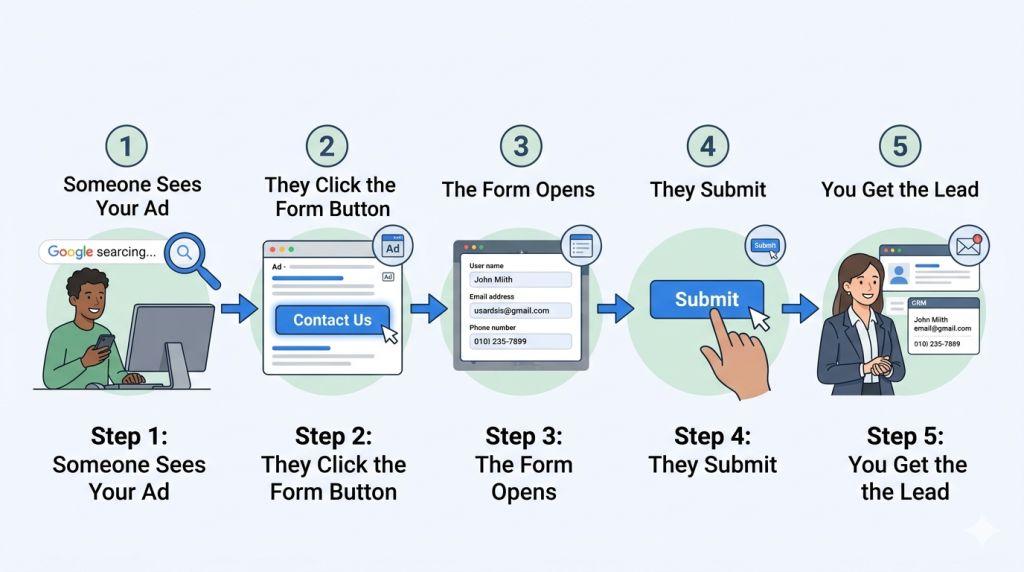
Let’s walk through what happens when someone sees your ad with a lead form extension.
Step 1: Someone Sees Your Ad – A person searches for something related to your business on Google. Your ad shows up in their search results.
Step 2: They Click the Form Button – Instead of clicking on your website link, they click on a button that says something like “Get More Info” or “Contact Us.”
Step 3: The Form Opens – A form pops up right there in the ad. If they’re logged into Google, their information is already filled in. If not, they type in their details like their name, email, and phone number.
Step 4: They Submit – With just one click, they send their information to you!
Step 5: You Get the Lead – The person’s information comes straight to your business. You can then call them, email them, or send them more information about what you sell.
It’s like a fast and easy way for interested people to say, “Hey, I want to learn more about your business!”
Getting Your Leads Where You Need Them
Once someone fills out your form, you need to receive that information. The good news is that Google gives you several ways to get your leads!
You can choose to:
- Download a List – You can download all your leads into a file on your computer whenever you want.
- Get Email Updates – Google can send you an email every time someone fills out your form. This way, you know right away about new customers interested in your business.
- Connect to Your CRM – A CRM is like a special computer program that helps businesses keep track of customers. Google can automatically send your leads to programs like HubSpot or Salesforce. This means your information goes exactly where your team needs it!
No matter which way you choose, you’ll never miss a customer who’s interested in your business.
What About Quality and Making Sure Leads Are Real?
One thing to know is that having lots of leads is good, but having real, interested leads is even better! Since it’s so easy to fill out the form, sometimes people might do it just for fun or because they’re not really interested.
To fix this, you can add special questions to your form. These questions help you figure out if someone is really interested in what you sell. For example, if you sell cars, you could ask “What type of car are you interested in?” This helps you know if they’re a real customer.
Google also has something called OTP Verification. OTP stands for “One Time Password.” It’s like a secret code that only real people can use. This helps make sure that the person filling out your form is a real person and truly interested in your business.
The Newest and Coolest Updates for 2026
Google is always making things better! In 2026, Google introduced something really exciting called the Business Agent for Leads. This is like having a helpful robot that can chat with people right in your ad!
Here’s how it works: Instead of just filling out a form, a person can click a “Chat” button in your ad. They can ask questions about your business, and an AI assistant answers them using information from your website. Then, if they want to learn more, they fill out a form that already has their information in it!
This is especially helpful for big decisions. If someone is trying to pick a university, buy a car, or buy a house, they probably have lots of questions. The Business Agent for Leads lets them ask those questions and get answers before they commit to anything. This makes them feel more confident about reaching out to your business.
Starting Your Own Lead Form Extension Campaign
Ready to try lead form extensions for your business? Here’s what you need to know:
First, you’ll create your form inside Google Ads. You choose what questions to ask and what information you want to collect.
Second, you pick which campaigns you want to use the form in. You can use them with search ads or performance max campaigns.
Third, you decide how you want to receive your leads. Will you download them, get emails, or have them go straight to your CRM?
Fourth, your form starts showing up in your ads! You’ll start getting leads from people interested in your business.
If you need help getting started with Google Ads lead form extensions or other types of lead generation, check out these helpful resources:
- Learn about Search Engine Marketing For Small Business
- Discover PPC Management For Small Business
- Explore Google Ads Lead Generation
These resources can help you create the best lead generation plan for your business!
Why Lead Form Extensions Are Perfect for Lots of Different Businesses
Google Ads lead form extensions work great for so many different types of businesses! Whether you sell houses, cars, college education, loans, or anything else, lead forms can help you find customers.
Real estate agents love them because people buying homes want to ask lots of questions. Car dealerships use them to find people looking for new vehicles. Schools and universities use them to find students who are interested in going there. Even dentists and doctors use them to find new patients!
The main thing all these businesses have in common is that they want to find people interested in what they offer, and they want to make it easy for those people to reach out.
Final Thoughts: Making Your Business Grow
Google Ads lead form extensions are a smart, simple way to find new customers. They make it easy for interested people to contact your business. They work on phones. They save people time. And they help you find real, interested customers.
If you want your business to grow and find more customers, lead form extensions are definitely something to try. They’re one of the best tools Google Ads offers for businesses that want to generate leads.
Start using Google Ads lead form extensions today and watch your business grow! For more information and professional help with your Google Ads campaigns, visit the resources mentioned above. Your next great customer might be just one click away!