
What Are Google Ads Lead Forms?
3 Google Ads Lead Form Examples – Imagine you own a business and someone is searching online for exactly what you sell. When they see your ad, they don’t have to click and wait. They can just fill out a quick form right there on Google. That’s a Google Ads lead form! It’s one of the smartest ways to get customers fast.
Google Ads lead forms have changed how businesses find customers. Instead of making people leave Google and go to your website, they can show interest in just a few seconds. This makes customers happy and helps businesses get better results.
In this article, we’ll look at 3 real Google Ads lead form examples. These examples will show you exactly how different businesses use lead forms to grow. Whether you sell insurance, teach students, or work in real estate, you’ll see how lead forms can help your business too.
How an Insurance Company Uses Google Ads Lead Forms
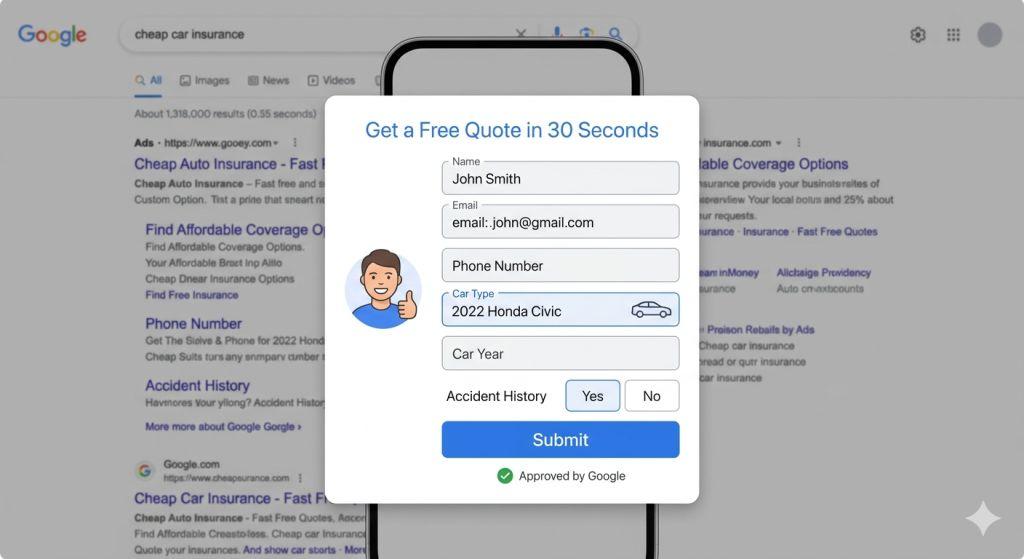
Let’s start with a car insurance company. This is a perfect Google Ads lead form example because insurance companies really benefit from collecting information fast.
The Setup: When someone searches “cheap car insurance” or “best car insurance,” the insurance company’s ad appears. The ad has a button that says “Get a Free Quote in 30 Seconds.” When the person clicks this button, a form pops up right on Google.
What Questions They Ask: The form asks:
- What is your name?
- What is your email address?
- What is your phone number?
- What type of car do you drive?
- What year is your car?
- Have you had an accident before?
Why This Works: These questions help the insurance company know if someone is serious. Someone looking for cheap car insurance and willing to answer these questions is probably ready to buy. The company can call them back quickly while they’re still interested.
The Results: Instead of waiting for people to visit their website and fill out a long form, the insurance company gets information in seconds. They can call the person back the same day. This makes customers happy and helps the company sell more insurance.
This Google Ads lead form example shows that asking the right questions helps you find the best customers.
How a Tutoring Company Uses Google Ads Lead Forms
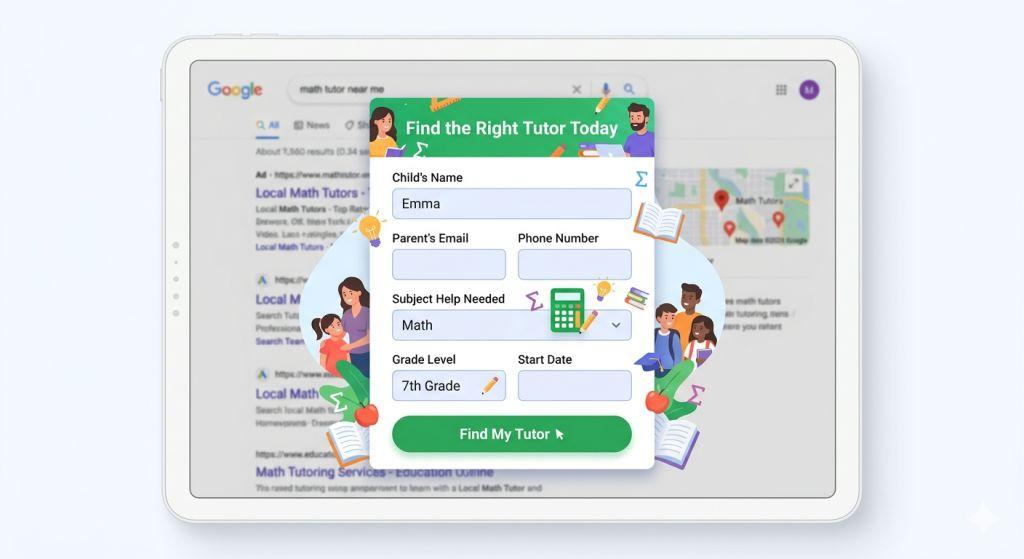
Now let’s look at a tutoring company. This is another great Google Ads lead form example because students and parents are actively searching for help.
The Setup: When a parent searches “math tutor near me” or “SAT test prep,” the tutoring company’s ad shows up. The button says “Find the Right Tutor Today.” Clicking it opens a form on Google.
What Questions They Ask: The form asks:
- What is your child’s name?
- What is your email?
- What is your phone number?
- What subject does your child need help with?
- What grade is your child in?
- When would you like tutoring to start?
Why This Works: This Google Ads lead form example is smart because it helps the tutoring company match students with the right tutor. A parent looking for a math tutor for a 7th grader needs different help than a parent looking for SAT prep for a 12th grader. By asking these questions, the company knows exactly who calls them back.
The Results: Parents get help fast. The tutoring company doesn’t waste time calling people who don’t need their services. Everyone is happy because the right tutors get matched with the right students.
This Google Ads lead form example shows that good questions help you understand what people really need.
How a Real Estate Agent Uses Google Ads Lead Forms
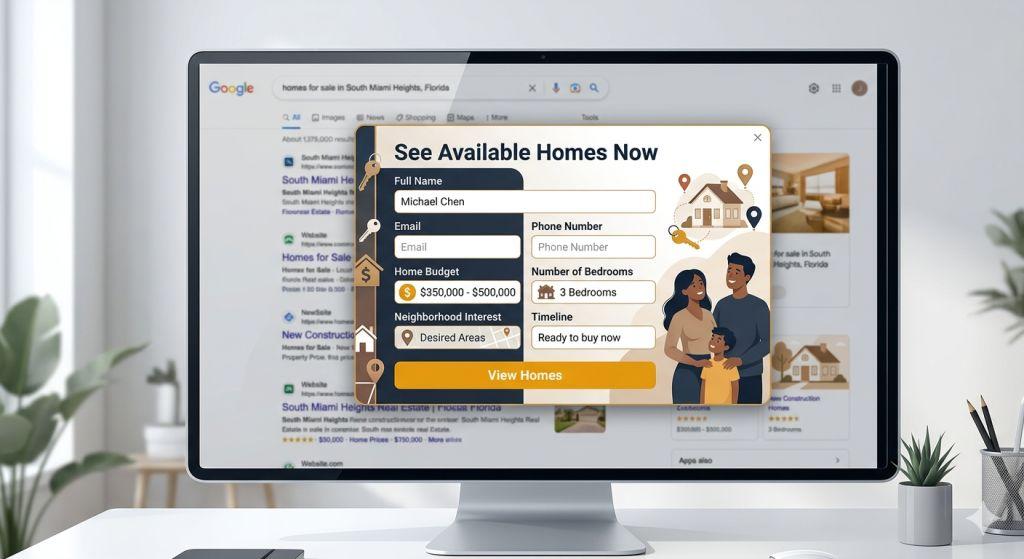
Finally, let’s look at a real estate agent. This is maybe the best Google Ads lead form example because home buying is a big decision and agents need lots of information.
The Setup: When someone searches “homes for sale in my city” or “best neighborhoods to live in,” the real estate agent’s ad appears. The button says “See Available Homes Now.” Clicking it opens a form on Google.
What Questions They Ask: The form asks:
- What is your name?
- What is your email?
- What is your phone number?
- What is your budget for a home?
- How many bedrooms do you need?
- What neighborhood interests you?
- When do you want to buy?
Why This Works: This Google Ads lead form example works so well because it saves the agent time. They don’t want to show houses to someone with a $200,000 budget if the houses cost $500,000. By asking about budget and needs first, the agent knows exactly which homes to show.
The Results: People who fill out this form are serious home buyers. The agent can spend time with people who are ready to buy right now. This helps the agent sell more homes and make more money. The buyers get help from someone who understands what they really want.
This Google Ads lead form example shows that asking about money and timeline helps you find serious customers.
What These 3 Google Ads Lead Form Examples Teach Us
Looking at these three examples, we can see some important patterns. Let’s talk about what makes these Google Ads lead form examples work so well.
Pattern 1: Ask Important Questions: All three examples ask questions that help them understand the customer better. Insurance asks about the car. Tutoring asks about the subject. Real estate asks about the budget. These questions help match the right service with the right customer.
Pattern 2: Keep It Short: None of these forms ask for too much information. If they asked for 20 questions, people would leave. By asking just the important questions, people actually fill them out.
Pattern 3: Focus on Serious Customers: These Google Ads lead form examples all attract people who are ready to make a decision. They’re not just browsing. They’re looking for help right now.
Pattern 4: Save Time: With these forms, the insurance agent, tutor, and real estate agent don’t waste time on people who aren’t ready. They focus on serious customers.
These patterns show why Google Ads lead form examples work so well for many types of businesses.
Why Google Ads Lead Forms Are So Helpful
Using Google Ads lead forms is great for businesses because:
Faster Information Collection: You get people’s information in seconds, not days. You can call them back or email them right away while they’re still interested.
Mobile-Friendly: More and more people search on their phones. Lead forms work great on phones because people don’t have to type a lot.
Better Quality Leads: People who fill out your form are usually interested in what you offer. They’re not just curious—they’re ready to do something about it.
Automatic Lists: Google keeps track of everyone who fills out your form. You can use this list later to show them more ads or send them emails. It’s like having a list of people who already said they’re interested!
Less Expensive: Lead forms often cost less per person than making people click to your website.
Setting Up Your Own Google Ads Lead Form Example
If you want to create your own Google Ads lead form example, here’s what you need to do:
Step 1: Log into your Google Ads account and go to the assets section.
Step 2: Click the blue plus sign and choose “Lead Form.”
Step 3: Write a catchy title for your form. Make it short and exciting. For example, “Get Your Free Quote Today!” or “Find Out How We Can Help.”
Step 4: Write a short description of what you offer. Keep it simple and clear.
Step 5: Choose what questions to ask. You can ask up to 10 questions. Ask for things like name, email, phone number, and anything else important to your business.
Step 6: Add a picture or background to your form to make it look nice.
Step 7: Write a message that people will see after they fill out your form. Tell them something like “Thanks! We’ll call you soon!” or “Check your email for our special offer!”
Step 8: Make sure you link to your privacy policy, which tells people how you’ll use their information.
Making Sure People Fill Out Your Form
Just having a lead form isn’t enough. You need to make sure people actually fill it out. Here are some tips:
Don’t Ask Too Many Questions: If your form has too many questions, people might not fill it out. Keep it short and simple. Ask only the questions you really need answered.
Ask Good Questions: Ask questions that help you know if someone is a real customer. For example, if you’re a pizza shop, you might ask “Do you want delivery or pickup?” This helps you give better service.
Make it Easy to Read: Use simple words and clear questions. Don’t make people confused or frustrated.
Use a Clear Button: Make sure the button that opens your form is easy to see and understand. Words like “Get a Quote,” “Learn More,” or “Call Now” work really well.
Getting Your Information Where You Need It
Once someone fills out your form, you need to get that information. Here are your options:
Download It Yourself: You can download the information in a file and save it on your computer.
Get It by Email: Google can send you an email when someone fills out your form.
Send It to Your CRM: If you use special software to manage your customers, Google can automatically send the information there. This is the fastest way and helps you not miss anyone.
The Future of Google Ads Lead Form Examples
Google keeps making lead forms better and easier to use. More and more businesses are using them because they work so well. If you want your business to grow and get more customers, learning about Google Ads lead forms is a great idea.
Whether you own a small shop, run a big company, or work in any kind of business, there’s probably a way to use Google Ads lead forms to help you. They’re one of the best tools Google has made to help businesses find customers.
Getting Help With Your Lead Forms
Creating and running Google Ads lead form examples can seem hard at first, but you don’t have to do it alone. Many companies can help you set up and manage your lead forms.
If you want to learn more about search engine marketing for small business, experts can show you how to use Google Ads the right way. You can also get help with PPC Management For Small Business, which is another name for managing ads like Google Ads.
For more specific help, learn about google ads lead generation and how it can change your business.
If you want to understand even more about how Google Ads work, check out Google’s official lead form page for the most up-to-date information.
Start Using Google Ads Lead Form Examples Today
Google Ads lead forms are an amazing way to get customers fast. They’re simple, they work on phones, and they help you find people who really want what you’re selling. By using Google Ads lead form examples, you can make your business grow without spending a lot of money.
The best part? You can start today! Create a Google Ads lead form, ask good questions, and watch as interested customers come to you. Remember, the easier you make it for people to contact you, the more people will do it.
Your business is worth it. Your customers are worth it. And Google Ads lead forms are the tool to make it happen.