
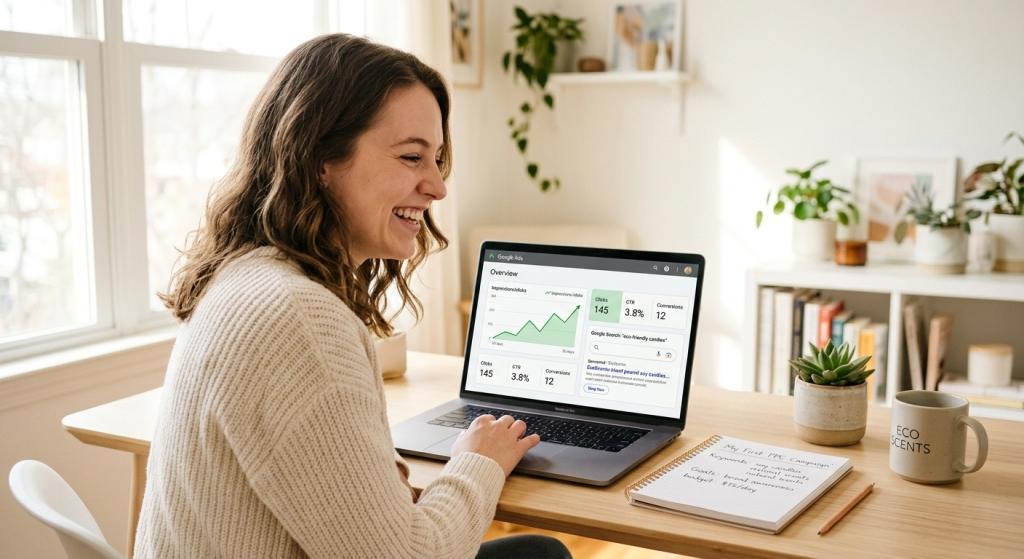
PPC Advertising for Beginners – Have you ever typed something into Google and noticed a few results at the very top with a small “Sponsored” label next to them? Those are PPC ads — and they are one of the most powerful tools in all of digital marketing.
If you’ve been curious about online advertising but aren’t sure where to start, you are in exactly the right place. This guide to PPC advertising for beginners will walk you through everything you need to know — in plain, simple language. No confusing tech talk. No overwhelming jargon. Just clear, honest information to help you get started with confidence.
Let’s go!
What Is PPC Advertising?
PPC stands for Pay-Per-Click. It’s a type of online advertising where you pay a small fee each time someone clicks on your ad. That’s it — you only pay when someone actually clicks and visits your website. If a thousand people see your ad but nobody clicks, you owe nothing.
PPC ads can show up in a lot of places online — at the top of Google search results, on YouTube videos, across websites you visit every day, and even on social media platforms like Facebook and Instagram. But for most beginners, Google Ads is the best place to start because it reaches people who are actively searching for exactly what you offer.
Here’s a stat that might surprise you: Google reports that businesses earn an average of $2 for every $1 they spend on Google Ads. That means a well-run PPC campaign can actually pay for itself — and then some.
Why PPC Advertising Is Great for Beginners
One of the best things about PPC is how beginner-friendly it truly is. Here’s why so many new advertisers love it:
⚡ It Works Right Away
Getting your website to show up in Google’s free search results through SEO can take months or even years. But with PPC, your ad can appear at the top of Google the same day you turn it on. For a new business that needs customers now, that speed is a game-changer.
💰 You Control Your Budget
You decide how much you spend — and you can change it anytime. Most beginners start with just $5 to $10 per day, or about $300 to $500 per month. Once you see what’s working, you can slowly increase your budget with confidence. You never spend more than you planned.
👥 You Reach the Right People
PPC lets you show your ad to specific people based on what they’re searching for, where they live, what device they’re using, and even what time of day it is. This means your money goes toward the people most likely to become your customers — not random strangers.
📊 You Can See Exactly What’s Happening
PPC gives you real numbers in real time. You can see how many people saw your ad, how many clicked, and how many became customers. This makes it easy to know what’s working and fix what isn’t.
How Does PPC Advertising Actually Work?
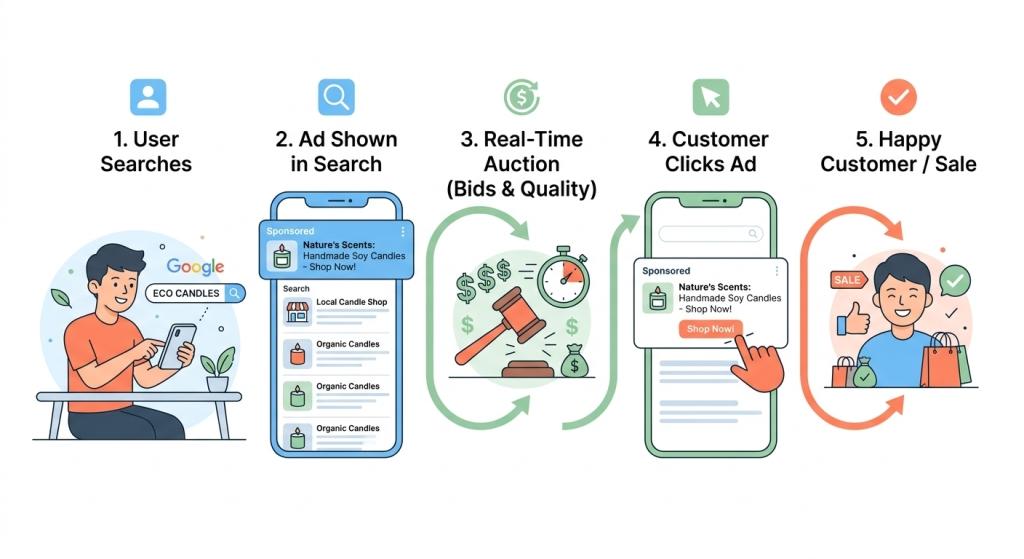
Every time someone types something into Google, a tiny auction happens behind the scenes in less than a second. Businesses that want to show their ads compete in this auction. Here’s how the process works from start to finish:
- You pick keywords — Keywords are the words or phrases you want your ad to appear for. A bakery might choose “birthday cakes near me” or “custom wedding cake delivery.”
- You write your ad — You create a short, eye-catching ad with a headline and a brief description that tells people why they should click.
- Google runs the auction — Google looks at your bid AND how good and relevant your ad is. A great ad can beat a competitor with a bigger budget!
- Your ad appears — If you win the auction, your ad shows up at the top of the search results page.
- Someone clicks — You pay only when a real person clicks your ad and lands on your website.
The secret weapon in this process is something called your Quality Score. This is Google’s rating — from 1 to 10 — of how relevant and useful your ad is. A higher Quality Score means Google rewards you with better ad placement at a lower cost per click. It’s one of the most important factors in PPC performance, and it’s completely within your control.
Key PPC Terms Every Beginner Needs to Know
Before you launch your first campaign, it helps to speak the language. Here are the most important PPC terms, explained simply:
- Keyword: A word or phrase people type into Google. You want your ad to show up for these.
- CPC (Cost Per Click): How much you pay each time someone clicks your ad.
- CTR (Click-Through Rate): The percentage of people who see your ad and actually click on it. A good CTR on Google Search is 3–5%, and great ads can hit 10% or higher.
- Quality Score: Google’s 1–10 rating of your ad’s relevance. Higher scores mean lower costs and better placement.
- Conversion: When a visitor takes the action you want — like calling you, filling out a form, or buying something.
- Landing Page: The page on your website where people go after clicking your ad. This page needs to be clear, fast, and easy to use.
- Impression: Every time your ad is shown to someone, that counts as one impression — even if they don’t click.
- Negative Keyword: A word you tell Google to not show your ad for. This saves your budget from wasted clicks.
Understanding Keyword Match Types
One of the trickiest parts of PPC advertising for beginners is understanding keyword match types. These tell Google how closely someone’s search needs to match your keyword before your ad shows up. As of 2026, there are three match types:
- Broad Match: Your ad can show for searches related to your keyword — even loosely. This gives you the widest reach but can attract irrelevant clicks if you’re not careful.
- Phrase Match: Your ad shows for searches that include the meaning of your keyword. This gives you a good balance between reach and control — and is a great starting point for beginners.
- Exact Match: Your ad only shows when someone searches for your exact keyword or very close variations. This is the most precise option and usually delivers the highest-quality traffic.
Getting match types wrong is one of the most common — and most expensive — beginner mistakes. Using Broad Match without adding negative keywords can quickly drain your budget on clicks that will never convert. Start with Phrase Match or Exact Match while you’re learning, and always build a negative keyword list from day one.
AI and Smart Bidding: What Beginners Need to Know in 2026
Here’s something exciting: Google’s artificial intelligence now does a lot of the heavy lifting for you. Smart Bidding uses machine learning to automatically adjust how much you bid for each click — in real time — based on who is searching, what device they’re on, where they are, and how likely they are to become a customer.
For beginners, automated bidding strategies like “Maximize Conversions” or “Target CPA” are highly effective because they let Google’s AI find the best opportunities within your budget.
But here’s the important thing to understand: AI only optimizes toward what it’s told to value. If you haven’t set up proper conversion tracking — telling Google what a “success” looks like for your business — the AI has nothing meaningful to learn from. Setting up conversion tracking before you spend your first dollar is not optional. It’s essential.
Also remember: AI is a helper, not a replacement for human judgment. Check your campaigns at least once a week, review which keywords are performing, and keep adding negative keywords as needed.
Building Your First PPC Campaign: A Simple Starting Point
Ready to try it? Here’s a simple framework to get your first campaign off the ground the right way:
Step 1: Define Your Goal
What do you want your ad to do? Get phone calls? Drive people to fill out a contact form? Sell a product? Know your goal before you do anything else — because everything else flows from it.
Step 2: Do Keyword Research
Use Google’s free Keyword Planner tool (found inside Google Ads) to find the words and phrases your ideal customers are searching for. Focus on high-intent keywords — phrases that show someone is ready to buy or take action right now, not just browsing.
Step 3: Write a Great Ad
Mirror the searcher’s exact language in your headline. If someone searches “emergency plumber near me,” your headline should speak directly to that problem. Use every available ad feature — sitelinks, callouts, and phone numbers — because Google rewards ads that use more of the available space.
Step 4: Build a Focused Landing Page
Your ad gets the click — but your landing page is what turns that click into a customer. Make sure your landing page loads fast, looks great on phones, clearly delivers what your ad promised, and makes it super easy to call, buy, or sign up. Every mismatch between your ad and your landing page is money walking out the door.
Step 5: Set Up Conversion Tracking
Before you go live, connect Google Analytics 4 to your Google Ads account and set up conversion tracking. This lets you see which ads are actually bringing in customers — not just clicks.
Step 6: Start Small and Scale What Works
Begin with a modest daily budget, let your campaigns run for at least two weeks to collect data, and then make decisions based on what you see. Pause what isn’t working. Increase the budget on what is. This is how smart advertisers grow.
Common PPC Mistakes Beginners Should Avoid
- ❌ Skipping conversion tracking — If you don’t track results, you’re flying blind.
- ❌ Using only Broad Match keywords — Without negative keywords, your budget can disappear fast on irrelevant searches.
- ❌ Sending traffic to your homepage — Build a dedicated landing page for each campaign instead.
- ❌ Never testing your ads — Write at least 3 variations per ad group and rotate them to find what resonates.
- ❌ Giving up too soon — PPC campaigns need time and data to optimize. Give them at least two weeks before making big changes.
- ❌ Ignoring your Quality Score — A low Quality Score means you pay more for worse placement. Fix it by improving your ad relevance and landing page experience.
Ready to Take the Next Step?
PPC advertising for beginners doesn’t have to be scary or complicated. At its core, it’s about showing the right message to the right person at the right moment — and paying only when they show interest. Start small, learn as you go, track your results honestly, and keep improving.
The businesses that succeed with PPC aren’t always the ones with the biggest budgets. They’re the ones who understand the basics, make smart decisions with their data, and never stop testing and improving.
If you want to learn how PPC fits into a bigger digital strategy, explore the world of search engine marketing for small business — it’s a great way to see how paid ads, SEO, and other tools work together to grow your business online.
And when you’re ready to hand your campaigns over to a team of experts who can manage everything for you, professional PPC Management For Small Business can help you get better results faster — so you can focus on running your business while the clicks keep coming in.
You can also explore Google’s own free learning resources at the Google Skillshop — a great place to deepen your knowledge of Google Ads at your own pace, completely free of charge.