
Have you ever logged into your Google Ads account and spotted that bright red warning that says “Limited by Budget”? It can feel like a flashing alarm — like something is very wrong and you need to spend more money right away.
But here’s the good news: that warning is not always a big deal. And even when it is a real problem, there are smart ways to handle it — ways that don’t always mean spending more money.
In this article, we’ll break down exactly what “limited by budget” in Google Ads means, when you should care about it, and what you can do to fix it. We’ll also share some of the newest updates from Google that change how budgets work in 2025 and 2026.
What Does “Limited by Budget” in Google Ads Actually Mean?
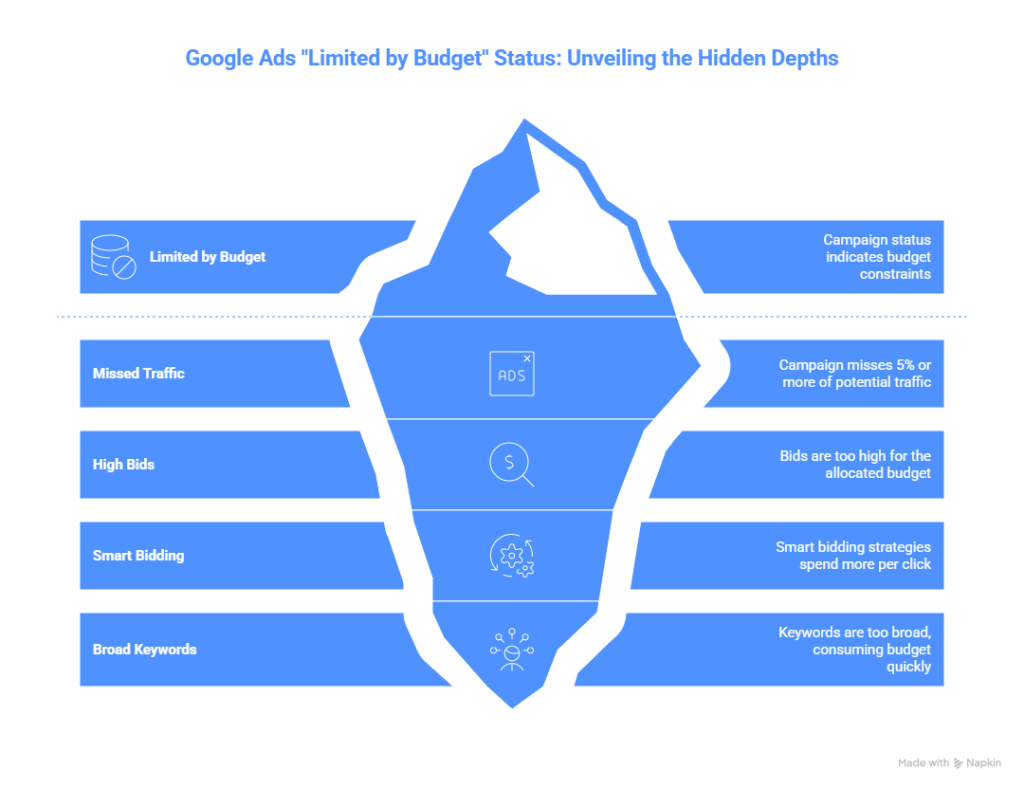
When Google Ads shows the “limited by budget” status on a campaign, it’s telling you one simple thing: your daily budget is lower than what Google thinks you need to show your ads to everyone who might be searching for your business.
Google marks a campaign as “limited by budget” when it’s missing out on 5% or more of potential traffic because the budget runs out before the end of the day. In other words, your ads stop showing before all the possible customers have had a chance to see them.
This can happen for a few different reasons:
- Your bids are too high for your budget. For example, if you raise your bids for people searching on mobile phones in a certain city, your ads become eligible for more auctions — and your budget gets used up faster.
- You’re using a smart bidding strategy like Target CPA or Target ROAS that aims for very specific results, which often means spending more per click.
- Your keywords are too broad, bringing in a lot of traffic that eats through your daily budget quickly.
The key thing to remember: a “limited by budget” campaign can still work well and help you reach your goals. It doesn’t mean your ads are failing — it just means you might be leaving some potential clicks on the table.
Is “Limited by Budget” Always a Problem?
Short answer: no.
Many advertisers — especially small businesses — run perfectly successful Google Ads campaigns while being “limited by budget.” The warning is not a panic button. It’s more like a nudge.
Here’s the smart way to check if it’s actually hurting you: look at your Search Lost Impression Share (Budget) column. You can find this by going to Columns > Modify Columns > Competitive Metrics in your campaign view.
This number tells you the exact percentage of searches where your ad could have shown but didn’t — because your budget ran out. If that number is small (say, 5–10%), you’re probably not missing much. If it’s 40% or 50%, that’s when the warning starts to matter more.
If your budget is fixed and you truly can’t raise it, the best move is to focus on what you can control — things like better ad copy, smarter keyword choices, and stronger landing pages. Learning more about search engine marketing for small business can help you make the most of every dollar you spend.
New Google Ads Budget Updates You Need to Know (2025–2026)
Google has been making some big changes to how budgets work. If you’re running Google Ads, these updates could affect how much you spend — even if you don’t change a single setting.
1. Big Change: New Budget Pacing Rules for Scheduled Campaigns (June 2026)
This is one of the most important recent changes. If your campaign only runs on certain days — like weekdays only, or just during business hours — Google is now trying to spend your full monthly budget within those limited windows.
Before this change, Google would pace your budget based on how many days your ads actually ran. Now, starting June 1, 2026, Google will try to spend the full monthly amount (30.4 times your daily budget) within whatever schedule you set.
Here’s a real example: A campaign set to run only on weekends with a $100 daily minimum budget used to spend about $800 per month. Under the new rules, it could spend up to $1,600 per month — hitting up to $200 on each weekend day.
What this means for you: If you use ad schedules, review your daily budgets now. You may need to lower them to avoid spending more than you planned each month.
2. Fixed “Total Budget” Option for Search and Shopping (January 2026)
Great news for businesses running short-term promotions: Google now lets you set a fixed total budget for Search, Performance Max, and Shopping campaigns. You set one number — say, $500 — and Google will never spend more than that, no matter how long the campaign runs.
This feature is available in open beta and is perfect for:
- Holiday sales and seasonal promotions
- Limited-time product launches
- Any campaign where you have a strict budget that cannot go over a certain amount
The campaign can run anywhere from 3 to 90 days, and Google’s system paces the spending smartly — so you don’t blow your whole budget in the first few days.
3. New Investment Strategy Tool (October 2025)
Google launched a helpful new tool called the Investment Strategy, found in the Recommendations tab of your account. This tool is designed specifically for campaigns that are limited by budget.
Here’s how it works: you tell the tool how much extra money you’d like to spend per week, or how many more conversions you’d like to get. It then looks at all your campaigns that are currently hitting budget limits and recommends the best way to spread that extra money around to get the best results.
For example, a software company spending $8,000 per month used the tool to model an extra $500 per week. The tool recommended splitting it between two campaigns and projected 23 additional conversions per week — at the same cost per conversion they were already getting. After three weeks, the results matched the projections closely.
The tool works best if you’re using smart bidding and have at least 7–10 days of conversion history. If you’re working with a tight budget and want to understand PPC management for small business, this tool can help make the case for where more budget would actually pay off.
How to Fix “Limited by Budget” in Google Ads
Not every situation calls for the same solution. Here’s a simple guide based on your situation:
If you CAN raise your budget: Use the budget simulator or Investment Strategy tool first. These tools will show you what kind of results you can expect before you commit to spending more. Don’t just increase your budget blindly — make sure the data supports it.
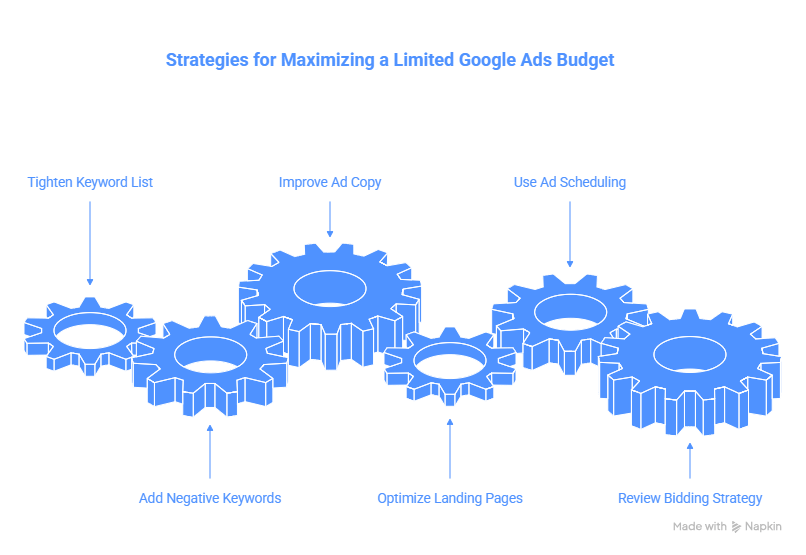
If you CANNOT raise your budget: Don’t panic. Focus on making your existing budget work harder:
- Tighten your keyword list and add negative keywords to avoid wasted clicks
- Improve your ad copy and landing pages to boost your conversion rate
- Use ad scheduling to show ads only during your best-performing hours
- Review your bidding strategy — switching to Target CPA or Target ROAS can sometimes help stretch a limited budget further
If you use ad schedules: Act now. With Google’s new pacing rules taking effect June 2026, your spend could increase significantly within your scheduled windows. Lower your daily budget to compensate if needed.
For a deeper dive into how to set the right numbers in the first place, check out this complete guide to Google Ads budget strategy.
What’s Causing Budgets to Stretch Thinner in 2026?
Even if your budget hasn’t changed, it might feel like it’s going less far than it used to. That’s because the cost of advertising on Google has been rising.
Average cost-per-click (CPC) across all industries hit $5.26 in 2026, up from $4.84 in 2025. Some industries — like legal services ($47 average CPC) and insurance ($23 average CPC) — are even more expensive. The average cost per lead also rose from $66.69 in 2024 to about $70.11 in 2025.
This rising cost is one big reason why more campaigns are showing the “limited by budget” warning even when advertisers haven’t changed anything. More competition in the auction means each click costs more, which means budgets run out faster.
According to Google’s Smart Bidding documentation, automated bid strategies work best when paired with proper budget levels — so if costs are rising in your industry, it’s worth regularly revisiting whether your budget still aligns with your bidding goals.
The solution isn’t always to spend more. It’s to spend smarter.
Quick Summary: What to Do When You See “Limited by Budget”
- Don’t panic. The warning doesn’t mean your campaign is failing.
- Check your Search Lost IS (Budget) to see how much traffic you’re actually missing.
- Use the Investment Strategy tool in your Recommendations tab to model the impact of a budget increase before committing.
- If you use ad schedules, review your daily budgets now because of Google’s new pacing rules.
- If budget is truly fixed, focus on quality — better keywords, better ads, better landing pages.
- Consider a Total Budget campaign for any time-limited promotions so you never overspend.
The “limited by budget” warning in Google Ads is a tool for better decision-making — not a reason to throw money at the problem. With the right approach, you can run strong, effective campaigns even with a modest budget.