
Google Ads Structure Examples – If you run a local business, Google Ads can bring customers right to your door. But many business owners make the same mistake: they throw all their ads into one campaign and hope for the best.
That’s like putting all your tools in one big box. Sure, they’re all in one place, but good luck finding the right one when you need it!
In this guide, we’ll show you two complete Google Ads structure examples that work great for local businesses. These aren’t complicated systems that need a computer science degree. They’re simple, proven structures you can set up this week.
Why Local Businesses Need Different Google Ads Structures
Local businesses are different from online stores or big companies. You serve a specific area. Your customers come from nearby neighborhoods. And you need phone calls and visits, not just website clicks.
According to Google’s Small Business Growth Report, 76% of people who search for something nearby on their phone visit a business within 24 hours. That’s huge! But you need the right campaign structure to catch these ready-to-buy customers.
A smart google ads account structure helps you show up exactly when local customers need you most.
What Makes a Good Local Business Ad Structure?
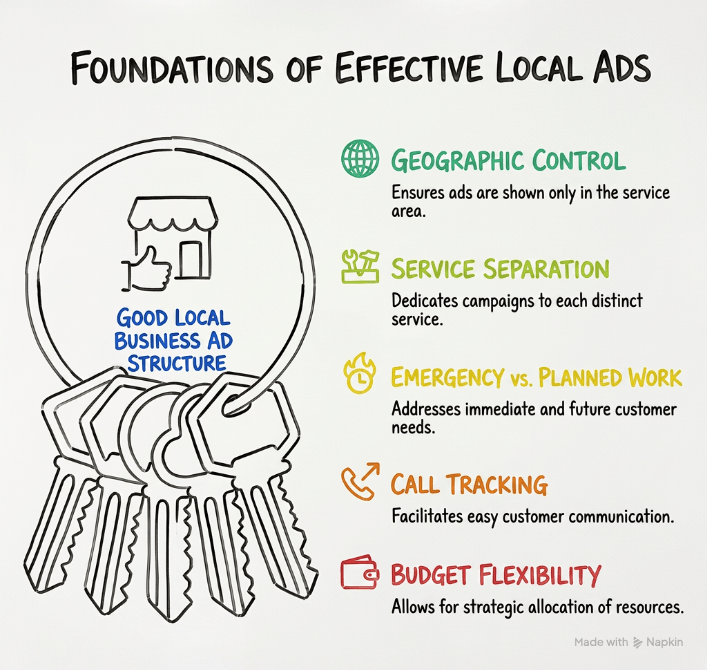
Before we dive into the examples, here’s what every good local business Google Ads structure needs:
Geographic Control You want to show ads only in areas you serve. No point paying for clicks from people 100 miles away if you can’t help them.
Service Separation Each service you offer should get its own attention. A plumber who does both emergency repairs and bathroom remodels needs different campaigns for each.
Emergency vs. Planned Work Some customers need help RIGHT NOW. Others are planning ahead. Your structure should handle both types differently.
Call Tracking Most local customers call instead of filling out forms. Your structure needs to make calling easy.
Budget Flexibility Some services make more money than others. Your structure should let you spend more on the profitable ones.
If you’re newer to Google Ads and want to understand how campaigns, ad groups, and keywords all fit together, it helps to first read up on the Google Ads account hierarchy before building your local structure. Now let’s look at two complete examples.
Example 1: The Home Service Pro Structure
This structure works perfectly for:
- Plumbers
- Electricians
- HVAC technicians
- Locksmiths
- Pest control
- Appliance repair
- Any business that does emergency and scheduled work
The Complete 5-Campaign Setup
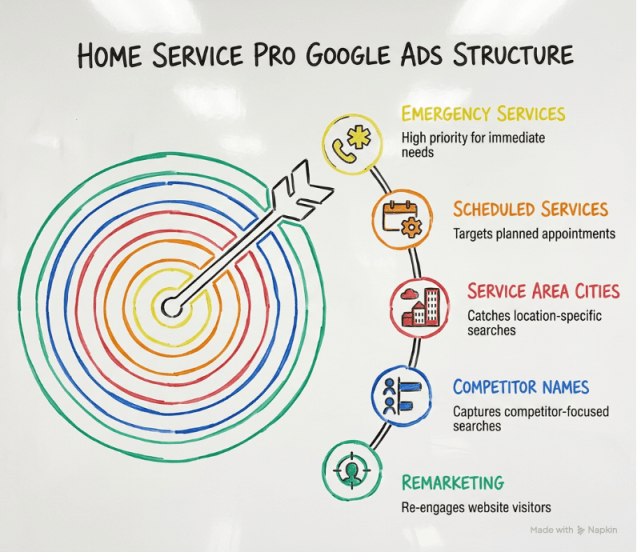
Campaign 1: Emergency Services (35% of budget)
This is your money-maker. When someone’s basement is flooding or their AC breaks on a hot day, they don’t care about price. They need help NOW.
What Goes Here:
- Keywords: “emergency plumber,” “24 hour electrician,” “same day HVAC repair”
- Bid Strategy: Bid high – these clicks are worth it
- Ad Message: “Available 24/7,” “Fast Response,” “Call Now”
- Phone Extensions: Show your number big and bold
Ad Group Example for Plumbers:
- Ad Group 1: Emergency Leak Repair
- burst pipe repair
- emergency leak plumber
- water leak emergency
- pipe burst help
- Ad Group 2: Emergency Drain Service
- clogged drain emergency
- backed up sewer emergency
- drain emergency service
- Ad Group 3: Emergency Water Heater
- water heater emergency
- no hot water emergency
- water heater repair now
Why This Budget: Emergency services convert at 25-40%, which is really high. People in emergencies click your ad and call. They’re not shopping around much. This justifies the bigger budget and higher bids.
Campaign 2: Scheduled Services (25% of budget)
This campaign targets people planning ahead. They’re comparing prices and reading reviews. You need to convince them you’re the best choice.
What Goes Here:
- Keywords: “water heater installation,” “bathroom plumbing,” “rewire house”
- Bid Strategy: Medium bids – more price-sensitive customers
- Ad Message: “Licensed & Insured,” “Free Estimates,” “5-Star Reviews”
- Review Extensions: Show off those good reviews
Ad Group Example for Plumbers:
- Ad Group 1: Water Heater Installation
- install water heater
- water heater replacement
- new water heater cost
- Ad Group 2: Bathroom Plumbing
- bathroom plumbing renovation
- new bathroom plumbing
- bathroom pipes replacement
- Ad Group 3: Kitchen Plumbing
- kitchen sink installation
- kitchen plumbing repair
- garbage disposal install
Campaign 3: Service Area Cities (20% of budget)
People often search with their city name. “Plumber in Austin” or “electrician near Dallas.” This campaign catches those searches.
Structure by City: Create one ad group for each major city or neighborhood you serve.
- Ad Group: Austin
- plumber Austin
- Austin plumbing service
- plumber near me Austin
- Ad Group: Round Rock
- plumber Round Rock
- Round Rock plumbing
- plumber near me Round Rock
- Ad Group: Cedar Park
- plumber Cedar Park
- Cedar Park emergency plumber
- plumber near me Cedar Park
Pro Tip: Mention the city name in your ad headlines. “Austin’s Trusted Plumber” or “Serving Round Rock Since 2010.”
Campaign 4: Competitor Names (10% of budget)
When people search for your competitors, you can show up too. This works if you offer better service, faster response, or better prices.
What Goes Here:
- Your competitor’s business names (as keywords, not in your ads)
- Ad message focusing on YOUR advantages
- Lower bids – test this carefully
Example Keywords:
- [Competitor Name] alternative
- better than [Competitor Name]
- [Competitor Name] vs [Your Company]
Important: You CAN bid on competitor names as keywords. You CANNOT use their business name in your ad text. That’s against Google’s rules.
Campaign 5: Remarketing (10% of budget)
People who visited your website but didn’t call yet. Remind them you’re ready to help.
What Goes Here:
- Target: Website visitors from the last 30 days
- Ad Message: “Still need help?” “Ready to schedule?” “Call today”
- Show on Google Display Network and YouTube
- Lower bids – these are warm leads
Real Budget Example: $2,000/Month
Here’s exactly how to split $2,000 across these campaigns:
- Emergency Services: $700 (35%)
- Scheduled Services: $500 (25%)
- Service Area Cities: $400 (20%)
- Competitor Names: $200 (10%)
- Remarketing: $200 (10%)
Daily Budget Settings
Google wants daily budgets, not monthly. Just divide by 30:
- Emergency Services: $23/day
- Scheduled Services: $17/day
- Service Area Cities: $13/day
- Competitor Names: $7/day
- Remarketing: $7/day
What Results to Expect
Home service businesses using this structure typically see:
- 15-25 calls per month per $1,000 spent
- 30-50% of calls turn into booked jobs
- Emergency campaigns convert 2-3x better than scheduled services
- City-specific campaigns have lower cost per click (less competition)
This setup is a cornerstone of effective PPC management for small business owners who want to maximize every advertising dollar.
Example 2: The Multi-Location Business Structure
This structure works great for:
- Restaurants with multiple locations
- Dental/medical offices in several cities
- Retail stores across a region
- Franchise businesses
- Any business with 2+ physical locations
If you’re running a franchise or multi-location business, you may also be wondering whether each location needs its own Google Ads account. This is a common question, and the answer depends on your setup — learn more about having multiple Google Ads accounts and the rules you need to follow.
The Complete 4-Campaign Setup
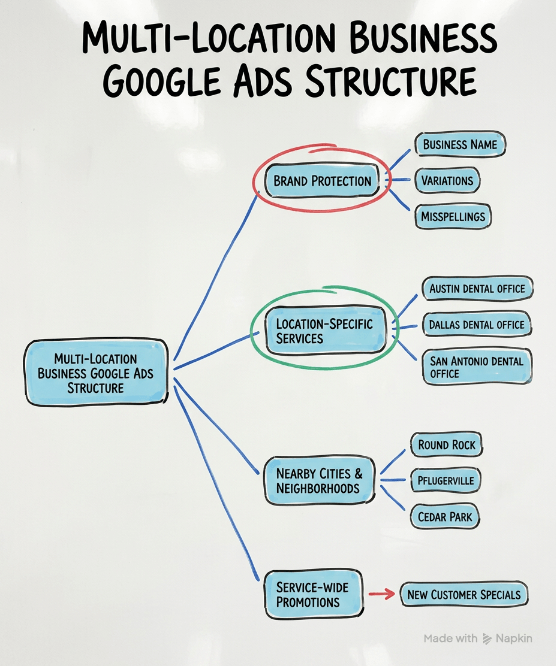
Campaign 1: Brand Protection (All Locations) (15% of budget)
When someone searches for your business name, you MUST show up. Even if you’re #1 in organic search, competitors can buy ads on your name.
What Goes Here:
- Your business name
- Variations of your name
- Misspellings of your name
- Very low bids (you’ll win most auctions anyway)
Ad Group Structure:
- Ad Group: Exact Brand Name
- [Your Business Name]
- “[Your Business Name]”
- Ad Group: Brand + Location
- [Your Business] Austin
- [Your Business] Dallas
- [Your Business] near me
Ad Message:
- Location extensions showing all stores
- Phone number
- “Visit Our [City] Location”
- Special offers
Campaign 2: Location-Specific Services (50% of budget)
This is your main campaign. Create separate campaigns for each location you serve.
Campaign Structure: Each location gets its own campaign:
- Campaign: Austin Location
- Campaign: Dallas Location
- Campaign: San Antonio Location
Inside Each Location Campaign, Create Service Ad Groups:
Example for a Dental Office:
Campaign: Austin Dental Office
- Ad Group 1: Teeth Cleaning Austin
- teeth cleaning Austin
- dental cleaning Austin
- teeth cleaning near me
- Ad Group 2: Teeth Whitening Austin
- teeth whitening Austin
- whiten teeth Austin
- teeth bleaching Austin
- Ad Group 3: Emergency Dentist Austin
- emergency dentist Austin
- emergency dental Austin
- tooth pain Austin
Campaign: Dallas Dental Office (Same ad groups, different location keywords)
Why Separate Campaigns Per Location?
- Control budget for each location
- Show specific addresses and phone numbers
- See which locations perform best
- Adjust bids based on local competition
- Track ROI per location
Campaign 3: Nearby Cities & Neighborhoods (25% of budget)
People in suburbs and nearby towns search too. They might drive 15-20 minutes for your service.
How to Structure:
Campaign: Austin Area – Nearby Cities
- Ad Group: Round Rock (suburb of Austin)
- dentist Round Rock
- dental office Round Rock
- teeth cleaning Round Rock
- Ad Group: Pflugerville
- dentist Pflugerville
- dental office Pflugerville
- Ad Group: Cedar Park
- dentist Cedar Park
- dental office Cedar Park
Ad Message: “Only 15 Minutes from [Suburb Name]” or “Serving [Suburb] Families Since [Year]”
Campaign 4: Service-Wide Promotions (10% of budget)
Special offers and promotions that apply to all locations.
What Goes Here:
- New customer specials
- Seasonal promotions
- Holiday offers
- Limited-time deals
Example for Dental Office:
Ad Group: New Patient Special
- dentist new patient special
- new patient dental exam
- dentist coupon
- cheap dental exam
Ad Message:
- “$99 New Patient Exam”
- “Includes X-Rays and Cleaning”
- “All Locations – Book Today”
Real Budget Example: $3,000/Month
For a business with 3 locations:
- Brand Protection: $450 (15%)
- Location-Specific: $1,500 (50%) – $500 per location
- Nearby Cities: $750 (25%)
- Promotions: $300 (10%)
Advanced Tip: Location Bid Adjustments
Within each campaign, you can bid more or less based on where someone is searching from.
For your Austin campaign:
- Searches from Austin: Normal bid (0% adjustment)
- Searches from Round Rock: Bid 20% less (they’re further away)
- Searches from Waco: Bid 50% less (probably too far)
This saves money on clicks from people who probably won’t drive to you.
What Results to Expect
Multi-location businesses using this structure typically see:
- Clear ROI tracking per location
- 30-40% better performance from city-specific campaigns
- Easy identification of underperforming locations
- Better control over marketing budget allocation
- Improved local search rankings from increased clicks
Shared Best Practices for Both Structures
Whether you use Example 1 or Example 2, follow these proven tips:
1. Use Location Extensions
Location extensions show your address, phone number, and directions right in your ad. According to Google, ads with location extensions get 10% more clicks.
How to set up:
- Link your Google Business Profile
- Enable location extensions in Google Ads
- Choose which locations to show for each campaign
2. Add Call Extensions
Make your phone number clickable on mobile. This is crucial for local businesses since most customers call.
Best practices:
- Use a tracking number to measure calls
- Set business hours so calls only come when you’re open
- Use different numbers for different campaigns if possible
3. Use Radius Targeting
Instead of targeting entire cities, draw a circle around your business.
Example:
- Target 10 miles around your shop
- Bid higher for people within 5 miles
- Bid lower (or exclude) people more than 20 miles away
This focuses your budget on people who can actually visit you.
4. Schedule Your Ads
Don’t run ads when you’re closed. If you don’t answer the phone at night, don’t waste money on evening clicks.
Example schedule for a business open 8am-6pm:
- Monday-Friday: 7am-7pm (catch early/late searches)
- Saturday: 8am-5pm
- Sunday: Paused (or lower bids if you do emergency calls)
5. Use Negative Keywords
These stop your ads from showing for irrelevant searches.
Common negatives for local businesses:
- free
- DIY
- how to
- jobs
- careers
- salary
- school
- course
- training
If you’re a plumber, you don’t want to show up for “plumbing school” or “free plumbing advice.”
6. Create Mobile-Specific Ads
Over 60% of local searches happen on phones. Make sure your ads work great on mobile.
Mobile ad tips:
- Keep headlines short (under 25 characters)
- Lead with your phone number
- Use “Call Now” as your call-to-action
- Make sure your website loads fast on phones
7. Track Phone Calls
Most local business customers call instead of filling out forms. Use call tracking to see which campaigns drive calls.
Options:
- Google’s free call tracking (basic)
- CallRail or similar services (advanced tracking)
- Unique phone numbers per campaign
Common Mistakes Local Businesses Make
Avoid these errors that waste money:
Mistake 1: One Campaign for Everything
This is the biggest mistake. When you lump all services and all locations into one campaign, you can’t see what’s working. You can’t adjust bids properly. And you waste money.
Mistake 2: Targeting Too Large an Area
If you only serve a 20-mile radius, don’t target the whole state. You’ll get clicks from people you can’t help.
Mistake 3: Ignoring Mobile
If your website doesn’t work well on phones, you’re wasting half your money. Test your site on a phone BEFORE running ads.
Mistake 4: Not Using Your Address
Show your actual address in ads. People trust local businesses more when they see you’re really nearby.
Mistake 5: Forgetting Negative Keywords
Without negative keywords, you’ll show up for all kinds of irrelevant searches. Add negatives weekly.
Mistake 6: Setting Budgets Too Low
If you only spend $5/day, Google doesn’t have enough data to optimize. For local businesses, start with at least $15-20/day minimum.
Mistake 7: Making the Phone Number Hard to Find
On mobile, your phone number should be front and center. If people have to hunt for it, they’ll click back and call your competitor.
How to Choose Between the Two Examples
Use Example 1 (Home Service Pro) if:
- You offer emergency and scheduled services
- Customers call when they have urgent problems
- Service area is more important than physical location
- You dispatch to customer locations
- Examples: plumbers, electricians, locksmiths
Use Example 2 (Multi-Location) if:
- Customers come to your physical locations
- You have 2+ storefronts or offices
- Each location has its own phone number
- Location-specific inventory or services
- Examples: restaurants, dental offices, retail stores
Use a Hybrid if:
- You have multiple locations AND do service calls
- You offer emergency services at several locations
- You want location-specific promotions
These local business setups work alongside the broader Google Ads campaign structure examples that apply across industries — including online stores and SaaS companies — so it’s worth exploring those if your business spans more than one model.
Setting Up Your Structure: Step-by-Step
Ready to build your structure? Here’s how:
Week 1: Planning
- List all your services
- Map your service area
- Identify emergency vs. planned services
- Set your total budget
- Allocate budget across campaigns
Week 2: Research
- Use Google Keyword Planner
- Find 10-20 keywords per ad group
- Check competitor ads
- Create your negative keyword list
- Write down competitor names
Week 3: Build
- Create campaigns following your chosen structure
- Set up ad groups
- Add keywords
- Write ads (3-4 per ad group)
- Add extensions (call, location, sitelink)
Week 4: Launch & Monitor
- Start with lower bids
- Check daily for the first week
- Add negative keywords as you find bad searches
- Adjust bids based on performance
- Track which campaigns get calls
Measuring Success
How do you know if your structure is working? Track these numbers:
Calls
- How many calls per campaign?
- Which campaigns drive the most calls?
- Cost per call for each campaign
Conversions
- How many calls turn into appointments?
- Which services book most easily?
- Revenue per conversion
Cost Metrics
- Cost per click by campaign
- Cost per call by campaign
- Return on ad spend (ROAS)
Geographic Performance
- Which cities perform best?
- Are nearby cities worth the spend?
- Should you expand or reduce your radius?
A good search engine marketing for small business strategy starts with tracking the right metrics from day one.
Real Example: How Structure Improved Results
Let’s look at a real plumbing company (name changed for privacy):
Before: One Campaign
- $2,000/month budget
- All services mixed together
- All cities in one campaign
- Result: 18 calls per month, $111 cost per call
After: 5-Campaign Structure (Example 1)
- Same $2,000/month budget
- Emergency Services campaign
- Scheduled Services campaign
- City-specific campaigns
- Competitor campaign
- Remarketing campaign
Results After 3 Months:
- 34 calls per month (+89%)
- $59 cost per call (-47%)
- Emergency campaign drove 60% of calls
- Could now see which cities were profitable
- Stopped wasting money on cities too far away
The structure didn’t cost more money. It just used the same budget smarter.
Taking Action Today
Here’s what to do right now:
If you’re starting fresh:
- Pick Example 1 or Example 2 based on your business type
- List your top 3 services
- Set a starting budget of $20-30/day
- Build just 2 campaigns to start
- Add more campaigns as you learn
If you already run Google Ads:
- Look at your current structure
- Identify what’s mixed together that should be separated
- Create new campaigns following the examples
- Move budgets gradually to test
- Compare results after 30 days
If you need help: Consider working with experts who understand PPC management for small business. They can set up your structure right the first time and save you months of trial and error.
Final Thoughts
A good Google Ads structure is like a good filing system. You might not think about it much, but it makes everything else work better.
These two examples have helped hundreds of local businesses get more customers from Google Ads. They’re not complicated. They don’t require special software. They just organize your campaigns in a way that makes sense for local businesses.
The businesses that succeed with Google Ads aren’t always the ones with the biggest budgets. They’re the ones with smart structures that put the right ad in front of the right customer at the right time.
Start with one of these structures today. Test it for 30 days. Track your results. Then optimize and grow from there.
Your next customer is searching for you right now. Make sure they find you.