
Are you trying to run Google Ads for your business? Feeling confused about how everything fits together? You’re not alone! Many business owners struggle to understand how Google Ads is organized.
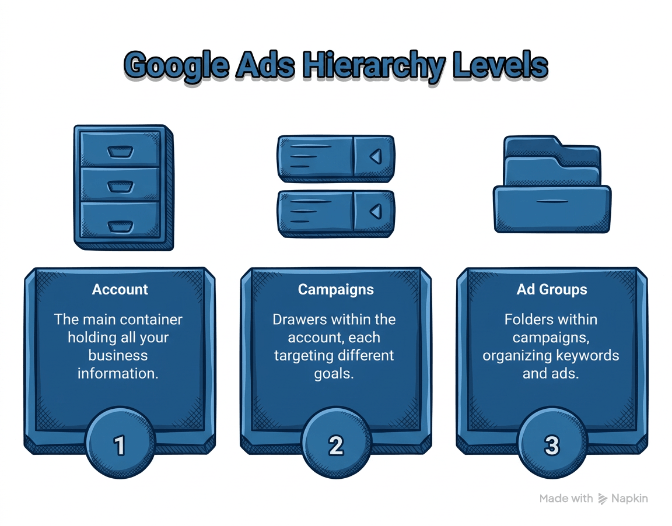
Think of Google Ads like a filing cabinet. Just like you need folders and labels to keep your papers organized, you need a good system to keep your ads organized too. This system is called the Google Ads account hierarchy.
In this guide, we’ll explain exactly how Google Ads is structured. We’ll use simple words and clear examples. By the end, you’ll know how to set up your account the right way.
What Is Google Ads Account Hierarchy?
The word “hierarchy” might sound fancy, but it’s simple. It just means “how things are organized from top to bottom.”
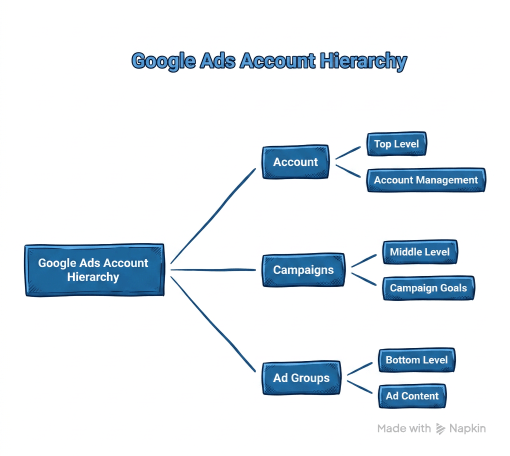
Your Google Ads account has three main levels:
- Account (the top level)
- Campaigns (the middle level)
- Ad Groups (the bottom level)
Let’s look at each level and see what it does.
Level 1: Your Account
Your account is like the filing cabinet itself. It holds everything together.
At this level, you set up:
- Your business name
- Your billing information
- Your email and password
- Who can access your account
You only need one account for your whole business. Everything else goes inside this account. If you’re wondering whether you might ever need more than one account — for separate brands, locations, or clients — it’s worth reading up on whether you can have multiple Google Ads accounts and what the rules are.
Level 2: Campaigns
Campaigns are like the drawers in your filing cabinet. Each drawer holds different types of things.
In Google Ads, you create different campaigns for different goals. For example:
- One campaign to show ads when people search on Google
- Another campaign to show picture ads on websites
- A third campaign to show video ads on YouTube
Each campaign has its own:
- Budget (how much money you want to spend)
- Target area (where you want your ads to show)
- Goals (what you want people to do)
Most businesses need at least 2-3 campaigns. Some need more. It depends on what you’re selling and who you want to reach. To see exactly how campaigns get organized in practice, check out these Google Ads campaign structure examples for online stores, service businesses, and software companies.
Level 3: Ad Groups
Ad groups are like the folders inside each drawer. They help you organize things even more.
Each ad group contains:
- A group of similar keywords
- The actual ads that people will see
- One landing page (where people go when they click)
For example, if you sell shoes, you might have:
- One ad group for running shoes
- Another ad group for dress shoes
- A third ad group for kids’ shoes
Each ad group focuses on one specific thing. This helps your ads match what people are searching for.
Why Does Google Ads Account Hierarchy Matter?
You might be thinking: “Why can’t I just throw everything together and let Google figure it out?”
Here’s why organization matters:
Better Results
When your account is organized well, Google understands what you’re selling. It can show your ads to the right people at the right time. This means more clicks and more customers.
Lower Costs
Good organization improves your Quality Score. This is like Google’s report card for your ads. A better score means you pay less for each click. You can get the same results while spending less money!
Easier Management
When everything is organized, you can find things quickly. You can see what’s working and what’s not. You can make changes without getting confused.
Better Tracking
A clear structure helps you understand your results. You can see which campaigns make money and which ones don’t. This helps you make smart decisions about where to spend your budget.
How to Set Up Your Google Ads Account Hierarchy
Now let’s talk about the best way to organize your account in 2026.
Step 1: Start With Your Business Goals
Before you create any campaigns, ask yourself:
- What do I want people to do? (Buy something? Call me? Sign up?)
- Who are my customers?
- Where are they located?
- What’s my budget?
Write down your answers. This will guide your whole setup.
Step 2: Create Separate Campaigns for Different Types
Don’t put everything in one campaign. Create different campaigns for different purposes:
Brand Campaign: Use this when people search for your business name. These people already know you, so they’re more likely to buy.
Search Campaign: Use this when people search for what you sell. For example, if you sell pizza, show ads when people search “pizza near me.”
Performance Max Campaign: This new campaign type uses Google’s artificial intelligence. It shows your ads across Google Search, YouTube, Gmail, and other places automatically.
You can learn more about managing these campaigns through professional PPC Management For Small Business services.
Step 3: Keep Your Ad Groups Simple
Inside each campaign, create 7-10 ad groups. Not more, not less.
Why this number? Google’s AI needs enough data to work well. If you have too many ad groups, each one gets too little traffic. The AI can’t learn what works.
Each ad group should get at least 15 conversions per month. A conversion is when someone does what you want (buys, calls, signs up).
Step 4: Use Good Naming
Give your campaigns and ad groups clear names. Use a pattern like this:
[Goal]–[Location]–[Product]–[Type]
For example:
- Sales–NYC–Pizza–Search
- Leads–California–Plumbing–Display
This helps you find things quickly. When you have 10 or 20 campaigns, good names save you lots of time.
Step 5: Set Up Conversion Tracking
This is super important! Conversion tracking tells Google when someone does what you want.
Without tracking, Google can’t learn. It’s like trying to play basketball blindfolded. You might score, but you won’t know when you do!
Set up tracking before you spend any money on ads.
Common Mistakes to Avoid
Many people make these mistakes when setting up their Google Ads account hierarchy:
Mistake 1: Too Many Ad Groups
Some people create 50 or 100 ad groups. They think more is better. But this spreads your budget too thin. Each ad group gets only a few clicks. Google can’t learn what works.
Keep it simple. Start with 7-10 ad groups per campaign.
Mistake 2: Mixing Everything Together
Don’t put search ads and display ads in the same campaign. Don’t mix brand searches with general searches. Keep different things separate.
Each campaign should have one clear purpose.
Mistake 3: No Organization System
Using random names like “Campaign 1” or “Test Campaign” makes life hard. Three months later, you won’t remember what anything is.
Use clear, consistent names from day one.
Mistake 4: Ignoring Performance Max
Performance Max is Google’s newest campaign type. It uses AI to show your ads everywhere. Many businesses ignore it because it seems complicated.
But Performance Max now drives 45% of all Google Ads conversions. You need to use it! Just make sure it works alongside your other campaigns, not instead of them.
Mistake 5: Setting and Forgetting
Your account hierarchy isn’t something you set up once and forget. You need to check it regularly.
Look at your results every week. Make small changes. But don’t do big reorganizations too often. Big changes confuse Google’s AI. It needs time to learn.
Understanding Google Ads Account Structure in 2026
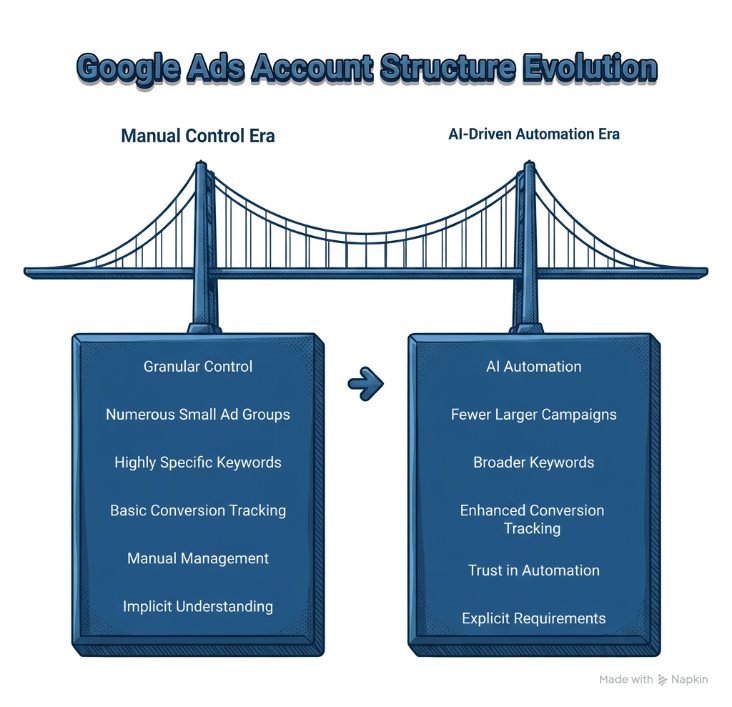
Things have changed a lot in the past few years. Google now uses artificial intelligence for most of the work.
The old way was to control every little detail. People created hundreds of tiny ad groups with very specific keywords.
The new way is simpler. You give Google good information and let the AI do its job.
This means:
- Fewer, bigger campaigns
- Broader keywords
- Better conversion tracking
- Trust in automation
You can read more details about google ads account structure and how it’s evolved.
Google’s AI is smart, but it needs three things to work:
- Clear goals (what you want people to do)
- Good data (accurate conversion tracking)
- Decent structure (campaigns and ad groups organized well)
Give it these three things, and it will find customers for you.
Once you understand the hierarchy, the next step is seeing how it translates into real-world campaign layouts. If you’re a local business, the Google Ads structure examples for local businesses show you exactly how the layers work together for home service providers and multi-location businesses.
Tools to Help Manage Your Hierarchy
As your account grows, management gets harder. Here are some tools that help:
Google’s Manager Account
If you run ads for multiple businesses, use a Manager Account. It lets you control many accounts from one dashboard. This is great for agencies or people who manage ads for others.
Automated Rules
Google lets you set up automatic rules. For example: “If a campaign spends $100 with no sales, pause it.” These rules save time and protect your budget.
Performance Reports
Check your performance reports weekly. They show which campaigns and ad groups work best. Use this information to move money from weak campaigns to strong ones.
Getting Help With Your Google Ads Hierarchy
Setting up a good Google Ads account hierarchy takes time and knowledge. Many small business owners don’t have time to learn all the details.
That’s okay! You have options:
You can hire an expert to set it up for you. They know all the best practices and can avoid common mistakes. This is especially helpful if you’re new to search engine marketing for small business.
You can also use Google’s own help resources. Google offers free training and support. Their Google Ads Help Center has guides and videos that explain everything.
Or you can start simple and learn as you go. Begin with just 1-2 campaigns. Get those working well. Then add more as you learn.
Final Thoughts
Google Ads account hierarchy isn’t complicated once you understand it. Remember these key points:
- Your account has three levels: Account, Campaigns, and Ad Groups
- Each level has a specific purpose
- Good organization leads to better results and lower costs
- Keep things simple – don’t create too many campaigns or ad groups
- Use clear naming so you can find things easily
- Let Google’s AI do the heavy work, but give it good data
- Check your results regularly and make small improvements
Start with a simple structure. Make sure your conversion tracking works. Then let it run for a few weeks. Watch what happens. Make small changes based on what you learn.
Over time, you’ll develop a system that works for your business. Your Google Ads account hierarchy will become a powerful tool for bringing in new customers.
Remember: the goal isn’t to create the most complicated account. The goal is to create an account that’s organized well enough for Google’s AI to do its job. Keep it simple, keep it organized, and keep learning.
Good luck with your Google Ads campaigns!