

You are running ads online. People click them. Some even fill out your contact form. But when you ask your sales team which ads are actually bringing in paying customers — nobody really knows.
Sound familiar?
This is one of the biggest blind spots in digital advertising, and it affects businesses of all sizes. The good news is there is a solution, and it is called offline conversion tracking.
In this guide, we will explain what offline conversion tracking is, why it matters so much right now, how it works across Google, Meta, and Microsoft Ads, and what steps you can take to set it up. No tech jargon, no confusing acronyms — just a clear, friendly breakdown that will help you finally connect your ad spend to your real-world results.
What Is Offline Conversion Tracking?
Let’s start with the basics.
When someone clicks your ad online and buys something on your website right then and there, that is easy to track. A cookie fires, a “thank you” page loads, and Google records the sale. Done.
But what about everything else?
What about the person who clicks your ad, fills out a contact form, and then gets a phone call from your sales rep two weeks later — and signs a contract? What about the customer who sees your ad, visits your store, and buys in person? What about the lead who books a consultation online but does not pay until they meet you face to face?
None of those show up in your standard ad reporting. As far as Google is concerned, those clicks went nowhere.
Offline conversion tracking fixes this. It creates a bridge between what happens online — the click on your ad — and what happens in the real world — the phone call, the store visit, the signed deal. By importing that offline information back into your ad platform, you give Google the full story of what your ads are actually doing for your business.
Why Does This Matter?
Here is the honest truth: if you are a service business, a B2B company, a medical practice, a law firm, a car dealership, or really any business where sales happen over the phone or in person, your ad data is probably lying to you — not on purpose, but because it is incomplete.
Without offline conversion tracking, your advertising platform only knows about the form fill. It has no idea whether that form fill turned into a $50 sale or a $50,000 contract. So when its automated bidding system tries to find more customers like your best ones, it cannot — because it does not know who your best ones are.
With offline conversion tracking in place, you unlock a much richer picture: how many leads actually became customers, what those customers were worth, which keywords drove the highest-value deals, and what your true cost per closed sale really is. That information is gold — not just for reporting, but for making your ads smarter through Value-Based Bidding, where you tell Google to optimize toward your highest-value outcomes rather than just any form submission.
Setting this up correctly starts with having solid Google Ads conversion tracking as your foundation, so the right data flows from the very first click all the way through to the final sale.
How Offline Conversion Tracking Works in Google Ads
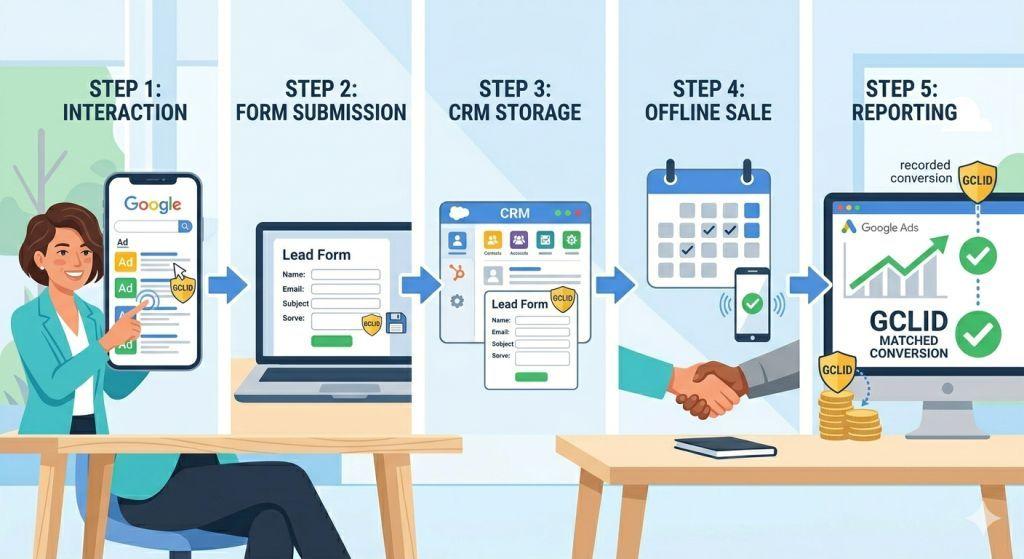
Google’s system is built around a small but powerful piece of data called a Google Click ID, or GCLID for short.
Here is how it works step by step:
- Someone clicks your Google ad and lands on your website. In the background, Google quietly attaches a unique GCLID to that visit — like a digital name tag that says “this person came from that specific ad.”
- Your website captures that GCLID and stores it alongside whatever information the visitor submits — their name, email, phone number, or anything else in your form.
- That information goes into your CRM (a tool like HubSpot, Salesforce, or even a spreadsheet) with the GCLID attached.
- Later, when that lead becomes a real customer — whether they sign a contract, make a purchase over the phone, or close a deal in person — you upload that conversion data back to Google Ads. You include the GCLID so Google knows which ad click to give credit to.
- Google matches the uploaded data to the original click and records it as a conversion. Now your campaign data reflects what actually happened, not just what happened on your website.
One important thing to know: GCLIDs expire after 90 days. That means you need to upload conversions within 90 days of the original ad click. If your sales cycle is longer than that, you will need to track an earlier milestone — like a qualified lead or booked appointment — to stay within the window.
The Smarter Upgrade: Enhanced Conversions for Leads
Google now recommends a more powerful version of offline conversion tracking called Enhanced Conversions for Leads. Instead of relying solely on the GCLID (which can get lost if someone uses a different device or browser), this method uses hashed first-party data — like a customer’s email address or phone number — to match conversions back to the original ad click.
Here is why that matters: if someone clicks your ad on their phone but fills out your form on their laptop at home later, the GCLID might not survive that device switch. Enhanced Conversions for Leads can still make the match by recognizing the customer’s hashed contact information across devices.
It is more accurate, more durable, and better for businesses with longer or more complex sales cycles. And starting in June 2026, Google is merging this feature into a single unified enhanced conversions setting — making it simpler than ever to turn on and use.
Setting It Up: What You Need
You do not need to be a developer to understand the pieces involved. Here is what offline conversion tracking requires at a basic level:
A way to capture the GCLID. This usually means adding a hidden field to your lead forms so that when someone submits their information, the GCLID gets saved along with it. Most modern form builders and CRMs support this.
A CRM or system to store your leads. Tools like HubSpot, Salesforce, and Pipedrive all have fields where you can store the GCLID alongside each contact record. When that contact eventually becomes a customer, that is your trigger to upload the conversion.
A way to send the data back to Google. You have several options here: manually uploading a CSV file, connecting through a tool like Zapier (which works with over 8,000 platforms), scheduling a Google Sheets import, or using the Google Ads API for high-volume setups. Zapier is a popular starting point for small businesses since it automates the process without requiring a developer.
A conversion action set up in Google Ads. In your Google Ads account, you create a new conversion action under Goals → Conversions → Import, and select “CRMs, files, or other data sources.” This tells Google what to look for when you upload your offline data.
It is also smart to create separate conversion actions for different stages of your funnel — for example, one for “Qualified Lead” and another for “Closed Sale” — so you can see exactly where your ads are having an impact.
If this feels like a lot to manage alongside actually running your business, that is completely understandable. Partnering with a team that specializes in PPC management for small business can take the technical heavy lifting off your plate while making sure everything is set up correctly from the start.
Offline Conversion Tracking Beyond Google
Google is not the only platform where this matters. Both Meta (Facebook/Instagram) and Microsoft Ads support offline conversion tracking too.
Meta Ads used to have a separate Offline Conversions API, but that was retired in May 2025. All offline conversion data now flows through Meta’s unified Conversions API. The matching process is similar to Google’s but uses Facebook’s own click identifiers alongside customer data like email and phone number. The more customer identifiers you send, the better the match rate — and the smarter Meta’s algorithm becomes at finding more customers like your best ones.
Microsoft Ads uses its own identifier called the MSCLKID (Microsoft Click ID) and works almost identically to Google’s GCLID system. If you are already running offline conversion tracking in Google Ads, getting it set up in Microsoft Ads is very similar, making it a fairly easy addition if you advertise on both platforms.
For businesses advertising across multiple channels, it is worth building your CRM to capture all three click IDs — Google’s GCLID, Meta’s FBCLID, and Microsoft’s MSCLKID — so that every platform gets the full picture of your offline results.
What Good Offline Conversion Tracking Looks Like
When everything is set up correctly, you stop guessing and start knowing. You can see:
- Which campaigns, ad groups, and keywords are generating actual revenue — not just leads
- Your true cost per closed sale (not just cost per form fill)
- Which types of customers are most valuable so you can find more of them
- How to allocate your budget toward the ads that drive real business outcomes
This is the difference between search engine marketing for small business done right and just throwing money at ads and hoping for the best. The businesses that invest in closing this data loop are the ones that consistently get more out of every dollar they spend on advertising.
Common Mistakes to Avoid
A few things tend to trip people up with offline conversion tracking:
Not storing the GCLID. If your forms are not set up to capture and save the GCLID, the whole system falls apart. Always test this first.
Waiting too long to upload. Remember the 90-day window. Upload conversions regularly — daily or weekly is ideal — rather than waiting until the end of the month.
Only tracking the final sale. If your sales cycle is long, set up mid-funnel milestones (like “demo booked” or “proposal sent”) as conversion events too. This gives Google data to learn from much faster.
Skipping the test. After tracking setup, always create a test lead, push it through your CRM workflow, and verify that a conversion appears in Google Ads within 24 hours before going live with real data.
For a deeper technical dive, Google’s own Offline Conversion Import Help Center guide is a great free reference to bookmark.
Final Thoughts
Offline conversion tracking and attribution tracking is the missing link between your online ads and your real-world revenue. For any business where customers call, visit, or sign contracts before they pay, it is the only way to truly know which ads are working.
The technology has gotten more powerful and easier to use in 2026 — with Google’s API improvements, the move to Enhanced Conversions for Leads, and Meta’s unified Conversions API all making the process more reliable than ever. There has never been a better time to close the loop on your ad data and start making decisions based on the full picture.
Set it up, keep it clean, and watch your campaigns finally start optimizing toward what matters most: customers who actually buy.