

How to write effective google ads – Have you ever searched for something on Google and noticed those ads at the very top of the page? Those are Google Ads — and they can be a super powerful way for small businesses to get found by the right people at just the right time.
But here’s the thing: not all Google Ads work the same way. Some ads get tons of clicks. Others just sit there and get ignored. So what makes the difference? It all comes down to how to write effective Google Ads. And the good news? Once you learn the basics, it’s not as hard as it sounds.
Let’s break it all down in a way that’s easy to understand.
What Are Google Ads, Anyway?
Google Ads are paid messages that show up when someone types something into Google. For example, if someone searches “best pizza near me,” a pizza shop could show their ad right at the top of the results — before any other website.
Businesses pay a small fee every time someone clicks their ad. That’s called pay-per-click (or PPC). It’s one of the most popular tools in search engine marketing for small business because you only pay when someone is already interested enough to click.
The goal is simple: write an ad that makes people want to click, visit your website, and take action — like calling you, buying something, or filling out a form.
Why Good Ad Writing Matters
Writing a Google Ad might seem easy — after all, how hard can a few sentences be? But here’s the truth: Google’s system is smart. It actually gives your ad a score based on how good and helpful it is. That score is called your Quality Score, and a higher score can mean lower costs and better placement.
Great ad writing helps you:
- Show up higher in search results
- Pay less per click
- Get more people to visit your site
- Turn those visitors into real customers
That’s why learning how to write effective Google Ads is one of the best investments a small business can make. If you’d rather have a professional handle it, check out PPC Management For Small Business to see how experts can help.
Step 1: Know Your Goal Before You Write Anything
Before you type a single word, ask yourself: What do I want this ad to do?
Do you want someone to call you? Visit your store? Buy something online? Sign up for your newsletter?
Every good Google Ad has one clear goal. When your ad tries to do too many things at once, it gets confusing — and confused people don’t click.
Pick one goal. Build everything around it.
Step 2: Use the Right Keywords
Keywords are the words people type into Google when they’re looking for something. If you want your ad to show up, your ad needs to match what people are searching for.
Here are some smart keyword tips:
- Use specific, long phrases when you can. Instead of just “roofing,” try “emergency roof repair after storm.” People who type longer phrases are usually ready to buy — not just browsing.
- Put your keyword near the beginning of your headline so people see it right away.
- Match your keyword to your customer’s problem. Think about what your customer is struggling with and use words that match that.
Step 3: Write Headlines That Grab Attention
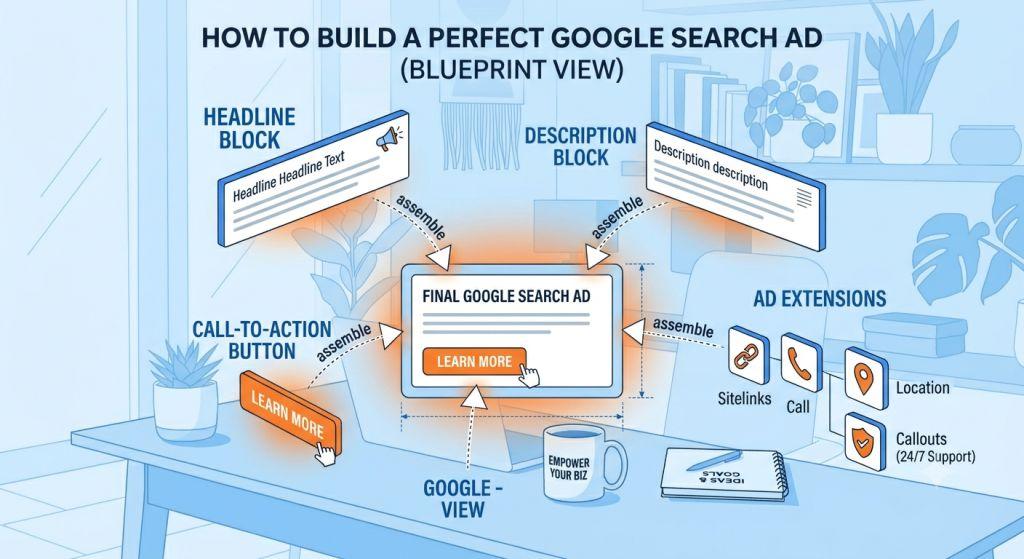
Your headline is the first thing people see. You get up to three headlines in a Google Ad, and each one can be up to 30 characters long. That’s not a lot of space, so every word counts.
Here’s what makes a great headline:
- Be specific. “Free Roof Inspection in Miami” is better than “We Do Roofing.”
- Use your keyword. It shows the person that your ad matches what they searched for.
- Make a promise. Tell people what they’ll get, not just what you do.
- Ask a question. “Need a Plumber Today?” grabs attention fast.
Avoid being boring or vague. “Welcome to Our Website” tells people nothing. “Same-Day AC Repair – Call Now” tells them exactly why to click.
Step 4: Write Descriptions That Sell the Click
After your headlines, you get two description lines — each up to 90 characters. This is your chance to give a little more detail and convince the person that clicking your ad is the right move.
Good descriptions:
- Focus on benefits, not just features. Don’t say “We have 20 years of experience.” Say “You get peace of mind with 20 years of trusted service.”
- Include a call to action (CTA). Tell people exactly what to do next: “Call Now for a Free Quote,” “Book Your Appointment Today,” or “Get Started in Minutes.”
- Be honest and clear. Google rewards ads that match what’s actually on your landing page. Misleading ads hurt your score — and your reputation.
Step 5: Use Responsive Search Ads the Smart Way
Here’s a cool trick that Google has built in: Responsive Search Ads (RSAs). Instead of writing just one version of your ad, you write up to 15 different headlines and 4 different descriptions. Google’s AI then mixes and matches them to find the best combo for each person searching.
Think of it like giving Google a box of puzzle pieces. Google figures out which pieces fit best together for each search.
To make the most of RSAs, make sure your headlines aren’t all saying the same thing. Try different angles, like:
- One headline focused on your main benefit (“Save 30% on Energy Bills”)
- One focused on trust (“Licensed & Insured Since 2005”)
- One focused on action (“Get Your Free Estimate Today”)
This variety helps Google’s system test what really works — and shows more people the message that speaks to them. Learn more about how responsive search ads can help your business get found smarter, not harder.
Want to see what great responsive search ads look like in the wild? Our responsive search ads examples article walks through real-world ad sets for several types of businesses — so you can model your own headlines and descriptions on what actually works. And if phone calls are important to your business, don’t forget to read about responsive search ads with call assets, which let customers tap to call you directly from the ad.
Step 6: Don’t Forget Your Landing Page
Here’s something a lot of people miss: your ad and your landing page need to match.
A landing page is the page on your website that people see after they click your ad. If your ad says “Free Roof Inspection” but your landing page talks about gutters and windows, people will get confused and leave. That’s called a bounce — and it hurts your Quality Score.
Your landing page should:
- Load fast (under 2 seconds on a phone)
- Repeat the promise made in the ad
- Have one clear next step (a phone number, a form, a button)
- Work well on mobile devices
Google’s AI actually reads your landing page to decide how relevant it is to your ad. The more they match, the better your ad performs.
Step 7: Add Ad Assets (Formerly Called Extensions)
Ad assets are extra pieces of information you can attach to your ad — for free. They make your ad bigger and more helpful, which means more people notice it.
Some popular ad assets include:
- Sitelinks – extra links to specific pages on your site
- Call assets – your phone number right in the ad
- Location assets – your address and map link
- Structured snippets – a list of services or features
According to Google’s own data, ads with assets regularly outperform ads without them. So add as many relevant ones as you can! For a deeper dive, Google’s official advertising help center has great guides for setting these up.
Step 8: Test, Learn, and Improve
The best Google Ads don’t happen by accident. They happen because someone kept testing what works.
Try two different versions of a headline. See which one gets more clicks. Try a different call to action. See if more people convert. This is called A/B testing, and it’s how the pros get better results over time.
Also keep an eye on your click-through rate (CTR) — that’s the percentage of people who see your ad and actually click it. A higher CTR usually means your message is connecting. If it’s low, try rewriting your headlines.
For a full guide on the specific rules and techniques that make RSAs perform at their best — from how many headlines to write, to when pinning hurts more than helps — check out our guide on responsive search ads best practices.
A Quick Recap: Your Google Ads Cheat Sheet
| What to Do | Why It Matters |
|---|---|
| Pick one clear goal | Keeps your message focused |
| Use specific keywords | Matches what people are searching |
| Write varied, specific headlines | Grabs attention and feeds the AI |
| Focus descriptions on benefits + CTA | Convinces people to click |
| Use Responsive Search Ads | Lets Google find the best combo |
| Match your landing page to your ad | Boosts Quality Score and conversions |
| Add ad assets | Makes your ad bigger and more useful |
| Test and improve regularly | Gets better results over time |
You’ve Got This!
Learning how to write effective Google Ads takes a little practice, but you don’t have to be a marketing expert to get started. Start with one clear goal, use the words your customers are already searching for, and keep testing until you find what clicks — literally.
And if you ever feel stuck, remember: you don’t have to do it alone. Whether you need help with your first campaign or want someone to manage the whole thing, a little expert guidance can go a long way.
Now go write some great ads. Your next customer is already searching for you. 🎯