
What Are Negative Keywords in Google Ads? – Have you ever wondered why some businesses waste money on online ads that don’t work? The secret to avoiding this problem is something called “negative keywords.” Don’t worry if that sounds confusing—we’re going to explain everything in a way that makes perfect sense!
Understanding Negative Keywords: The Basics
Imagine you own a pet store that sells dog shampoo. You create a Google ad so people can find your products. But what if your ad shows up when someone searches for “how to make shampoo at home”? That person isn’t going to buy from you—they want to make their own shampoo! You just wasted money on a click that won’t turn into a sale.
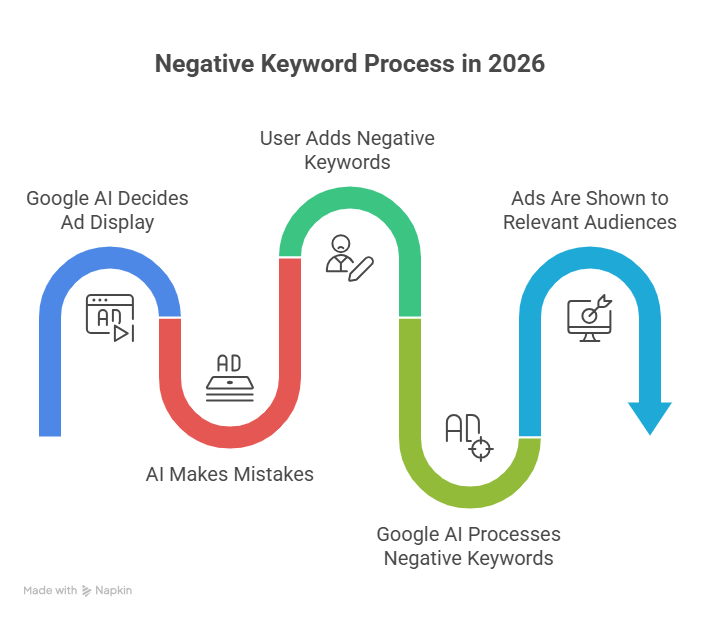
This is where negative keywords save the day. Negative keywords in Google Ads are words or phrases that tell Google NOT to show your ads when people search for those terms. They work like a filter that keeps the wrong people from seeing your ads, so you only pay for clicks from people who might actually buy from you.
Think of negative keywords as a “do not show” list for your advertising. Just like regular keywords help your ads appear for the right searches, negative keywords make sure your ads stay hidden from the wrong searches.
How Negative Keywords Work in 2026
Google Ads has changed a lot over the years. In 2026, negative keywords have become more important than ever before. Here’s why: Google’s smart computer systems (called AI) now decide when to show your ads based on what they think people want. This is usually helpful, but sometimes the computer gets it wrong.
When you use negative keywords, you’re giving Google clear instructions about who should NOT see your ads. This helps you control where your advertising money goes, even when the computer is making most of the decisions.
Let’s look at a real example. One person who ran ads for a carpentry business (someone who builds wooden decks and outdoor furniture) noticed something strange. Their ads were showing up when people searched for “carpenter please please please.” It turns out people were actually looking for a song by Sabrina Carpenter, not someone to build a deck! By adding words like “song,” “lyrics,” and “music” to their negative keywords list, they stopped wasting money on music fans.
Why Your Business Needs Negative Keywords
You might be thinking, “Do I really need to worry about this?” The answer is yes! Here are the main reasons why negative keywords matter for your business:
Save Money on Every Click
Every time someone clicks on your Google ad, you pay money. If 100 people click but only 2 people buy something, that’s a lot of wasted money. Negative keywords help you avoid paying for clicks from people who will never become customers. For small businesses with tight budgets, this can mean the difference between a profitable ad campaign and one that loses money.
In fact, using search engine marketing for small business effectively requires smart money management, and negative keywords are one of the best ways to stretch your advertising dollars.
Attract Better Customers
When you block the wrong searches, you automatically attract more of the right searches. This means the people who do click on your ads are more likely to be interested in what you’re selling. This is called “improving your click quality,” and it’s one of the most important parts of successful advertising.
Make Your Ads More Relevant
Google rewards ads that match what people are searching for. When you use negative keywords to filter out bad matches, your remaining ads become more relevant to the people who see them. This can actually lower how much you pay for each click and help your ads show up in better positions on the search results page.
Avoid Embarrassing Mistakes
Sometimes negative keywords prevent funny—but expensive—mistakes. For example, a beauty company that sold human shampoo forgot to add “dog” and “cat” as negative keywords. Their ads showed up for pet shampoo searches, and they wasted thousands of dollars before they caught the mistake. A simple negative keyword list would have prevented this problem from day one.
Different Types of Negative Keywords
Just like regular keywords, negative keywords come in different types. Understanding these types helps you block searches more effectively:
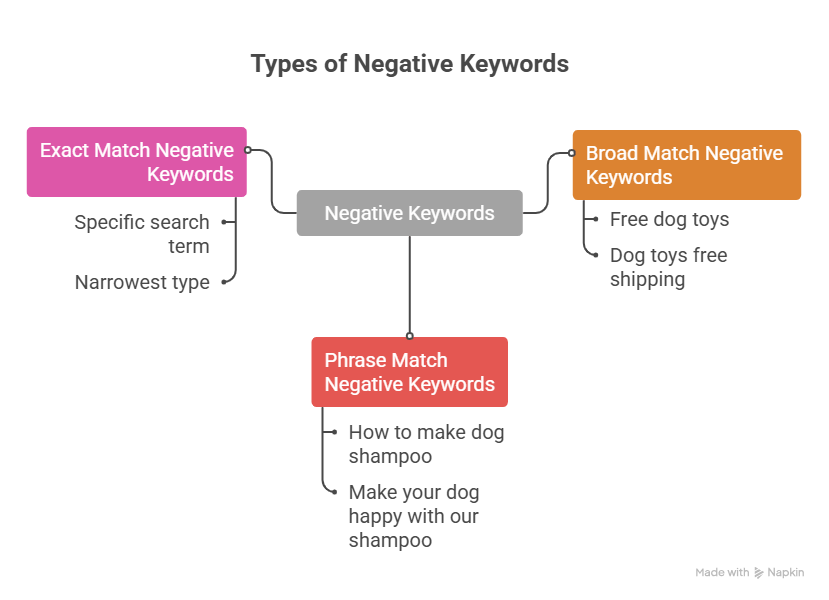
Broad Match Negative Keywords are the most common type. If you add “free” as a broad match negative keyword, your ad won’t show for any search containing that word, like “free dog toys” or “dog toys free shipping.”
Phrase Match Negative Keywords block searches that contain your exact phrase in the same order. If you add “how to make” as a phrase match negative, your ad won’t show for “how to make dog shampoo” but might still show for “make your dog happy with our shampoo.”
Exact Match Negative Keywords only block that specific search term with nothing added. This is the most narrow type and is useful when you want to block one specific phrase but not similar searches.
These three types behave very differently from each other — and in some counterintuitive ways. For a full breakdown of how each match type works, including when broad match actually blocks MORE searches than exact match, read our detailed guide on negative keywords match types. For most businesses, broad match negative keywords work best because they cast a wider net and protect you from more irrelevant searches. If you need help deciding which type to use, professional PPC Management For Small Business services can guide you through the process.
Common Negative Keywords Every Business Should Use
While every business is different, there are some negative keywords that almost everyone should consider:
Job-Related Words: If you’re not hiring, add words like “jobs,” “careers,” “hiring,” and “employment” to your negative list. These searches come from people looking for work, not customers looking to buy.
Free and Cheap: Unless you sell items at no charge, block “free,” “free download,” and “no cost.” If you sell premium products, you might also want to block “cheap” and “discount.”
DIY and Homemade: People searching for “DIY dog shampoo” or “homemade” want to make things themselves—they’re not going to buy from you.
Learning Words: Terms like “how to,” “tutorial,” “guide,” and “instructions” usually mean people are doing research, not ready to buy.
Wrong Products: If you only sell new products, add “used,” “second-hand,” and “refurbished” as negatives.
How to Find Your Negative Keywords
Finding the right negative keywords for your business takes some detective work, but it’s worth the effort. Here are the best ways to discover which words to block:
Check Your Search Terms Report
Google Ads shows you exactly what people searched for before clicking your ads. Look at this report regularly (at least once a week) and watch for searches that don’t match your business. These are perfect candidates for your negative keyword list.
Think Like a Customer
Put yourself in your customer’s shoes and think about searches that SOUND like they might be related to your business but really aren’t. For the dog shampoo example, words like “recipe,” “ingredients,” and “homemade” would be good negative keywords.
Look at Your Competitors
Sometimes you can learn from what others in your industry are doing. While you can’t see their exact negative keyword lists, you can think about searches where you compete with them and decide if those searches are actually valuable for your business.
Use Category Thinking
Instead of adding negative keywords one at a time, think in categories. Make lists like “educational searches,” “job searches,” “wrong product type,” and “competitor brands.” This makes it easier to manage hundreds of negative keywords without getting overwhelmed.
The team at Google has even made this easier in 2026 by introducing a preview tool that shows you what might happen if you add certain negative keywords. This helps you avoid accidentally blocking good searches while trying to block bad ones. For a complete walkthrough of every method for uncovering which terms to block — including using your search terms report, AI tools, and n-gram analysis — see our guide on how to find negative keywords.
New Features in 2026 That Make Negative Keywords Easier
Google Ads keeps getting better, and 2026 brought some exciting improvements for negative keywords:
Impact Preview Tool: Before you add negative keywords, you can now see an estimate of how they might affect your ads. This prevents you from accidentally blocking too many good searches.
More Keywords Allowed: Google increased the limit from 100 negative keywords per Performance Max campaign to 10,000. This gives you much more control, especially if you run big advertising campaigns.
Better Organization: You can now create lists of negative keywords and apply the same list to multiple campaigns. This saves time and keeps your advertising organized.
According to Search Engine Journal, these updates represent Google’s response to advertisers who wanted more control over their automated campaigns. The company is listening and making tools that balance smart automation with advertiser control.
Performance Max and Negative Keywords
If you use Performance Max campaigns (a type of Google ad that shows across multiple platforms like YouTube, Gmail, and Google Search), negative keywords are especially important. These campaigns use Google’s AI to find customers automatically, which is powerful but can sometimes show ads to the wrong people.
The good news is that you can now add negative keywords directly to Performance Max campaigns without calling Google for help. This means you have more control over where your ads appear, even when the computer is doing most of the work.
Best Practices for Using Negative Keywords
To get the most benefit from negative keywords, follow these helpful tips:
Start on Day One: Don’t wait until you’ve wasted money to start using negative keywords. Begin with a basic list of obvious words to block, even before you launch your first ad.
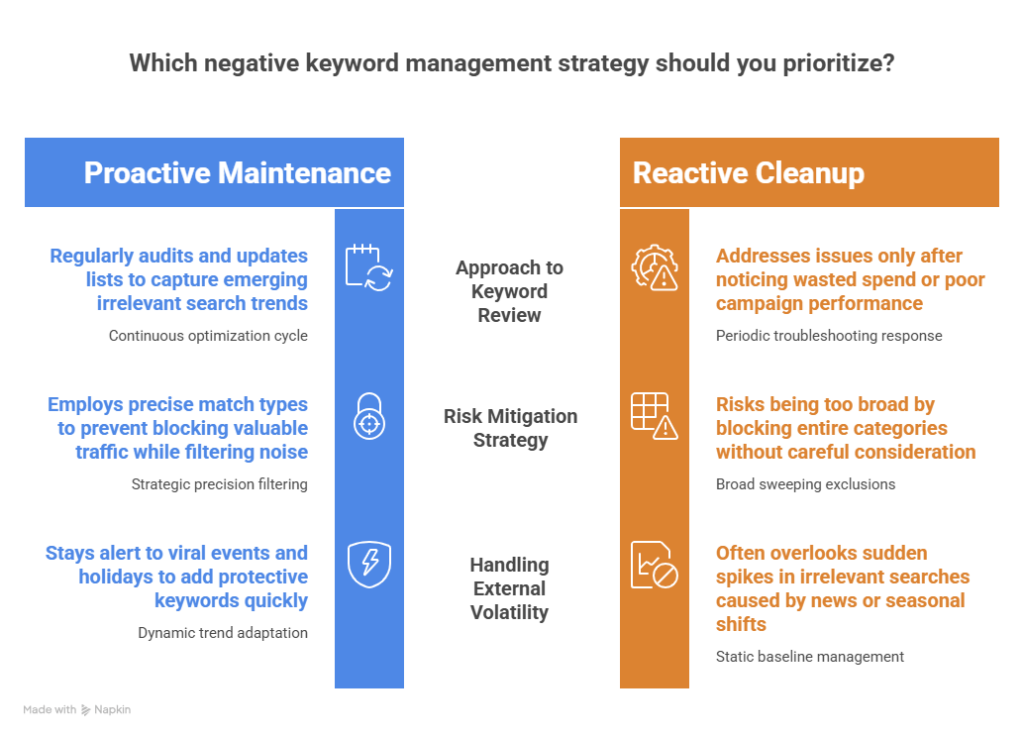
Review Regularly: Set a reminder to check your search terms report every week. New irrelevant searches pop up all the time, especially if trending topics or viral events relate to your keywords.
Don’t Go Overboard: While negative keywords are helpful, you can block too much. Be careful not to add negative keywords that might also block good searches. For example, blocking “cheap” might also block “cheap shipping,” which could be something you actually offer.
Organize by Theme: Group your negative keywords into categories like “jobs,” “DIY,” “competitors,” and “wrong product type.” This makes them easier to manage as your list grows.
Test and Adjust: Sometimes a negative keyword that seemed like a good idea actually blocks valuable traffic. If you notice your ad performance drops after adding new negatives, review what you added and consider removing some.
Use Account-Level Lists: For negative keywords that apply to ALL your campaigns (like “jobs” or “free”), create an account-level list. This automatically applies them everywhere and saves you time.
For more detailed strategies, check out this helpful guide on negative keywords and how to avoid wasting money on Google Ads.
Common Mistakes to Avoid
Even experienced advertisers make mistakes with negative keywords. Here are the most common ones to watch out for:
Ignoring Them Completely: The biggest mistake is not using negative keywords at all. Even a basic list is better than nothing.
Setting and Forgetting: Adding negative keywords once and never reviewing them again means you’ll miss new irrelevant searches that cost you money.
Being Too Broad: Blocking entire categories of words without thinking carefully can eliminate good traffic along with bad traffic.
Not Checking Match Types: Using the wrong match type can either block too much or too little. Make sure you understand how each type works.
Forgetting About Trends: Viral events, holidays, and news stories can create sudden spikes in irrelevant searches. Stay alert and add protective negative keywords quickly when needed.
The Future of Negative Keywords
As Google’s AI gets smarter, you might wonder if negative keywords will still be necessary. The answer is yes! In fact, they’re becoming MORE important, not less.
As Google’s automation expands and makes more decisions about when to show ads, negative keywords are one of the few ways advertisers can maintain control. They’re like guardrails that keep the AI on the right track, ensuring your ads reach people who might actually become customers.
Industry experts predict that Google will eventually offer AI-powered negative keyword suggestions, where the computer recommends words to block based on your campaign performance. But even with these smart features, you’ll still need to review and approve the suggestions to make sure they make sense for your specific business.
Take Action Today
Now that you understand what negative keywords are and why they matter, it’s time to put this knowledge into action. Here’s what to do next:
- Log into your Google Ads account
- Go to your keywords section and click on “negative keywords”
- Start with 10-20 obvious words that don’t apply to your business
- Check your search terms report and add any irrelevant searches you find
- Set a weekly reminder to review and update your negative keyword list
- Watch your results improve as you pay only for relevant clicks
For step-by-step instructions on exactly how to add these keywords inside your account — including campaign-level, account-level, and shared list methods — see our practical guide on how to add negative keywords in Google Ads.
Remember, every dollar you save on irrelevant clicks is a dollar you can spend attracting real customers. Negative keywords are one of the simplest yet most powerful tools in your Google Ads toolkit. Start using them today, and you’ll see better results from your advertising budget.
Whether you’re just starting with Google Ads or you’ve been running campaigns for years, negative keywords deserve your attention. They’re the secret weapon that separates successful advertisers from those who wonder why their ads don’t work. Now you know the secret—use it wisely!