
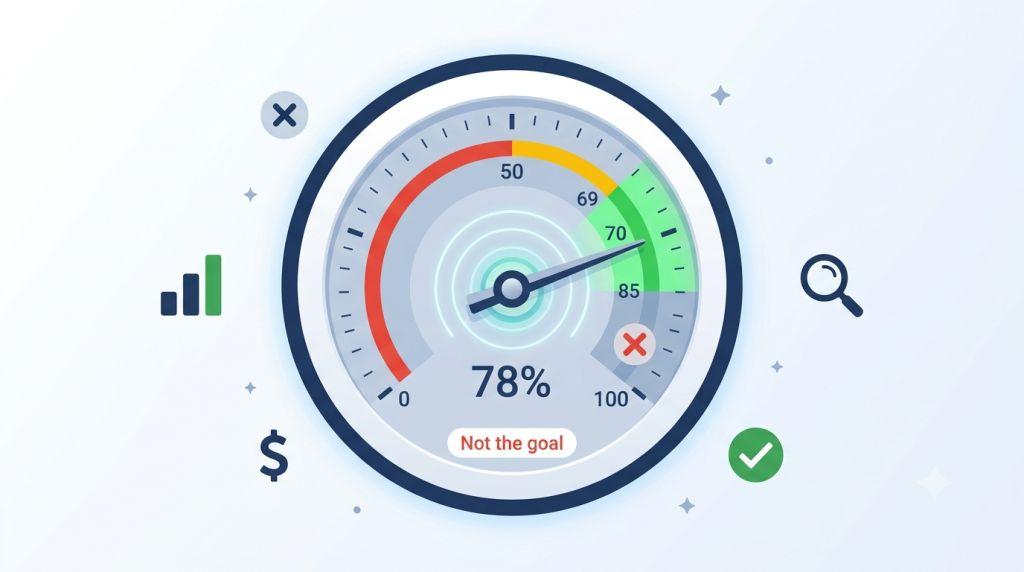
If you’ve spent any time inside your Google Ads account, you’ve seen it — that colored circle in the top corner of your Recommendations tab with a percentage inside it. Maybe it says 64%. Maybe 83%. Maybe you’ve even managed to push it all the way to 100% and felt pretty good about it.
But here’s the question that most guides won’t answer directly: what is a good optimization score for Google Ads?
The answer is not what you’d expect — and getting it wrong is one of the most common (and expensive) mistakes small business advertisers make. Some chase 100% and end up with campaigns that look great on paper but deliver terrible results. Others ignore the score entirely and miss real problems hiding in their account.
In this guide, we’re going to give you the real answer. We’ll explain what the score actually measures, what a smart target looks like, how it connects to other important metrics like your quality score and ad rank, and exactly how to use it in a way that helps your business — not just your dashboard numbers.
Let’s get into it.
First, What Does the Google Ads Optimization Score Actually Measure?
Before we can answer what a good score looks like, we need to understand what it’s actually measuring — because a lot of advertisers have this part wrong.
Your Google Ads optimization score is a real-time estimate that runs from 0% to 100%. It lives inside the Recommendations tab of your Google Ads account and tells you how well Google thinks your account is set up to perform based on its own best practices.
The key phrase there is Google’s own best practices. The score doesn’t measure how profitable your campaigns are. It doesn’t measure how happy your customers are. It doesn’t measure whether your ads are actually generating leads or sales. It measures how closely your account follows the recommendations Google has made for it.
Google pairs the score with a list of specific suggestions — things like switching to automated bidding, adding new keywords, enabling new campaign types, or uploading more ad images. Each suggestion comes with a number showing how many percentage points your score would go up if you applied it. Apply enough of them, and your score climbs toward 100%.
Simple enough. But here’s the important thing to hold onto: following Google’s suggestions is not the same as running great campaigns. Some suggestions are genuinely helpful. Others can hurt your results if applied without thinking. The score doesn’t tell you which is which — that’s your job.
This is one of the big reasons Google Ads feels so complicated to many small business owners. There are multiple overlapping metrics and systems, and the platform is designed to make it easy to click “Apply All” — even when that’s not the right move.
So What Is a Good Optimization Score for Google Ads?
Here’s the answer most guides bury or skip entirely: the ideal Google Ads optimization score for most advertisers is somewhere between 70% and 85%.
Not 100%. Not 95%. Somewhere in that 70–85% range — and here’s exactly why.
Reaching 100% requires accepting every single recommendation Google has made for your account. That sounds good on the surface. But some of Google’s recommendations are built for the average advertiser running average campaigns — and your business is not average. You have a specific budget, specific goals, a specific audience, and a specific strategy. Some of Google’s suggestions will fit perfectly. Others won’t fit at all.
For example, Google frequently recommends switching to broad match keywords. For some businesses, this opens up valuable new traffic. For others — especially those with a tight budget or a narrow product line — it can mean paying for clicks from people who were never going to buy from you. One blindly applied broad match recommendation can drain a small business budget in a matter of days.
Google also regularly recommends switching to Target CPA or Target ROAS bidding strategies. These automated approaches are genuinely powerful — but only when your account has enough conversion data to support them. Apply them too early, and your campaigns can underperform dramatically while the algorithm tries to learn from data that isn’t there yet.
The smartest advertisers treat every recommendation as a proposal, not an order. They read each one carefully, ask whether it fits their current goals, apply the ones that make sense, and dismiss the ones that don’t. And here’s the part that most people don’t know: when you dismiss a recommendation, Google removes it from your score calculation entirely. Your score won’t suffer for making a thoughtful business decision. The 70–85% range is often the result of exactly this kind of careful, strategic management.
The one exception worth noting: if you work with a Google Partner agency, that agency needs to maintain a score of 80% or above across their managed accounts to keep their Google Partner certification. That’s a real requirement — so if your agency is keeping your score in that range, there’s a good reason for it. You can learn more about what a well-managed score looks like on our Google Ads optimization score breakdown page.
Does Google Ads Optimization Score Matter?
This brings us to the next big question: does Google Ads optimization score matter at all?
Yes — but in a specific and limited way. Here’s how to think about it.
Your optimization score is best thought of as a health check, not a performance metric. It’s like the check-engine light in your car. When it comes on, you pay attention. You don’t ignore it. But you also don’t replace the engine just because the light flickered — you find out what actually triggered it first.
Here’s what the score is genuinely good for:
Catching real account problems. A sudden drop in your optimization score can signal that something actually broke — like your conversion tracking stopped working, your ads are disapproved, or conflicting negative keywords are accidentally blocking your own campaigns from showing. These are real, costly issues, and the score helps surface them quickly.
Discovering new features. Google rolls out new tools constantly — AI Max for Search campaigns, Performance Max updates, Smart Bidding Exploration, new ad asset types. Your Recommendations tab is often the first place these show up for your account. Even if you don’t apply every suggestion, knowing what’s available helps you make informed decisions.
Keeping your account tidy. The Recommendations tab regularly flags basic housekeeping issues — missing sitelinks, duplicate keywords, ads that haven’t been updated in a long time. These aren’t always urgent, but addressing them consistently keeps your account in good shape over time.
Here’s where it doesn’t matter: as a standalone measure of success. Your optimization score says nothing about your conversion rate, your cost per lead, your return on ad spend, or whether your campaigns are actually making your business money. A score of 95% with a campaign that’s hemorrhaging budget is worth far less than a score of 72% on a campaign that’s profitably generating customers every single day.
How the Optimization Score Connects to Quality Score and Ad Rank
One of the most important things to understand about your optimization score is what it is not connected to — and the biggest one is quality score and ad rank.
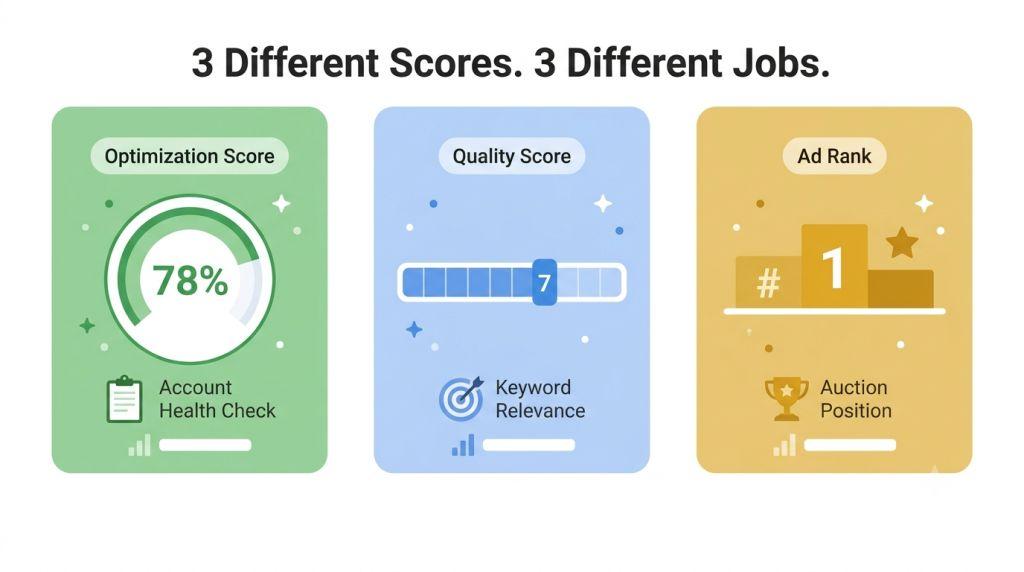
These are three completely separate metrics. Google does not use your optimization score to calculate your quality score or your ad rank. They measure different things entirely.
Quality Score is a 1–10 rating that Google gives to each keyword in your account. It measures how relevant your ad is to the search, how good your landing page experience is, and how likely someone is to click your ad. A higher quality score means you pay less per click and compete more effectively — even against advertisers with bigger budgets. According to data from over 15,000 Google Ads accounts, the average quality score across most advertisers is just 5–6 out of 10. Getting to a 7 or above puts you ahead of the majority of your competition.
Ad Rank is the number Google calculates — in real time, for every single search — to decide where your ad shows up and whether it shows at all. The formula multiplies your maximum bid by your quality score and the expected impact of your ad assets. Because quality score is multiplied through the formula, improving it can raise your ad position without raising your bids at all. This is one of the most powerful leverage points in all of Google Ads.
Your optimization score, by contrast, is an account-level health check. It can point you toward improvements that help your quality score indirectly — like adding ad assets that improve your expected click-through rate, or fixing landing page issues that drag down your landing page experience rating. But it doesn’t calculate quality score or ad rank directly.
The practical implication: don’t sacrifice quality score improvements in pursuit of a higher optimization score. Tightly themed ad groups, well-matched ad copy, and fast, relevant landing pages will do more for your long-term campaign performance than chasing recommendations on a dashboard.
Your Google Search Optimization Score: What It Shows at Each Level
Your Google search optimization score is available at three different levels inside your account, and each one tells you something slightly different.
Campaign level shows you the optimization score for each individual campaign. This is the most useful view for spotting which specific campaigns have the most room to improve — and which recommendations are tied to each one. If one campaign is sitting at 55% while others are at 80%, that’s a clear signal to look more closely at what’s happening there.
Account level gives you an overall score for your entire Google Ads account. This is the number most people think of when they talk about their optimization score, and it’s the one that matters most for Google Partner certification requirements.
Manager Account level combines scores across multiple accounts — relevant if you’re an agency or managing ads for several different businesses. Google calculates this by weighting each account’s score based on its size and activity.
One important quirk of the score at all levels: it updates in real time. Google is constantly adding new recommendations as your campaigns run and as new platform features roll out. That means your score can drop overnight without you changing a single thing — simply because Google added a new suggestion to your account. A dip in your score doesn’t always mean something went wrong. It often just means there’s a new recommendation waiting for your review.
The Recommendations Worth Applying — and the Ones to Think Twice About
Not all recommendations are created equal. Here’s a practical guide to what to prioritize and what to approach with caution.
Almost always worth applying:
Fix broken conversion tracking. If Google flags a conversion tracking issue, address it immediately. Your entire bidding strategy — especially any automated or Smart Bidding approach — depends on clean, accurate conversion data. Broken tracking means the algorithm is making decisions based on bad information.
Add missing ad assets. Sitelinks, callout extensions, structured snippets, image assets — these are free to add, easy to set up, and directly improve your Ad Rank by increasing the expected impact of your ads. Missing assets are one of the most common and most easily fixed reasons for a lower score.
Fix conflicting negative keywords. Sometimes negative keywords accidentally block searches you actually want to show up for. When that happens, you’re losing impressions and traffic that should be coming your way. This fix is usually quick and the impact can be immediate.
Think carefully before applying:
Broad match keyword suggestions. Always check your search term reports first. Broad match can dramatically expand your reach — for better or worse. Make sure the extra traffic it would bring is actually relevant to what you sell.
Budget increase suggestions. Google will often tell you that you’re missing impressions because your budget is too low. This may be true. But increasing budget only makes sense if your current campaigns are already converting efficiently. More budget on a campaign that isn’t working won’t fix it.
AI Max and Performance Max campaign suggestions. These AI-powered campaign types can deliver impressive results — AI Max for Search campaigns delivers an average of 7% more conversions when using its full feature suite, according to Google’s own data from 2026. But they work best when you have a solid conversion tracking foundation, strong landing pages, and enough historical data for the AI to learn from. Jumping in too early with too little data can lead to wasted spend during the learning phase.
Automated bidding switches. Target CPA and Target ROAS are powerful strategies — but they need conversion volume to work properly. Google generally recommends at least 30–50 conversions per month before switching to these strategies. Switching before that threshold is met can cause your campaigns to underperform while the algorithm tries to learn.
Building a Weekly Habit That Works
The best way to manage your optimization score isn’t to obsess over it daily or ignore it for months at a time. It’s to build a simple, consistent weekly routine that keeps you in control without letting the score run your strategy.
Once a week, open your Recommendations tab and spend about ten minutes reviewing what’s new. Sort by the suggestions with the highest score impact. For each one, ask two questions: “Is this technically accurate?” and “Does this fit my current business goals?” If both answers are yes, apply it. If either answer is no, dismiss it — and the score calculation adjusts automatically.
At the same time, check the metrics that actually measure business performance: conversion rate, cost per conversion, impression share, and return on ad spend. These are your real scoreboard. Your optimization score is one input among many — useful context, not the final verdict.
If your score suddenly drops significantly between weekly check-ins, that’s your signal to look more closely. What new recommendations appeared? Did anything break in your account? Is there a new campaign type being pushed that doesn’t apply to your situation? A little investigation usually reveals a simple explanation.
Managing all of this on top of running a business is genuinely a lot. If you’re a small business owner doing everything yourself, it may be worth exploring what professional PPC Management for Small Business looks like. A good agency manages your optimization score strategically — keeping it in the healthy 70–85% range, applying the right recommendations, dismissing the wrong ones, and keeping the focus on what actually drives results.
What 2026 Changes Mean for Your Score Going Forward
The Google Ads landscape is shifting faster than ever in 2026, and those shifts are affecting the optimization score in important ways.
Google is pushing harder than ever toward AI-powered automation. Starting in September 2026, campaigns using Dynamic Search Ads and campaign-level broad match will automatically be migrated to AI Max — whether advertisers opt in or not. This means AI Max recommendations are going to appear in a lot of accounts’ Recommendations tabs as high-impact suggestions, simply because Google is making the transition mandatory.
Understanding this context matters. When a recommendation appears in your account with a big score impact number next to it, it doesn’t mean applying it is automatically right for your business. It means Google thinks it fits its general best practice model. Your job is to evaluate it through the lens of your specific situation.
Google Ads CPCs also rose 10–25% across most industries in 2026 — the steepest increase in years, driven by increased competition and AI-driven auction density. In that environment, every dollar of wasted spend matters more. Applying recommendations that aren’t right for your account doesn’t just hurt your score — it can cost you real money during a time when efficiency matters most.
The advertisers doing well in this environment are the ones who understand both the tools and the strategy. They use automation as a force multiplier, not a replacement for judgment. They keep their scores in a healthy range without chasing perfection. And they keep their eyes on the metrics that actually move their businesses forward.
If you’re working with or looking for a great search engine marketing partner for your small business, understanding these nuances is exactly what separates a great agency from one that just chases vanity metrics.
Final Thoughts
So — what is a good optimization score for Google Ads? The answer is 70–85%, managed thoughtfully and reviewed consistently.
Not 100%. Not whatever number you happen to land on after clicking “Apply All.” A carefully maintained score in the 70–85% range, where every applied recommendation was a conscious choice and every dismissed one was a deliberate decision, will outperform a perfect score built on autopilot every single time.
Your optimization score is a tool. Used wisely, it helps you catch real problems, discover new opportunities, and keep your account in good shape. Used blindly, it leads you toward changes that help Google’s dashboard numbers but not your bottom line.
Keep the score in its place — one useful signal among many. And always keep your focus on what actually matters: the clicks, conversions, and customers that grow your business.
For the official explanation of how Google calculates optimization scores and what each recommendation category means, Google’s Optimization Score Help Center page is always a reliable, up-to-date resource straight from the source.