
What Is Bidding in Google Ads: Winning Online Auctions – Have you ever been to an auction where people raise their hands to buy something? Google Ads works almost the same way! Every time someone searches on Google, a super-fast auction happens behind the scenes. Understanding what bidding in Google Ads means can help your business show up when customers are looking for you.
Let’s break down exactly what bidding is, how it works, and why it matters for your business.
What Is Bidding in Google Ads?
Bidding in Google Ads is part of the process advertisers go through to get their ads shown to customers. Setting your bidding preferences tells Google what you’re willing to spend for a click or number of views for your ad.
Think of it like this: imagine you’re at a carnival trying to win a prize at a game booth. You decide how many tickets you’re willing to spend for each turn. That’s your bid. In Google Ads, instead of carnival tickets, you’re deciding how much money you’ll spend to show your ad to someone searching on Google.
The cool part? You’re not just competing on price. Google also cares about how helpful and relevant your ad is to the person searching.
How Does the Google Ads Auction Work?
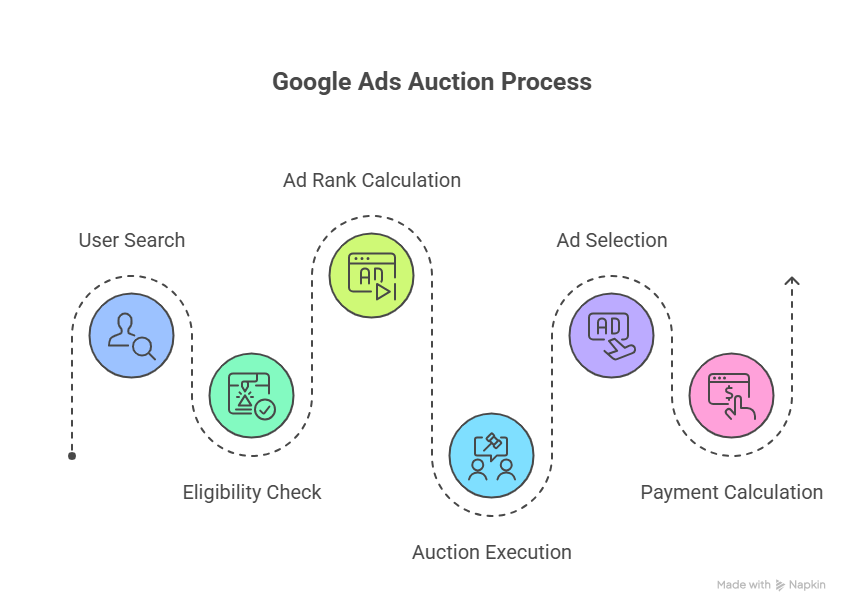
Here’s something amazing: Google Ads runs an auction every single time it has an ad space available, and each auction decides which ads will show at that moment in that space. Your bid puts you in the auction.
That means literally millions of auctions happen every day. In fact, every time someone searches, an auction happens in milliseconds. Google Ads first decides which ads are eligible based on targeting, policy compliance, and settings, then it ranks the eligible ads using Ad Rank.
Let’s say someone in your city searches for “best pizza near me.” Google instantly looks at all the pizza restaurants running ads, checks their bids, looks at their ad quality, and decides which ads to show—all in about the time it takes to blink!
You Don’t Always Pay What You Bid
Here’s a secret that surprises most people: You almost never pay your maximum bid. Google uses a second-price auction model, which means you pay just enough to beat the advertiser ranked below you—plus one cent.
This is great news! If you’re willing to pay $5 per click but you only need to pay $2.50 to beat the next advertiser, that’s all you pay. Google doesn’t take your maximum bid just because you offered it.
For businesses interested in search engine marketing for small business, this auction system means you can compete even against bigger companies with smaller budgets if your ads are really good.
What Makes You Win the Auction?
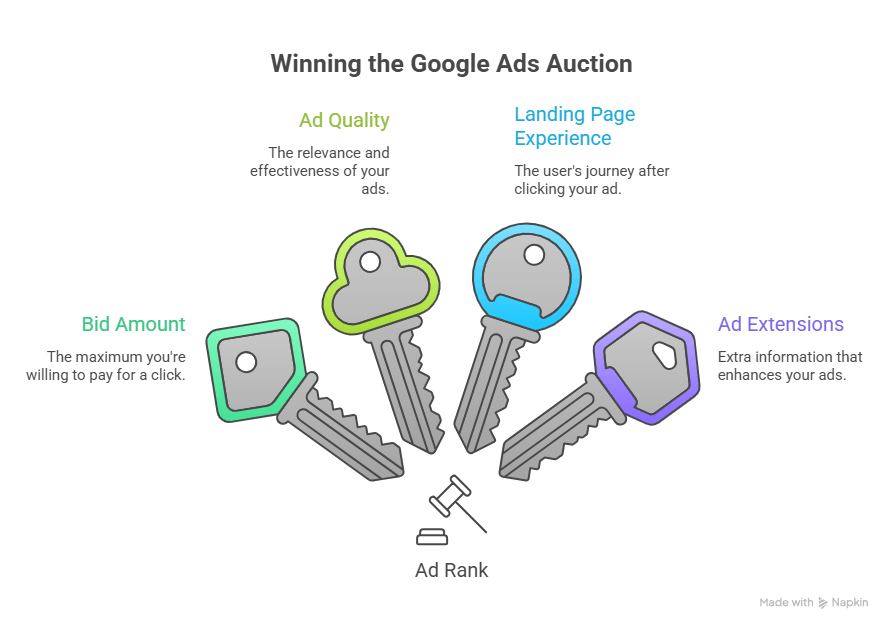
Winning the Google Ads auction isn’t just about having the most money. Google uses something called “Ad Rank” to decide who wins.
Ad Rank is determined by your bid, the quality of your ads and landing page, and the expected impact from your ad assets and other ad formats.
Here are the main things Google looks at:
Your Bid Amount
This is the maximum you’re willing to pay. Higher bids help, but they’re not everything.
Your Ad Quality
Google sets minimum quality thresholds that an ad must achieve to show in a particular ad position. Context matters – Google looks at the search terms entered, the person’s location, device type, time of search, and other user signals.
Google wants to show ads that actually help people. If someone searches for “birthday cakes,” Google wants to show them ads from bakeries, not car repair shops!
Your Landing Page Experience
When someone clicks your ad, where do they go? If your website is slow, confusing, or doesn’t match what your ad promised, Google notices. A great landing page can actually lower how much you pay per click.
Your Ad Extensions
These are extra pieces of information you can add to your ad, like your phone number, address, or links to specific pages on your website. Even if your competition has higher bids, you can still win a higher position at a lower price by using highly relevant keywords, ads, and assets.
Different Ways to Bid in Google Ads
Advertisers can focus on different things when they bid: clicks, impressions, conversions, views for video ads, or engagements, depending on campaign type.
Let’s look at the most common bidding approaches:
Manual Bidding
This is like driving a car yourself. You decide exactly how much to bid for each keyword. It gives you total control but requires more work and attention.
Manual CPC bidding allows you to set clear and very direct parameters around how much you’re willing to spend for each click, giving you the chance to be in control and make sure you aren’t spending too much per click.
Smart Bidding (Automated Bidding)
This is like having a really smart robot help you drive. Google’s computers automatically adjust your bids to help you reach your goals.
Smart Bidding is a set of automated bid strategies that uses Google AI to optimize for conversions or conversion value in each and every auction, factoring in signals such as device, location, time of day, language, and operating system.
The numbers are impressive: Over 80% of Google advertisers are using automated bidding, and on average, advertisers that switch from Target CPA to Target ROAS can see 14% more conversion value at a similar return on ad spend with conversion value bidding.
For those learning about PPC management for small business, Smart Bidding can save tons of time while improving results.
What You Can Bid For
When you set up bidding in Google Ads, you need to decide what you’re trying to get. Here are the main options:
Bidding for Clicks
You pay when someone clicks on your ad. This is perfect if you want people to visit your website. If you run a flower shop and want people to browse your bouquets, bidding for clicks makes sense.
Bidding for Impressions
You pay based on how many people see your ad, even if they don’t click. This works well for brand awareness. Maybe you’re opening a new restaurant and just want people to know you exist.
Bidding for Conversions
You pay to get specific actions, like someone buying a product or signing up for your newsletter. This is the most popular choice for businesses that know exactly what success looks like.
Bidding for Video Views
If you’re running video ads on YouTube, you can bid based on how many people watch your video.
Exciting New Updates in 2026
Google just made bidding in Google Ads even smarter with some brand new features!
Journey-Aware Bidding
Google just announced journey-aware bidding, which aims to help Google Ads optimize towards the full lead-to-sale journey instead of relying mostly on front-end conversion actions like form fills.
What does this mean? Imagine someone visits your website three times before buying. Journey-aware bidding helps Google understand that whole journey, not just the final purchase. When you track your full lead-to-sales journey, Search Ads campaigns can learn from both biddable and non-biddable conversion goals including phone calls, form submissions, and newsletter signups.
This is especially helpful for businesses where customers take time to decide, like buying a car or choosing a lawyer.
Smart Bidding Exploration
Smart Bidding Exploration allows advertisers to set a ROAS tolerance and is expanding to Performance Max and Shopping campaigns. Search campaigns using Smart Bidding Exploration see on average 27% more unique converting users.
Think of this as giving Google permission to explore and find new customers you might have missed. It’s like telling a friend “I usually like pepperoni pizza, but I’m willing to try similar pizzas too.”
Demand-Led Budget Pacing
Google announced new demand-led budget pacing updates for Search and Shopping campaigns. The feature automatically shifts spend toward periods where Google predicts stronger consumer demand while reducing spend during slower periods.
This means Google spends more of your budget when lots of people are searching for what you offer, and saves money during quiet times. Smart!
Why Quality Matters as Much as Money
Here’s the most important thing to understand about what bidding in Google Ads really means: having the biggest budget doesn’t guarantee winning.
Ads with high Quality Scores will see better placements and lower cost per click. Your bid is just one piece of the Google Ads puzzle – it’s also crucial that ad quality and relevance factor into your ad ranking.
Let’s look at an example. Imagine two bakeries:
Bakery A bids $3 per click but has a poorly written ad and a slow website.
Bakery B bids $2 per click but has a helpful ad with great reviews and a fast website that shows beautiful cake photos.
Bakery B will often win, even with a lower bid! Plus, they’ll pay less per click.
This is why understanding different Google Ads bidding strategies can make such a huge difference for your business.
How Much Should You Bid?
There’s no single right answer, but here are some tips:
Start with what you can afford – If getting a customer is worth $50 to your business, don’t bid more than that per click.
Watch your competition – Use Google’s tools to see what others in your industry are bidding.
Test and learn – Start with smaller bids and increase them as you see what works.
Consider automation – Smart Bidding in 2026 now incorporates a broader set of signals than ever before, making automated bidding smarter than ever.
Let data guide you – Smart Bidding Exploration requires campaigns to have at least 50 weekly conversions for optimal performance. Build up your data before expecting perfect results.
The Future of Bidding in Google Ads
The direction of Google Ads is clear: more automation, more AI-driven decisions, and less manual lever-pulling.
This doesn’t mean humans aren’t important anymore. It means your job is changing from manually adjusting bids every day to focusing on strategy, creative ads, and understanding your customers.
According to Search Engine Journal, since 2025, Google has made over 20 improvements to Search and Shopping bid strategies. The platform keeps getting smarter and more helpful.
Getting Started with Bidding
Ready to start using what you’ve learned about bidding in Google Ads? Here are your first steps:
- Decide your goal – Do you want website visits, phone calls, or sales?
- Set a budget – How much can you spend per day or month?
- Choose a bidding strategy – Start simple with manual bidding or maximize clicks
- Create great ads – Remember, quality matters as much as money
- Track your results – Watch what works and adjust accordingly
- Consider getting help – Google Ads can be complex, and expert guidance makes a big difference
The Bottom Line
Understanding what bidding in Google Ads means is the first step to advertising success online. It’s not just about spending money—it’s about spending it smartly.
Every time someone searches on Google, you have a chance to show them your business. Your bid gets you into the auction, but your ad quality, landing page, and relevance help you win at the best price.
The auction happens in milliseconds, considers dozens of factors, and ensures that helpful, relevant ads get rewarded. This benefits both advertisers who create great ads and people who search on Google looking for answers.
Whether you’re just starting out or looking to improve your current campaigns, remember: bidding is both an art and a science. Start with the basics, test different approaches, and keep learning as Google continues to make the platform smarter and more powerful.
Your perfect customers are searching right now. With the right bidding strategy, your ad can be exactly what they’re looking for.