

Where Do Google Display Ads Appear? – Have you ever been browsing a news article, watching a YouTube video, or checking your Gmail — and suddenly spotted a banner ad for something you were just looking at? That was a Google Display Ad. But where exactly do Google Display Ads appear, and how does Google decide where to put them?
If you’re a business owner thinking about running display ads, or just curious about how the whole thing works, you’re in the right place. This guide breaks it all down in simple, plain language — including some major changes Google just made in 2026 that every advertiser needs to know about.
What Are Google Display Ads?
Google Display Ads are the visual ads you see while browsing the internet — things like banner images, animated graphics, and even small video clips that pop up on websites. They are very different from the text ads you see on Google Search. Search ads show up when you type something into Google. Display ads, on the other hand, follow you around the web while you’re reading, watching, and scrolling — even when you’re not actively searching for anything.
Think of Display Ads like billboards on the internet. Just like a highway billboard reaches drivers who weren’t looking for it, Display Ads reach people while they are doing something else entirely. That makes them a powerful tool for building brand awareness and reminding past visitors to come back.
What Is the Google Display Network?
The Google Display Network, often called the GDN, is the giant collection of websites, apps, and online platforms where Google is allowed to show Display Ads. It is one of the largest advertising networks in the world. The GDN reaches over 3 million websites and more than 90% of internet users worldwide. That is almost every person on the internet.
When a website owner signs up to show Google ads on their site (through Google’s AdSense program), their site becomes part of the GDN. Every time a visitor lands on that site, Google can show them a relevant Display Ad from an advertiser. The website owner earns a small fee, the advertiser gets exposure, and Google connects the two.
Where Do Google Display Ads Appear? The Full List
Let’s go through every place where Google Display Ads can show up. You might be surprised by just how many spots there are.
1. Websites Across the Internet
The most common place to see a Display Ad is on a regular website. News sites, blogs, recipe pages, sports sites, weather apps — if that site is part of the Google Display Network, it can show your ad. These ads usually appear as banners at the top of the page, rectangles in the sidebar, or images within the article content. The most effective size is the medium rectangle (300×250 pixels), which works on both desktop and mobile screens.
2. YouTube
YouTube is owned by Google and is a huge part of the Display Network. Display Ads can appear as banner overlays on videos, as image ads in the sidebar next to YouTube search results, and as ads that play before, during, or after a video. With billions of people watching YouTube every day, this is one of the most valuable placements available to advertisers.
3. Gmail
Gmail ads are a special type of Display Ad that appear in the Promotions and Social tabs of your Gmail inbox. They look like regular emails at first glance, but when you click on them, they expand into a full ad experience — almost like opening an email from a brand. These are great for advertisers who want to reach people in a more personal, inbox-level setting.
4. Google Discover
Google Discover is the personalized feed of news stories and articles that appears on the Google app and the Chrome browser on mobile phones. It shows content Google thinks you’ll be interested in based on your search history and interests. Display Ads can appear within this feed, giving advertisers a chance to reach people who are in a relaxed, browsing mindset rather than an active searching one.
5. Google Maps
Display Ads can also appear on Google Maps, especially for searches like “pizza near me” or “coffee shops open now.” These location-based placements are especially powerful for local businesses that want to drive foot traffic or phone calls. If someone is actively looking for a business nearby, showing your ad in Maps puts you right where the decision is being made.
6. Mobile Apps
Millions of free mobile apps show Google Display Ads to their users as a way to earn revenue. Whether someone is playing a game, using a weather app, or reading the news on their phone, Google can serve Display Ads within those apps. Mobile advertising is growing fast — it already accounts for more than half of all digital ad spending worldwide.
7. Connected TV (CTV)
This is a newer placement that is growing quickly. Connected TV refers to smart TVs, streaming sticks, and devices like Roku or Amazon Fire TV. Google can now run Display and video ads on these platforms, reaching people on the biggest screen in their home. CTV ads run in a horizontal 16:9 format and must meet a minimum resolution of 1920×1080 pixels.
How Does Google Decide Where to Show Your Ad?
Google doesn’t just randomly place your ads. It uses targeting to make sure your ad reaches the right people in the right places. Here are the main ways targeting works:
- Demographic targeting: Show ads to specific age groups, genders, income levels, or parental status.
- Interest-based targeting: Reach people based on their hobbies, passions, and browsing habits.
- In-market audiences: Target people who are actively researching a product or service similar to yours.
- Contextual targeting: Show ads on websites and pages that match your chosen keywords or topics.
- Remarketing: Re-reach people who have already visited your website. Remarketing campaigns can result in a 10% increase in conversion rate compared to non-remarketing campaigns.
Breaking News: Google Is Changing How Display Ads Work in 2026
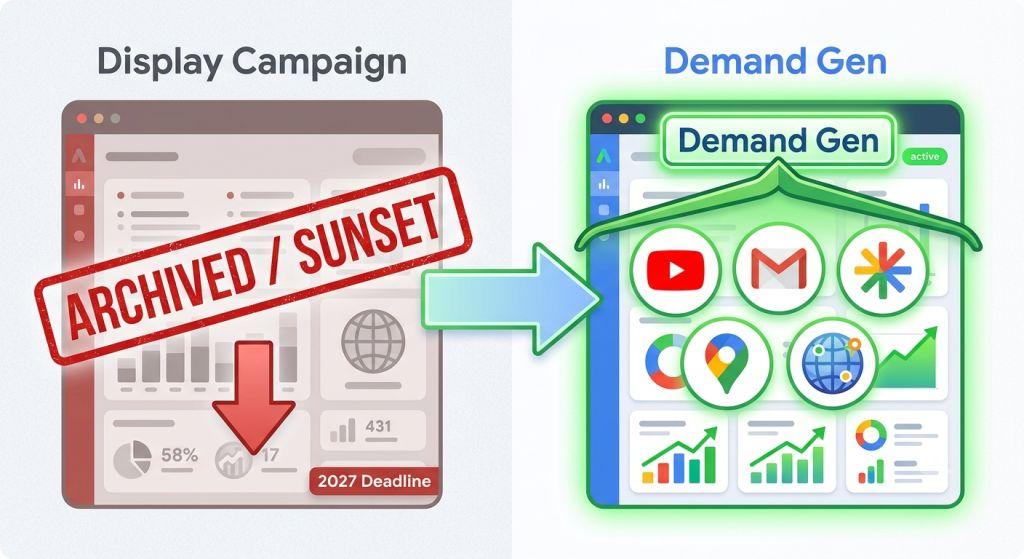
Here is something very important that every advertiser needs to know right now. On May 26, 2026, Google made a major announcement: standalone Google Display Ads campaigns are being retired.
What does that mean? For over 20 years, advertisers could run a dedicated “Display campaign” in Google Ads. That campaign type is going away. Instead, Google is moving everything into a newer campaign type called Demand Gen. Demand Gen already manages ads on YouTube, Gmail, and Google Discover. Now the Google Display Network is being added to it as well.
Here is the key timeline advertisers need to follow:
- June 2026: A migration tool becomes available. Eligible advertisers can begin moving their existing Display campaigns into Demand Gen voluntarily.
- Later in 2026: New standalone Display campaigns can no longer be created.
- By 2027: All remaining Display campaigns will be automatically migrated into Demand Gen. The transition will be complete.
The good news? The Google Display Network itself isn’t going away. The same 3 million+ websites, apps, and platforms will still be available for your ads. You will simply manage everything through a single, unified Demand Gen campaign instead. And early data shows that advertisers who made the switch saw an average 9.5% increase in ROI.
One smart move Google is also making: the migration tool carries 42 days of your performance history over to the new structure, so you don’t lose valuable data when you switch.
This migration affects more than just where ads appear — it also changes the campaign-level controls you have over budget pacing and audience reach. If your campaigns aren’t spending properly after a migration, our guide on Google Ads not spending explains why smart bidding targets and budget settings need to be recalibrated when you move to a new campaign type.
Other Google Display Ad Updates You Should Know
Ads Inside AI Overviews
Google now allows ads to appear above, below, and in some cases inside AI-generated search summaries called AI Overviews. This is brand new territory. When someone asks Google a question and gets an AI-written answer, your ad could appear right alongside that answer. This opens up entirely new moments for advertisers to connect with potential customers.
New Brand Safety Controls
Google has launched new brand suitability controls across the YouTube Home Feed, YouTube Watch Next Feed, and Google Discover. This gives advertisers more power to choose where their ads do and do not show up — making it easier to protect your brand from appearing next to content that doesn’t match your values.
Smarter Automated Creative Rotation
Starting August 12, 2026, Google will automatically manage which of your ad creatives gets shown based on your campaign goal. If your goal is to get more conversions, Google’s system will automatically favor the ads most likely to convert. You no longer need to manually set creative rotation rules.
How to See Where Your Display Ads Are Showing
Once your Display Ads are running, you can see exactly where they appeared. Inside your Google Ads account, go to the Placements section and click “Where Ads Showed.” This report lists the websites, mobile apps, and YouTube channels where your ads have appeared. You can sort by impressions, click-through rate, conversion rate, and cost. If you see placements that are not a good fit for your brand, you can exclude them right from this report.
If you’re seeing placements but no impressions being registered at all — or if impressions suddenly dropped to zero — the issue may not be placement-related at all. Our guide on Google Ads not getting impressions walks through ten specific causes and a step-by-step diagnostic checklist, including how Google’s 2026 Limited Ad Serving policy can silently throttle your delivery. Separately, if your ads aren’t appearing in any format across either the Display or Search network, the troubleshooting steps in our guide on Google Ads are not showing cover every scenario from paused campaigns to Quality Score issues.
Making Google Display Ads Work for Your Small Business
Understanding where Google Display Ads appear is just the first step. The real challenge is making sure your ads show up in the right places, to the right people, with the right message — all while staying within your budget. That takes strategy, experience, and time.
For small businesses especially, getting expert guidance on search engine marketing for small business can make the difference between ads that drain your budget and ads that consistently bring in new customers.
A dedicated team handling your PPC Management For Small Business will know how to navigate the 2026 Demand Gen migration, set up proper targeting, exclude wasteful placements, and keep your brand appearing in all the right places across the web.
And if your campaigns are running but not delivering results, check out our full guide on Google Ads not working — which covers the most common performance problems and how to fix them fast.
A Free Tool to Check Your Display Ad Placements
Google’s own Ad Preview and Diagnosis Tool lets you check where and how your ads appear without racking up impressions or affecting your data. It’s a free, official Google tool that every advertiser should bookmark. Use it to test different locations, devices, and search terms to see your ads exactly as your audience would see them.
The Bottom Line
So, where do Google Display Ads appear? Practically everywhere. Websites, YouTube, Gmail, Google Discover, Google Maps, mobile apps, and even connected TVs. The Google Display Network is one of the most powerful advertising tools in the world because it puts your brand in front of 90% of internet users — across millions of places they visit every single day.
And in 2026, the game is changing. With standalone Display campaigns being retired and everything moving into Demand Gen, now is the perfect time to review your strategy, get your campaigns in order, and make sure you’re set up for the future of Google advertising.
Whether you manage your own ads or work with a professional team, understanding where your ads appear — and who sees them — is the foundation of every successful display campaign. Start there, and everything else becomes much easier.