
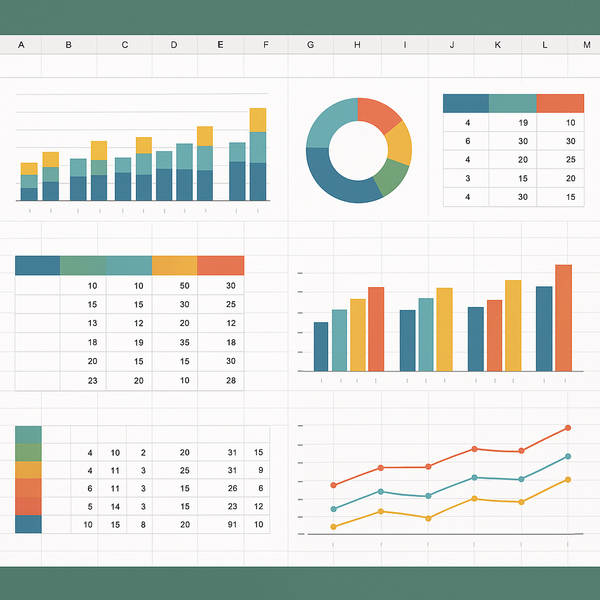
Digital Marketing Plan Template Excel – Creating an effective digital marketing strategy requires careful planning, tracking, and analysis. A well-structured digital marketing plan template excel serves as your roadmap to success, helping you organize campaigns, monitor budgets, and measure results all in one centralized location.
Whether you’re launching a startup, managing multiple client campaigns, or scaling an established business, having a comprehensive Excel template transforms scattered marketing efforts into a cohesive, data-driven strategy. This guide walks you through everything you need to know about creating, customizing, and maximizing your digital marketing planning spreadsheets.
What is a Digital Marketing Plan Template Excel?
A digital marketing plan template Excel is a pre-formatted spreadsheet designed to help marketers organize, track, and analyze their digital marketing activities. Unlike static documents, Excel templates provide dynamic functionality through formulas, pivot tables, and automated calculations that update in real-time as you input data.
These templates serve as centralized hubs where marketing teams can collaborate on strategy development, budget allocation, campaign scheduling, and performance measurement. By leveraging Excel’s powerful features, marketers can create sophisticated planning tools without investing in expensive specialized software.
Key Components of an Excel Marketing Template
A comprehensive marketing template typically includes several interconnected worksheets, each serving a specific planning function. The executive summary sheet provides high-level insights and key performance indicators at a glance. This overview connects to detailed campaign planning sheets where you outline specific initiatives, target audiences, and messaging strategies.
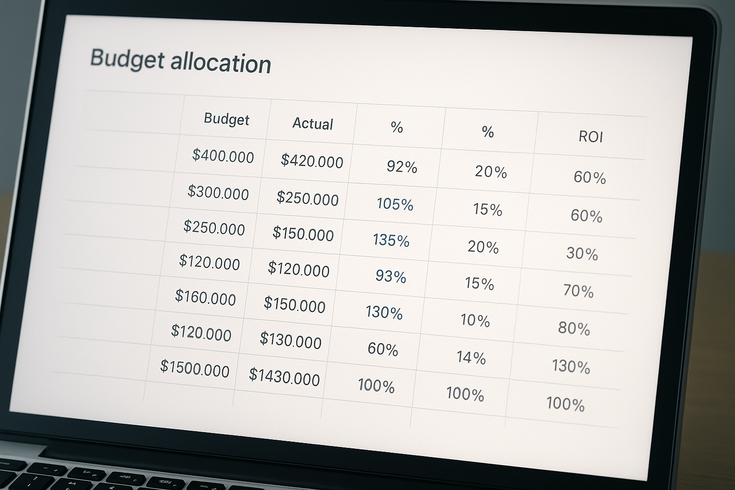
Budget allocation worksheets form another critical component, featuring formulas that automatically calculate spending across different channels and campaigns. These sheets often include variance analysis to compare planned versus actual spending, helping maintain financial control throughout your marketing efforts.
Content calendars integrated into the template help coordinate publishing schedules across multiple platforms. These calendars can include automated date calculations, deadline reminders, and status tracking to ensure consistent content delivery.
Performance tracking sheets complete the template structure, providing spaces to input metrics from various marketing channels. Built-in formulas calculate conversion rates, return on investment, and other key performance indicators automatically.
Benefits of Using Excel for Marketing Planning
Excel offers unmatched flexibility for creating customized marketing plans tailored to your specific business needs. Unlike rigid software solutions, Excel templates can be modified instantly to accommodate new channels, metrics, or reporting requirements as your marketing strategy evolves.
The familiar interface reduces learning curves for team members, enabling quick adoption across organizations. Most professionals already possess basic Excel skills, making collaboration straightforward without extensive training requirements.
Cost-effectiveness represents another significant advantage. Excel comes standard with most Microsoft Office installations, eliminating additional software subscription fees. This accessibility makes professional marketing planning tools available to businesses of all sizes.
Data integration capabilities allow Excel to connect with various marketing platforms and analytics tools. Through Power Query and other features, you can import data directly from sources like Google Analytics, social media platforms, and email marketing systems for comprehensive reporting.
Essential Features of a Digital Marketing Excel Template
Professional marketing templates incorporate specific features that streamline planning processes and enhance decision-making capabilities. Understanding these essential components helps you select or create templates that truly support your marketing objectives.
Budget Tracking and ROI Calculators
Effective budget management forms the foundation of successful marketing campaigns. Advanced Excel templates include sophisticated budget tracking systems with multiple allocation levels, from overall marketing spend down to individual campaign elements.
ROI calculators built into these templates automatically compute returns based on your input data. These calculations consider various factors including customer acquisition costs, lifetime value, and conversion rates across different channels. Conditional formatting highlights performance variations, making it easy to identify over-performing and under-performing investments.
Budget forecast models help predict future spending needs based on historical data and planned activities. These projections assist in securing appropriate funding and preventing budget overruns before they occur.
Expense categorization features allow detailed tracking of spending across different marketing activities. Whether monitoring paid advertising, content creation costs, or event expenses, organized categorization provides clear visibility into resource allocation.
Campaign Timeline and Scheduling Tools
Timeline management features transform static planning documents into dynamic scheduling tools. Gantt chart functionality visualizes campaign durations, dependencies, and resource allocation across multiple initiatives simultaneously.
Automated date calculations ensure accuracy when planning campaign phases. By entering start dates and durations, the template automatically calculates milestone dates, deadline reminders, and buffer periods between activities.
Resource scheduling components help prevent team overload by tracking personnel allocation across projects. These features identify potential conflicts and capacity issues before they impact campaign execution.
Integration with calendar applications enables automatic reminder creation for important deadlines and milestones. This connectivity ensures nothing falls through the cracks during busy campaign periods.
How to Use Your Digital Marketing Plan Template Excel
Implementing a digital marketing template requires systematic setup and consistent maintenance to maximize its value. Following structured implementation steps ensures your template becomes an indispensable planning tool rather than another unused spreadsheet.
Setting Up Your Marketing Goals and KPIs
Begin by establishing clear, measurable marketing objectives aligned with broader business goals. Your template should include dedicated sections for documenting SMART goals – Specific, Measurable, Achievable, Relevant, and Time-bound objectives that guide all marketing activities.
Define key performance indicators that directly relate to your established goals. Common KPIs include website traffic growth, lead generation rates, conversion percentages, and customer acquisition costs. Build these metrics into your template’s tracking sheets with clear definitions and calculation methods.
Create baseline measurements for all KPIs to enable accurate performance comparison over time. Historical data provides context for setting realistic targets and identifying meaningful improvements. Include fields for recording baseline figures alongside current performance metrics.
Establish reporting frequencies appropriate for each metric. While some KPIs require daily monitoring, others may only need monthly or quarterly review. Build these reporting cadences into your template structure to streamline data collection and analysis processes.
Customizing Formulas for Your Business
Standard templates provide starting points, but customization transforms generic tools into powerful business assets. Begin by reviewing all pre-built formulas to understand their functions and ensure alignment with your calculation methods.
Modify conversion rate calculations to reflect your specific sales funnel stages. Different businesses define conversions differently, from email signups to completed purchases. Adjust formulas accordingly to maintain accuracy and relevance.
Create custom metrics unique to your industry or business model. E-commerce companies might track average order values and cart abandonment rates, while B2B organizations focus on lead quality scores and sales cycle lengths. Build these specialized calculations into your template.
Implement data validation rules to prevent input errors that could corrupt calculations. Dropdown lists, date pickers, and numerical constraints maintain data integrity while simplifying data entry for team members.
Advanced Excel Features for Marketing Planning
Moving beyond basic spreadsheet functionality unlocks powerful capabilities that transform your marketing planning process. Advanced Excel features enable sophisticated analysis and reporting that rivals dedicated marketing software platforms.
Creating Dynamic Dashboards

Interactive dashboards consolidate complex data into easily digestible visual formats. Start by identifying the most critical metrics for different stakeholder groups – executives need high-level overviews while campaign managers require detailed operational data.
Utilize pivot tables to create flexible data summaries that update automatically as new information enters the system. These dynamic tables allow instant reorganization to view data from different perspectives without manual recalculation.
Implement slicers and timeline controls that enable users to filter dashboard views interactively. These tools make it simple to examine specific time periods, campaigns, or channels without modifying underlying data structures.
Design visual elements using Excel’s charting capabilities to represent data graphically. Combination charts showing both absolute values and percentage changes provide comprehensive performance views at a glance. Use consistent color coding and formatting to enhance readability and professional presentation.
Automating Reports and Analytics
Automation capabilities within Excel significantly reduce manual reporting burdens while improving accuracy and timeliness. Begin by identifying repetitive reporting tasks that consume significant time each week or month.
Create macro recordings for common report generation sequences. These automated scripts can format data, update charts, and even generate email-ready reports with single button clicks. Start with simple automation and gradually increase complexity as comfort levels grow.
Leverage Power Query for automated data imports from external sources. This feature connects directly to databases, web services, and other data sources, refreshing information on scheduled intervals without manual intervention.
Build automated alert systems using conditional formatting and formula-based notifications. These systems highlight when metrics fall outside acceptable ranges, ensuring prompt attention to potential issues before they escalate.
Industry-Specific Template Customizations
Different industries require unique approaches to digital marketing plan template excel customization. Understanding these specialized needs ensures your planning tools align perfectly with industry standards and expectations.
B2B Marketing Plan Modifications
Business-to-business marketing involves longer sales cycles and multiple decision-makers, requiring templates that track extended customer journeys. Include lead scoring mechanisms that evaluate prospect quality based on engagement behaviors and demographic factors.
Account-based marketing sections help coordinate personalized campaigns targeting specific high-value accounts. These template components should track individual account engagement across multiple touchpoints and stakeholders.
Content mapping features align marketing materials with different buyer journey stages. B2B templates need sophisticated tracking for educational content, case studies, and technical resources that support complex purchasing decisions.
Partnership and channel marketing sections accommodate the collaborative nature of B2B sales. Include tracking for partner-generated leads, co-marketing initiatives, and channel performance metrics that influence overall marketing success.
E-commerce Marketing Adaptations
E-commerce businesses require templates emphasizing transactional metrics and customer behavior analysis. Shopping cart analytics sections track abandonment rates, average order values, and product performance across different marketing channels.
Seasonal planning components help e-commerce marketers prepare for peak selling periods. These sections should include historical sales data, inventory coordination features, and promotional calendar integration for maximum effectiveness.
Customer lifetime value calculations take prominence in e-commerce templates. Include sophisticated models that factor in purchase frequency, average order values, and retention rates to guide customer acquisition spending decisions.
Multi-channel attribution modeling helps e-commerce businesses understand how different marketing touchpoints contribute to sales. Build attribution frameworks into your template that assign appropriate credit across the entire customer journey.
Best Practices for Template Maintenance and Updates
Regular maintenance ensures your digital marketing plan template Excel remains accurate, relevant, and valuable over time. Establishing systematic update procedures prevents data degradation and maintains template effectiveness.
Schedule monthly template reviews to verify formula accuracy and data connections. Marketing environments change rapidly, requiring periodic adjustments to calculations, metrics definitions, and reporting structures to maintain relevance.
Create version control systems that preserve historical template iterations while enabling controlled updates. This approach allows reverting to previous versions if new modifications cause unexpected issues while maintaining clear update documentation.
Document all customizations and formula modifications within the template itself. Include instruction sheets that explain calculation logic, data sources, and update procedures for team members who may inherit template management responsibilities.
Regularly backup your templates to prevent data loss from file corruption or accidental deletion. Cloud storage solutions provide automatic versioning and recovery options that protect your valuable planning tools.
Conclusion
A well-designed digital marketing plan template Excel transforms chaotic marketing efforts into organized, measurable campaigns that drive real business results. By leveraging Excel’s powerful features and following the customization strategies outlined in this guide, you create planning tools perfectly aligned with your unique business needs.
Remember that templates evolve alongside your marketing strategies. Start with basic functionality and gradually incorporate advanced features as your team’s Excel proficiency grows. Regular maintenance and updates ensure your templates remain valuable assets that support data-driven decision making.
Whether you’re managing solo marketing efforts or coordinating large team initiatives, Excel templates provide the flexibility, functionality, and accessibility needed for effective digital marketing planning. Take time to customize templates thoroughly, train team members on proper usage, and establish maintenance routines that keep your planning tools current and accurate.
For additional guidance on marketing planning and strategy development, the Marketing and sales | U.S. Small Business Administration offers valuable resources and best practices for businesses of all sizes.