
Can I Learn WordPress? – You are contemplating whether you can embark on the journey of learning WordPress. This contemplation is common, as WordPress, while ubiquitous, can appear as a formidable digital engine to the uninitiated. This article will dissect the learning process, illuminate available resources, and provide a roadmap for your educational excursion, demonstrating that the answer to your query is unequivocally affirmative.
Your learning trajectory for WordPress rests upon several fundamental architectural pillars. Understanding these will establish a robust foundation for your knowledge acquisition.
Understanding WordPress.org vs. WordPress.com
Before you even begin, you must grasp a crucial distinction: the separation between WordPress.org and WordPress.com. This is not merely a nuance; it is a bifurcation of your operational environment.
WordPress.org: The Self-Hosted Frontier
WordPress.org represents the open-source software you download and install on your own web hosting. This grants you maximum control, flexibility, and the ability to customize extensively. Think of it as owning the land and building your house from the ground up, with full architectural freedom. Here, you are responsible for hosting, security, and maintenance, but the potential is boundless. Resources like tutorials focusing on setting up hosting and installing WordPress.org are paramount here, as highlighted by numerous YouTube tutorials.
WordPress.com: The Managed Service Enclave
WordPress.com, conversely, is a commercial platform that hosts your WordPress site for you. It’s akin to renting an apartment where many of the maintenance and infrastructure concerns are handled by the landlord. While simpler to initiate, it offers less control over themes, plugins, and server configurations without premium upgrades. Beginner lessons from WordPress.com itself are tailored for this environment, often requiring no prior experience. Recognising this distinction is your first foundational step.
Navigating the WordPress Interface and Core Functionality
Once you have a clear understanding of the platform you intend to use, your next logical step is to become conversant with the WordPress dashboard and its core functionalities. This is akin to learning the controls of a vehicle before attempting to drive it.
The Dashboard: Your Command Center
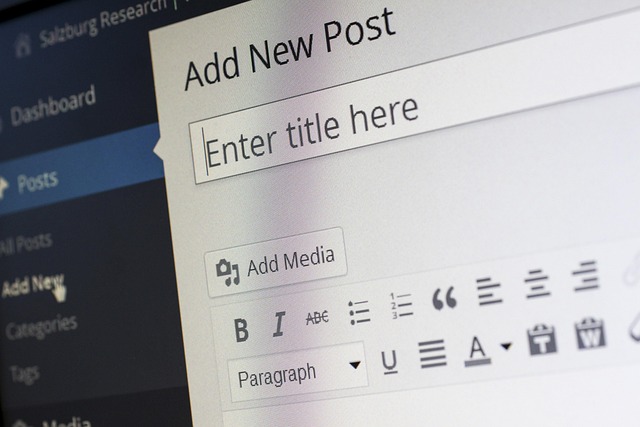
The WordPress dashboard is your central hub for managing your website. From here, you will create content, manage users, configure settings, and extend your site’s capabilities. Familiarize yourself with menu items like Posts, Pages, Media, Comments, Appearance, Plugins, Users, and Settings. Numerous beginner videos on YouTube, often using themes like Astra and page builders like Elementor, will walk you through these sections systematically.
Content Creation: Posts and Pages
Distinguish between posts and pages. Posts are typically chronological, used for blog entries or news items, and often categorized and tagged. Pages are static content, such as an “About Us” or “Contact” page. Understanding their application is vital for structuring your website effectively. Envato Tuts+ offers a 2.3-hour beginner video guide that delves into posts, media, and other core aspects.
Media Management: Images and Videos
WordPress provides a robust media library for uploading, organizing, and embedding images, videos, and other files. Efficient media management is crucial for website performance and user experience. The Envato Tuts+ guide explicitly covers media management.
Leveraging Available Learning Resources
The landscape of WordPress learning resources is vast and continually expanding. You are not traversing an unmapped territory; rather, you are presented with a multitude of well-trodden paths.
Official Documentation and Community Hubs
Official documentation serves as the authoritative source of information. These platforms are meticulously maintained and updated, offering accurate and comprehensive guidance.
WordPress Codex and Learn.WordPress.org
The WordPress Codex, though somewhat superseded by newer resources, remains a repository of fundamental information. More actively, Learn.WordPress.org offers free learning pathways for both users and developers. These pathways cover introductory topics, themes, plugins, blocks, and core basics. Think of it as the foundational university textbook for WordPress.
WordPress.org Tutorials and Forums
WordPress.org itself provides tutorials that are a valuable starting point. Furthermore, the WordPress.org forums are a vibrant community where you can pose questions, seek solutions, and learn from the experiences of others. This collective knowledge base is an invaluable asset.
Video Tutorials and Online Courses
In an era dominated by visual learning, video tutorials and online courses have emerged as highly effective pedagogical tools. They offer step-by-step guidance, allowing you to follow along practically.
YouTube as a Learning Engine
YouTube is an extraordinary, free resource for learning WordPress. Channels and individuals consistently publish beginner-friendly content. You can find step-by-step videos demonstrating how to build entire websites using popular combinations like the Astra theme and Elementor page builder, including hosting setup. Metics Media, for instance, offers full courses tailored for beginners. This platform functions as a vast, constantly updated lecture hall.
Specialized Tutorial Platforms
Several platforms specialize in WordPress tutorials. WP101 is frequently cited as a premier resource, offering free beginner lessons and overviews. WP Apprentice also provides free tutorials. For more in-depth or advanced learning, WP101 offers both free and paid video tutorials, and experts recommend starting with their beginner course and supplementing it with WPBeginner and WordPress.org docs. WPAstra’s 2026 Guide also lists these as top free resources.
MOOCs and Structured Courses
Massive Open Online Courses (MOOCs) platforms like Coursera offer structured learning experiences. You can find free access to courses such as “WordPress 101 – The Complete Guide” and “Intro to WordPress Development Specialization“. These courses provide a more formal learning environment, bridging foundational to advanced skills. Darrel Wilson’s guide also emphasizes official WordPress resources, online platforms, blogs, and communities as beginner resources.
Blogs and Practical Guides
Beyond formal courses and video lessons, a wealth of practical information resides within dedicated WordPress blogs and guides. These often offer actionable tips, troubleshooting advice, and insights into specific functionalities.
Astra Blog/YouTube and WPBeginner
The Astra Blog and its YouTube channel offer resources like “How to Make a WordPress Website in 60 Minutes“. These are practical, time-efficient guides for getting started. WPBeginner is also highly recommended for supplementing your learning, providing a vast library of articles and tutorials covering various aspects of WordPress. Think of these as practical manuals and quick-start guides that get you hands-on quickly.
The Learning Process: A Journey, Not a Destination
Learning WordPress is not a single sprint but an ongoing journey. Embrace this marathon mindset, and you will find your capabilities expanding incrementally.
Start Small, Iterate Often
Do not aim to build a complex e-commerce site on day one. Begin with a simple blog or a basic informational website. This allows you to apply what you learn without being overwhelmed. Each small success builds confidence and reinforces your understanding. Think of it as learning to walk before attempting to run a marathon.
Hands-On Practice is Paramount
Reading about WordPress is informative, but actively building a site is transformative. Create a local development environment (using tools like Local by Flywheel) or set up a sandbox site on a hosting provider. Experiment freely, break things, and then learn how to fix them. Practical application solidifies theoretical knowledge. This active engagement is the crucible in which your skills are forged.
Embrace the Learning Curve
Like any new skill, WordPress presents a learning curve. You will encounter frustrations, errors, and moments of confusion. These are not obstacles to your learning but integral parts of it. Persevere, consult your resources, and seek help from communities. The initial steepness of the curve will gradually flatten as your proficiency increases.
Focus on Foundational Concepts First
Resist the urge to immediately dive into advanced customization or complex plugin configurations. Master the core concepts: posts, pages, themes, plugins, and widgets. A strong grasp of these fundamentals will make understanding more intricate functionalities considerably easier. Skipping foundational steps is like trying to build a skyscraper without a solid footing.
You can Hire WordPress Developer to create a stunning and functional website for your business.
Expanding Your WordPress Proficiency
Once you grasp the basics, your journey can naturally branch into more specialized areas. WordPress’s modular nature allows for comprehensive site development without requiring you to become a full-stack developer.
Exploring Themes and Customization
Themes dictate the visual appearance and layout of your WordPress site. Understanding how to choose, install, and customize themes is crucial.
Child Themes: Preserving Customizations
As you delve into customization, you will likely encounter the concept of child themes. These are essential for making modifications to a parent theme without losing your changes during theme updates. This is a critical best practice for maintaining a stable and sustainable website.
Page Builders: Visual Site Construction
Page builders like Elementor have revolutionized how many users build WordPress sites. They offer a drag-and-drop interface, allowing you to design complex layouts without writing code. Learning a popular page builder significantly enhances your ability to create visually appealing and unique websites.
Understanding and Utilizing Plugins
Plugins extend the functionality of your WordPress site, ranging from SEO optimization and security to e-commerce and contact forms. There are tens of thousands of free and premium plugins available.
Essential Plugin Categories
Familiarize yourself with essential plugin categories: security (e.g., Wordfence), SEO (e.g., Yoast SEO, Rank Math), caching (e.g., WP Super Cache, LiteSpeed Cache), backup (e.g., UpdraftPlus), and contact forms (e.g., Contact Form 7, WPForms). Your website’s feature set and performance will heavily rely on judicious plugin selection.
Plugin Management and Updates
Learn how to safely install, update, and deactivate plugins. It is crucial to use reputable plugins and keep them updated to ensure security and compatibility. Learn.WordPress.org offers pathways for understanding plugins.
Basic SEO and Performance Optimization
Even as a beginner, understanding the rudiments of Search Engine Optimization (SEO) and performance optimization is beneficial. This ensures your site is discoverable and provides a good user experience.
Permalinks and Meta Descriptions
Configure SEO-friendly permalinks from the outset. Understand the role of meta descriptions and titles in search engine results. Basic SEO knowledge is like setting signposts on a road; it helps others find your destination.
Image Optimization and Caching
Learn general practices for optimizing images to reduce file size without compromising quality. Implement caching mechanisms to improve loading times. A faster website enhances user experience and can positively impact search engine rankings.
Conclusion
Can you learn WordPress? Absolutely. The plethora of freely available, high-quality resources, ranging from official documentation and community forums to comprehensive video tutorials and structured online courses, means that the tools for your success are abundant. Your journey will involve understanding fundamental distinctions, engaging in hands-on practice, and embracing an iterative learning process. With dedication and consistent effort, you will not only learn WordPress but also master its capabilities, transforming your digital aspirations into tangible realities. The portal is open, and the path is well-lit; all that remains is for you to step through.