
Negative Keywords: Not Wasting Money on Google Ads – Imagine you own an ice cream shop and you put up a big billboard on the highway. It says “ICE CREAM – NEXT EXIT!” Sounds great, right?
But what if your billboard accidentally ends up on a highway where there’s no exit to your shop? Or worse – what if it’s showing to people who are allergic to dairy and can’t eat ice cream? You’d be paying for that billboard space but getting zero customers!
That’s EXACTLY what happens when you run Google Ads without using negative keywords. You’re paying for people to see your ads who will NEVER buy from you. And in 2026, that can waste 20-40% of your advertising budget!
Today, you’re going to learn what negative keywords are, why they’re so important, and how they can save you tons of money on your ads.
What Are Negative Keywords?
Negative keywords are the opposite of regular keywords. Let me explain:
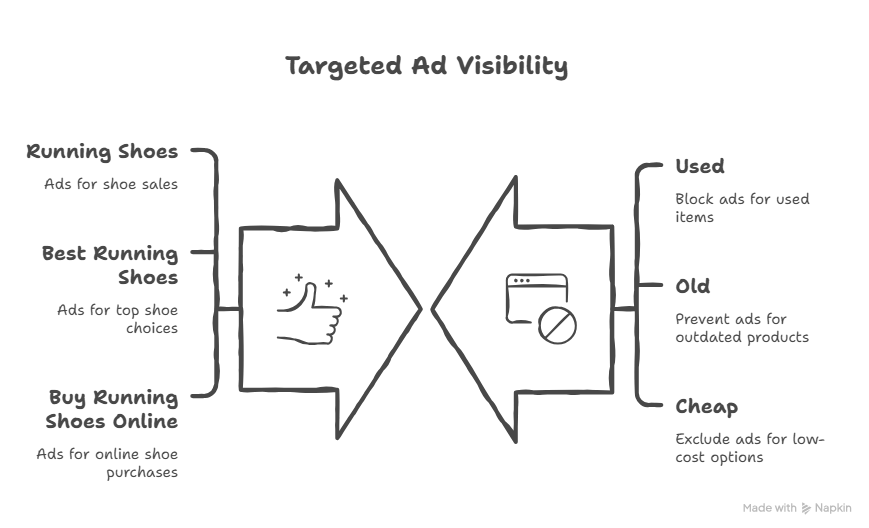
Regular keywords tell Google “Show my ad when people search for THIS.” For example, if you sell running shoes, you’d want your ad to show for “best running shoes” or “buy running shoes online.”
Negative keywords tell Google “DON’T show my ad when people search for THAT.” So if you only sell NEW running shoes, you’d add “used” as a negative keyword. Now your ad won’t show when someone searches “used running shoes.”
Think of it like this:
- Regular keywords = Green light (Go ahead, show my ad!)
- Negative keywords = Red light (Stop! Don’t show my ad!)
A Real-Life Example That Will Make This Click
Let’s say you run a fancy furniture store called “Console Tables & More.” You sell beautiful console tables (those skinny tables you put in hallways).
You decide to advertise on Google using the keyword “console.” Sounds smart, right?
But here’s what happens: Your ads start showing when people search for:
- “PlayStation 5 console”
- “Xbox Series X console”
- “Nintendo Switch console”
- “Game console repair”
Oops! These people want VIDEO GAME consoles, not furniture! But you’re paying $2 every time one of them clicks your ad. If 100 gamers click your ad thinking they’ll find PlayStations, you just wasted $200!
The Fix: Add negative keywords like “PlayStation,” “Xbox,” “Nintendo,” “game,” and “gaming.” Now Google knows to skip showing your ad to video game shoppers!
This actually happened to a real furniture company, and once they added these negative keywords, they stopped wasting hundreds of dollars every single day.
Why Are Negative Keywords So Important in 2026?
Here’s something that changed recently: Google’s advertising system got “smarter” with AI. Sounds good, right? Well, not always!
Google now uses something called “broad match,” which means it shows your ads to MORE people than ever before – including people who might not actually want what you’re selling.
Studies show that without negative keywords, 20-40% of your ad budget goes to people who will NEVER buy from you. That’s like throwing away $2,000 to $4,000 out of every $10,000 you spend on ads!
Even worse, Google sometimes takes weeks to “learn” that certain searches don’t work. During those weeks, you’re bleeding money. Negative keywords stop the bleeding immediately!
Here’s what negative keywords do for you:
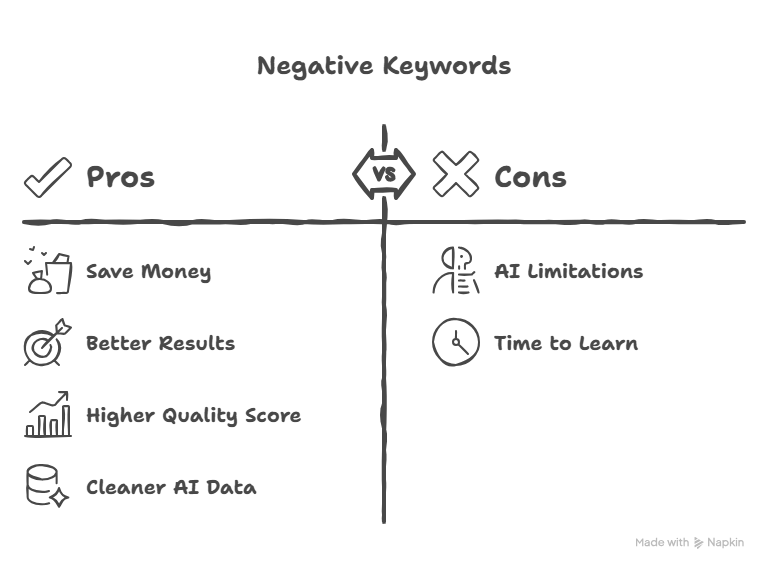
Save You Money: Every click costs money. If you’re paying for clicks from people who aren’t interested, you’re basically burning cash.
Get Better Results: When only the RIGHT people see your ads, more of them actually buy! One company cut their wasted spending by 52% just by adding the right negative keywords.
Make Google Like You More: Google has something called a “Quality Score.” When the right people click your ads, your score goes up. Higher scores = you pay LESS for each click!
Work Better with AI: When you use negative keywords, Google’s AI gets cleaner information. It’s like giving your GPS the right directions instead of sending it down every random road.
The Magic List: Negative Keywords Almost Every Business Should Use
Ready for some gold? Here’s a list of negative keywords that almost EVERY business should add to their Google Ads right now:
The “Free Stuff Seekers”
- free
- freeware
- gratis
- complimentary
- no cost
- trial (unless you actually offer a free trial!)
Why? Because people searching for free stuff almost never buy paid products. They’ll click your ad, see your prices, and leave.
The “Job Hunters”
- jobs
- careers
- hiring
- salary
- resume
- employment
- work from home
- internship
Why? Unless you’re actually hiring, you don’t want job seekers! A dog grooming business doesn’t want people searching “dog grooming jobs” – they want dog owners!
The “Just Learning” People
- how to
- what is
- tutorial
- DIY
- guide
- course
- training
- learn
- definition
Why? These people are in learning mode, not buying mode. Someone searching “how to fix a leaky faucet” probably wants to do it themselves, not hire a plumber!
The “Bargain Hunters”
- cheap
- cheapest
- budget
- discount
- used
- second hand
- refurbished
Why? If you sell premium products or services, bargain hunters will just waste your money. Someone searching “cheap lawyer” probably can’t afford your $300/hour rate!
How to Find YOUR Perfect Negative Keywords
Now let’s find negative keywords specifically for YOUR business!
Step 1: Look at Your Search Terms Report
If you’re already running Google Ads, Google keeps a secret list of every single search that triggered your ad. It’s called the “Search Terms Report.”
Go into your Google Ads account and look at this report. Sort it by “Clicks” from highest to lowest. Then ask yourself: “Did THIS search make sense for my business?”
You might be shocked! A company selling human shampoo discovered their ads were showing for “dog shampoo” and “cat shampoo.” They had no idea until they checked this report!
Step 2: Think Like a Bad Customer
Who is the WRONG customer for you? Make a list:
- People in the wrong location (if you’re local)
- People looking for different products
- People who want cheaper versions
- People who want to do it themselves
- Job seekers
- Students doing research
Then turn those into negative keywords!
Step 3: Spy on Your Competitors
Not literally! But think about competitor brand names. If you’re a plumber in Chicago and you DON’T want to waste money on people specifically looking for your competitor “Roto-Rooter,” add “Roto-Rooter” as a negative keyword.
Now you’ll only get people searching for “plumber Chicago” or “emergency plumber” – people who are still choosing!
How Negative Keywords Connect to Your Bigger Marketing Strategy
When you master negative keywords, everything else gets better!
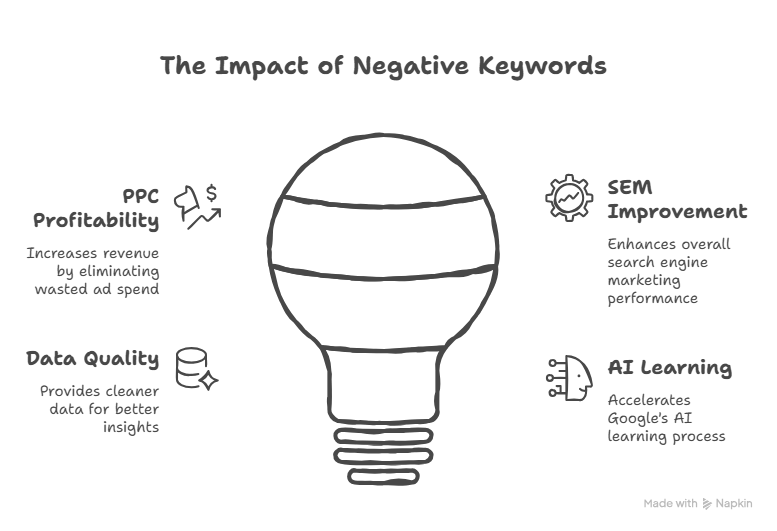
Your PPC management for small business becomes way more profitable. PPC stands for “pay-per-click” – the type of advertising we’re talking about. When you stop paying for bad clicks, suddenly your PPC campaigns make a lot more money!
Your overall search engine marketing for small business strategy improves too. You’re not just saving money – you’re also getting better data. Google’s AI learns faster when it’s only seeing good clicks from real potential customers.
It’s like training a puppy. If you only reward good behavior, the puppy learns fast. If you reward everything (good and bad), the puppy stays confused!
How to Organize Your Negative Keywords
Don’t just throw negative keywords into one big messy pile! Organize them smart:
The Master “Block Everything Bad” List
Create one list with negative keywords that should apply to ALL your ads:
- Free
- Jobs
- Careers
- How to
- DIY
- Cheap
Apply this list to your entire Google Ads account. Now every campaign is protected!
Campaign-Specific Lists
Some negative keywords only matter for certain campaigns. For example:
- If you have a “winter boots” campaign, add “summer” as a negative
- If you have a “women’s shoes” campaign, add “men” and “boys” as negatives
- If you have a “luxury watches” campaign, add “used,” “cheap,” and “replica” as negatives
The One-Word Wonder Strategy
Here’s a pro tip: Sometimes one word can block tons of bad searches!
If you’re a local business in Houston and you DON’T serve Dallas, just add “Dallas” as a negative keyword. Now you’ve blocked:
- “Plumber in Dallas”
- “Dallas emergency plumber”
- “Best plumber Dallas Texas”
- And thousands more!
One word = thousands of bad searches blocked. That’s powerful!
Common Mistakes to Avoid
Mistake #1: Adding Too Many Negatives You can go overboard! If you add 2,000+ negative keywords, you might be blocking GOOD customers too. Be smart, not crazy.
Mistake #2: Using the Wrong Match Type For negative keywords, use “broad match” most of the time. This blocks the word in ANY order. Don’t use exact match unless you have a very specific reason!
Mistake #3: Set It and Forget It Your business changes! You might start offering “free shipping” next year. If you have “free” as a negative keyword, remove it! Check your negative keywords every month.
Mistake #4: Not Checking Your Work After adding negative keywords, watch your traffic. Did you accidentally block too much? It’s okay to undo and fix it!
The Weekly Routine That Saves Thousands
Want to know what successful advertisers do? They follow this simple routine:
Every Week:
- Check your Search Terms Report
- Find 3-5 new negative keywords
- Add them to your lists
- Watch your wasted spend drop!
Every Month:
- Review your entire negative keyword list
- Remove any that don’t make sense anymore
- Add industry-specific terms you discovered
Every Three Months:
- Do a deep audit of everything
- Look for patterns in wasted clicks
- Reorganize your lists if needed
This takes maybe 20 minutes per week. But it can save you HUNDREDS or even THOUSANDS of dollars every month!
Real Results from Real Businesses
Let me share some quick success stories:
The Beauty Company: They were advertising shampoo for humans, but getting clicks from pet owners. After adding “dog,” “cat,” “pet,” and “animal” as negatives, their wasted spending dropped by 30% in one week!
The HVAC Company: They added “jobs,” “careers,” and “salary” as negatives and immediately saw their conversion rate jump by 35%. Why? Because they stopped getting clicks from job seekers!
The Furniture Store: The one I mentioned earlier with the console table problem? After adding video game terms as negatives, they reduced wasted clicks by $500 per day. That’s $15,000 saved every single month!
Your Action Plan Starting Today
Ready to stop wasting money? Here’s what to do right now:
Today:
- Log into your Google Ads account
- Add the “universal negative keywords” list I gave you earlier
- Create a shared negative keyword list
This Week:
- Check your Search Terms Report
- Add 5-10 negative keywords specific to your business
- Set a weekly reminder to check it again
This Month:
- Review your results
- Calculate how much money you saved
- Keep building your negative keyword lists
The Bottom Line
Negative keywords are like having a bouncer at a club. The bouncer’s job isn’t to let everyone in – it’s to keep the wrong people OUT so the right people can have a good time!
Your Google Ads campaigns work the same way. You don’t want EVERY click – you want the RIGHT clicks. Negative keywords are your bouncer.
Remember these key facts:
- 20-40% of ad budgets get wasted without negative keywords
- Adding them can cut wasted spending by 52%
- Results show up in the first week
- It takes just 20 minutes per week to maintain
The businesses winning at Google Ads in 2026 aren’t necessarily spending the most money. They’re the ones being SMART with their money. And that starts with negative keywords!
So stop letting video game players waste your console table advertising budget. Stop paying for job seekers when you want customers. Stop showing ads to people who want free stuff when you sell premium products.
Take control of your advertising with negative keywords, and watch your profits grow while your wasted spending disappears!