


Introduction: Can ChatGPT Build Me a Website?
The question “Can ChatGPT build me a website?” has become increasingly common as artificial intelligence transforms how we approach web development. While ChatGPT cannot directly create and host a fully functional website on its own, it can serve as a powerful assistant throughout the website creation process. This comprehensive guide explores exactly how you can leverage ChatGPT’s capabilities to build your website, from generating code to crafting compelling content. For businesses seeking professional assistance, Free Website Design options are also available to complement AI-powered development.
Understanding ChatGPT’s Website Building Capabilities
ChatGPT excels at generating HTML, CSS, and JavaScript code based on your specifications. It can create website structures, suggest layouts, write content, and even help with basic functionality. However, it’s important to understand that ChatGPT works as a code generator and advisor rather than a complete website builder. You’ll need to take the code it generates and implement it using traditional web hosting methods.
The AI can process your requirements and translate them into working code snippets. Whether you need a simple landing page or a more complex multi-page website, ChatGPT can provide the foundational code and guide you through the development process. Its strength lies in understanding natural language instructions and converting them into technical implementations.
What This Guide Will Cover
This guide provides a detailed roadmap for using ChatGPT in website development. We’ll explore the seven-step process that takes you from initial concept to deployed website. You’ll learn about ChatGPT’s strengths and limitations, discover practical prompts for generating different website components, and understand when to consider alternative solutions.
We’ll also examine real-world examples demonstrating how businesses, freelancers, and bloggers have successfully used ChatGPT to create their websites. By the end of this guide, you’ll have a clear understanding of how to effectively use ChatGPT as your website building assistant.
How ChatGPT Can Help with Website Building
When wondering “Can ChatGPT build me a website,” it’s essential to understand the specific ways this AI tool can assist in the development process. ChatGPT serves multiple roles in website creation, from technical code generation to creative content writing.
Generating HTML/CSS Code
ChatGPT demonstrates remarkable proficiency in generating clean, semantic HTML and CSS code. You can describe your desired layout, color scheme, and structure in plain language, and ChatGPT will produce the corresponding code. For example, requesting a “responsive navigation bar with a logo on the left and menu items on the right” results in complete HTML markup and CSS styling.
The AI understands modern web development practices, including responsive design principles, flexbox layouts, and grid systems. It can generate code that follows best practices for accessibility and SEO optimization. This capability makes it particularly valuable for those who understand web design concepts but may not be fluent in coding syntax.
ChatGPT can also help debug existing code, suggest improvements, and explain how different code segments work. This educational aspect makes it an excellent learning tool for aspiring web developers while providing practical solutions for immediate website needs.
Creating Content and Copy
Beyond code generation, ChatGPT excels at creating website content. It can write compelling homepage copy, product descriptions, about sections, and blog posts tailored to your target audience. The AI understands different writing styles and tones, allowing you to maintain consistency across your website.
ChatGPT can generate SEO-friendly content by incorporating relevant keywords naturally throughout the text. It can create meta descriptions, title tags, and header structures that help search engines understand your content. This dual capability of technical and creative assistance makes ChatGPT a comprehensive website building companion.
The AI can also help with microcopy elements like button text, form labels, and error messages. These small but crucial details contribute to a professional, user-friendly website experience.
Structuring Website Architecture
Planning website architecture becomes more manageable with ChatGPT’s assistance. The AI can suggest logical site structures based on your business type and goals. It can recommend page hierarchies, navigation flows, and content organization strategies that enhance user experience.
ChatGPT can create detailed sitemaps and wireframes in text format, helping you visualize your website before diving into development. It understands information architecture principles and can suggest how to organize content for optimal user engagement and search engine visibility.
The tool can also advise on technical considerations like URL structures, internal linking strategies, and content categorization. This strategic planning capability ensures your website has a solid foundation for growth and scalability.
Limitations of Using ChatGPT for Website Creation
While exploring “Can ChatGPT build me a website,” it’s crucial to understand the tool’s limitations. Recognizing these constraints helps set realistic expectations and plan accordingly for your website project.
Technical Constraints
ChatGPT cannot directly interact with web servers, databases, or hosting platforms. It generates code that you must manually implement, test, and deploy. The AI lacks real-time debugging capabilities and cannot see how your code renders in actual browsers. This limitation means you’ll need basic technical knowledge to implement the generated code effectively.
Complex functionalities requiring server-side programming, database connections, or API integrations present challenges. While ChatGPT can provide code examples and guidance for these features, implementing them requires additional tools and potentially more advanced programming knowledge.
The AI’s knowledge has temporal limitations, meaning it might not be aware of the very latest web development frameworks or updates. Its training data has a cutoff date, so emerging technologies or recent best practices might not be reflected in its suggestions.
Design Limitations
ChatGPT cannot create or manipulate visual elements like images, logos, or graphics. While it can suggest design principles and describe layouts in code, you’ll need separate tools for creating visual assets. The AI can recommend color schemes and typography choices but cannot show you visual previews of these selections.
Creating truly unique, innovative designs remains challenging through text-based interactions alone. ChatGPT tends to suggest conventional layouts and design patterns, which, while functional, may lack the creative flair that custom design work provides.
The tool cannot perform user experience testing or provide analytics on design effectiveness. These crucial aspects of web design require additional tools and methodologies beyond ChatGPT’s capabilities.
Functionality Restrictions
E-commerce functionalities, payment processing, and complex user authentication systems exceed ChatGPT’s direct capabilities. While it can provide code templates and explain implementation concepts, setting up these features requires integration with third-party services and platforms.
Real-time features like chat systems, live updates, or complex animations require specialized knowledge and tools. ChatGPT can provide basic JavaScript for simple interactions but cannot handle the infrastructure needed for advanced dynamic features.
The AI cannot test cross-browser compatibility, mobile responsiveness in real devices, or performance optimization. These critical aspects of modern web development require actual testing environments and specialized tools.
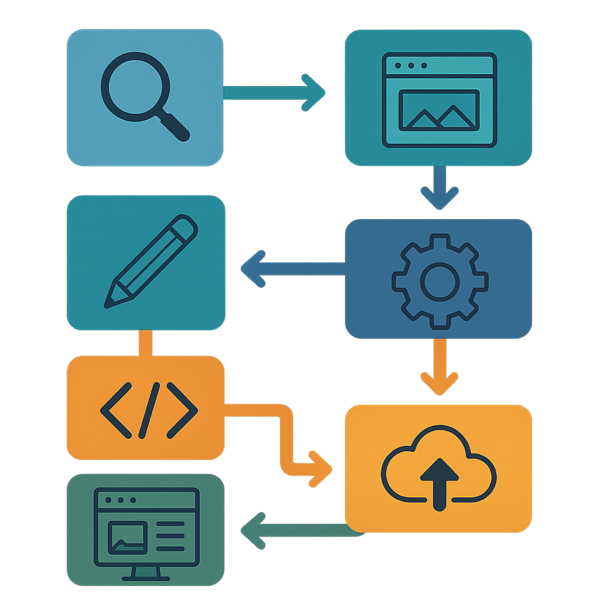
7-Step Process: Can ChatGPT Build Me a Website Successfully?
Understanding how Can ChatGPT build me a website effectively requires following a structured approach. This seven-step process maximizes ChatGPT’s strengths while addressing its limitations through strategic planning and implementation.
Visual workflow of website creation with ChatGPT
Step 1: Define Your Website Requirements
Begin by clearly articulating your website’s purpose, target audience, and essential features. Create a detailed brief including the type of business, desired functionality, design preferences, and content requirements. The more specific your requirements, the better ChatGPT can assist you.
Consider creating a requirements document that outlines pages needed, features required, design style preferences, color schemes, and any specific functionality. Include examples of websites you admire and explain what appeals to you about them. This preparation ensures productive interactions with ChatGPT.
Think about your technical constraints and hosting preferences. Determine whether you need a simple static website or something more dynamic. Consider your budget, timeline, and long-term maintenance capabilities. These factors influence how you’ll use ChatGPT throughout the development process.
Step 2: Generate Initial Code Structure
With requirements defined, begin prompting ChatGPT to create your website’s foundational structure. Start with a basic HTML template that includes proper document structure, meta tags, and responsive viewport settings. Request a CSS reset or normalization stylesheet to ensure consistent rendering across browsers.
Ask ChatGPT to generate a responsive layout structure using modern CSS techniques like Grid or Flexbox. Specify your preferred approach and any specific breakpoints for mobile, tablet, and desktop views. The AI can create modular, reusable CSS classes that maintain consistency throughout your site.
Request JavaScript functionality for common features like mobile menu toggles, smooth scrolling, or form validation. ChatGPT can provide vanilla JavaScript solutions or code using popular libraries if you specify your preferences. Build your codebase incrementally, testing each component before moving to the next.
Step 3: Create Content with ChatGPT
Leverage ChatGPT’s content creation capabilities to populate your website with engaging copy. Start with your homepage, providing context about your business and target audience. Request different versions to find the tone and style that best represents your brand.
Generate content for each page systematically. For service pages, provide details about what you offer and ask ChatGPT to create benefit-focused descriptions. For about pages, share your story and values, allowing the AI to craft a compelling narrative. Remember to review and personalize all generated content to ensure authenticity.
Create SEO-optimized meta descriptions, title tags, and header structures for each page. ChatGPT can help identify relevant keywords and incorporate them naturally into your content. Request variations to A/B test different approaches and find what resonates with your audience.
Step 4: Refine the Design
Work with ChatGPT to refine your website’s visual presentation through CSS enhancements. Request specific styling for typography, including font families, sizes, line heights, and spacing that create visual hierarchy and improve readability.
Ask for CSS animations and transitions that add polish without overwhelming users. ChatGPT can provide code for hover effects, loading animations, and scroll-triggered reveals. Specify your performance concerns to receive optimized solutions that don’t impact page load times.
Refine your color scheme implementation by requesting CSS custom properties (variables) for consistent color management. ChatGPT can generate accessible color combinations and suggest improvements for contrast ratios. Request responsive adjustments to ensure your design works across all devices.
Step 5: Add Interactive Elements
Enhance user engagement by adding interactive elements with ChatGPT’s help. Request JavaScript code for contact forms with client-side validation, ensuring users provide necessary information correctly. Include helpful error messages and success confirmations.
Implement interactive features like image galleries, accordion menus, or tab interfaces. ChatGPT can provide progressively enhanced solutions that work without JavaScript while offering richer experiences when available. Focus on features that genuinely improve user experience rather than adding complexity.
Create microinteractions that provide feedback for user actions. Request code for button click effects, form field focus states, and loading indicators. These small details contribute significantly to perceived website quality and professionalism.
Step 6: Test and Debug
While ChatGPT cannot directly test your website, it can guide you through comprehensive testing procedures. Request checklists for cross-browser testing, mobile responsiveness verification, and accessibility compliance. Use these guides to systematically verify your website’s functionality.
When encountering issues, describe them to ChatGPT for debugging assistance. Provide error messages, unexpected behaviors, and relevant code snippets. The AI can suggest solutions, explain why problems occur, and provide corrected code.
Optimize your website’s performance with ChatGPT’s guidance. Request techniques for minimizing file sizes, optimizing images, and improving load times. Implement lazy loading for images and optimize your CSS and JavaScript delivery.
Step 7: Deploy Your Website
Prepare for deployment by asking ChatGPT about hosting options suitable for your website type. The AI can explain differences between shared hosting, VPS, and static site hosting, helping you make an informed decision based on your needs and budget.
Request guidance on domain setup, SSL certificate installation, and basic security measures. ChatGPT can provide step-by-step instructions for popular hosting platforms and explain DNS configuration concepts.
Create a deployment checklist with ChatGPT’s help, ensuring you don’t miss critical steps like setting up redirects, submitting sitemaps to search engines, and configuring analytics. Plan for ongoing maintenance and updates to keep your website secure and functional.
Practical ChatGPT Prompts for Website Components
Mastering the art of prompting is essential when exploring Can ChatGPT build me a website. Effective prompts yield better results and save development time.
Homepage Structure Prompts
Craft prompts that clearly describe your homepage vision. For example: “Create a responsive homepage hero section with a compelling headline, subheading, and two call-to-action buttons. Include HTML and CSS for a full-width background image with overlay.” This specificity helps ChatGPT generate immediately usable code. When it comes to Can ChatGPT build me a website, this is one of the fastest checks to run.
Request modular components that you can customize: “Generate a features section showcasing three services in a card layout. Each card should have an icon placeholder, heading, description, and link. Make it responsive with cards stacking on mobile.” This approach creates reusable patterns throughout your site.
Ask for conversion-focused elements: “Create a testimonials section with a slider functionality. Include customer quotes, names, and company information. Add navigation dots and ensure smooth transitions.” These social proof elements enhance credibility and encourage user action.
Navigation Menu Prompts
Design effective navigation with targeted prompts: “Build a responsive navigation bar with logo on the left and menu items on the right. Include a hamburger menu for mobile devices with smooth slide-in animation.” Clear specifications result in functional, user-friendly navigation.
Request accessibility features explicitly: “Add keyboard navigation support and ARIA labels to the navigation menu. Include focus states and skip-to-content functionality.” This ensures your website is usable by all visitors, regardless of their abilities.
Consider multi-level navigation needs: “Create a dropdown menu system for main navigation items with subcategories. Ensure dropdowns are accessible on both desktop hover and mobile tap.” Complex navigation structures require careful planning and implementation.
Contact Form Prompts
Generate functional contact forms with comprehensive prompts: “Create a contact form with fields for name, email, phone (optional), and message. Include HTML5 validation, custom error messages, and a submit button. Style with modern CSS including focus states.”
Add advanced functionality: “Implement JavaScript form validation that checks email format, required fields, and message minimum length. Show inline error messages and disable submit button until valid.” Client-side validation improves user experience and data quality.
Request security and spam prevention measures: “Add a simple math captcha to the contact form and implement form submission rate limiting suggestions.” While ChatGPT cannot implement server-side security, it can guide you toward best practices.
Alternative AI Website Builders to Consider
While investigating Can ChatGPT build me a website, it’s valuable to explore alternative AI-powered solutions. Understanding the broader landscape helps you choose the most appropriate tool for your specific needs. Professional Website Design Services can also complement these AI tools for more complex projects.
Comparison with Traditional Website Builders
Traditional website builders like WordPress, Wix, and Squarespace offer visual interfaces that differ significantly from ChatGPT’s text-based approach. These platforms provide drag-and-drop functionality, pre-designed templates, and integrated hosting solutions. They excel at rapid deployment but may limit customization compared to ChatGPT-generated code.
AI-enhanced builders like Hostinger’s AI Website Builder and 10Web combine visual interfaces with AI assistance. They offer the convenience of traditional builders while leveraging AI for content generation and design suggestions. This hybrid approach suits users who want AI benefits without coding requirements.
ChatGPT offers unlimited customization potential since you work directly with code. This flexibility appeals to users with some technical knowledge who want complete control over their website’s functionality and appearance. The trade-off is the additional effort required to implement and host the generated code.
Consider your technical skills, time constraints, and customization needs when choosing between ChatGPT and traditional builders. ChatGPT excels for learning purposes and custom solutions, while visual builders offer faster deployment for standard website needs.
When to Choose AI Tools Over ChatGPT
Dedicated AI website builders make sense when you need rapid deployment without touching code. These platforms handle hosting, security, and updates automatically, reducing technical overhead. They’re ideal for small businesses needing professional web presence quickly.
Choose visual AI builders when design is paramount, and you need to see changes in real-time. The ability to experiment with layouts visually and immediately see results accelerates the design process. This visual feedback loop is particularly valuable for design-focused projects.
ChatGPT remains superior for educational purposes and when you need highly customized functionality. Learning web development through ChatGPT provides deeper understanding than using visual tools. Custom business logic, unique interactions, or specific technical requirements often necessitate ChatGPT’s code-generation capabilities.
Consider hybrid approaches where you use ChatGPT for specific components within a traditional website builder. This combination leverages ChatGPT’s customization abilities while maintaining the convenience of established platforms.
Real Examples and Case Studies
Examining real-world applications demonstrates how Can ChatGPT build me a website in practice. These examples showcase different approaches and outcomes across various website types.
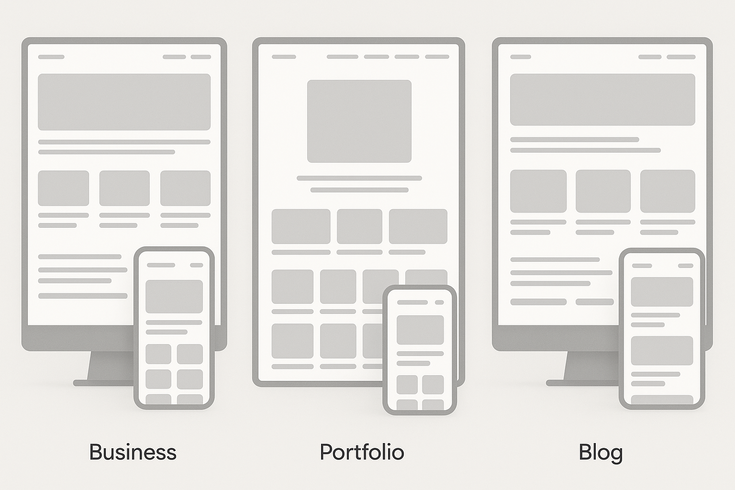
Sample website layouts created with ChatGPT assistance
Small Business Website Example
A local bakery used ChatGPT to create their website, focusing on showcasing products and enabling online orders. The owner, with minimal coding experience, started by describing their needs: a homepage featuring daily specials, a menu page with categories, and a simple order form.
ChatGPT generated a responsive layout with a warm color scheme appropriate for a bakery. The homepage included a hero section with rotating images of baked goods, a featured products grid, and customer testimonials. The CSS included subtle animations that added visual interest without overwhelming visitors.
The menu page used an organized structure with categories for breads, pastries, and cakes. Each item included descriptions and pricing in a clean, scannable format. ChatGPT provided JavaScript for filtering menu items by category and dietary preferences, enhancing user experience.
The order form integrated client-side validation and calculated order totals dynamically. While the owner needed additional help implementing payment processing, ChatGPT’s foundation significantly reduced development time and costs. The website launched successfully and increased online orders by making the bakery’s offerings more accessible.
Portfolio Website Example
A freelance graphic designer leveraged ChatGPT to build a portfolio showcasing their work. The designer had basic HTML/CSS knowledge but wanted to create something more sophisticated than their skills allowed. They used ChatGPT to generate a modern, minimalist design that highlighted their projects.
The homepage featured a striking hero section with animated text introducing the designer’s services. ChatGPT provided code for a sophisticated project grid with hover effects revealing project details. The layout adapted beautifully to different screen sizes, ensuring work displayed properly on all devices.
Individual project pages used a clean layout combining images with descriptive text. ChatGPT generated a lightbox gallery for viewing full-size images and smooth scroll animations for storytelling. The code included lazy loading for optimal performance despite image-heavy content.
The contact page integrated a styled form with creative field animations. ChatGPT also provided code for a free to use resume link and social media integration. The designer successfully launched their portfolio, receiving positive feedback from potential clients about the professional presentation.
Blog Website Example
A travel enthusiast created a blog using ChatGPT-generated code, focusing on sharing adventures and travel tips. Starting with no coding experience, they learned alongside ChatGPT’s explanations. The process became educational while producing a functional website.
The blog homepage displayed recent posts in a card-based layout with featured images, excerpts, and read-more links. ChatGPT provided CSS for a magazine-style layout that looked professional and engaging. Responsive breakpoints ensured readability across devices.
Individual blog post templates included proper typography for long-form reading, with comfortable line lengths and spacing. ChatGPT generated code for a sticky navigation bar, social sharing buttons, and related posts sections. These features enhanced user engagement and time on site.
The blogger implemented categories and a simple search functionality with ChatGPT’s guidance. While requiring manual content management initially, the foundation allowed for future growth. The blog successfully attracted readers and established the blogger’s online presence in their niche.
Best Practices and Tips
Maximizing success when exploring Can ChatGPT build me a website requires understanding best practices and avoiding common pitfalls. These insights come from extensive experience helping users leverage ChatGPT for web development.
Optimizing Your ChatGPT Prompts
Effective prompting begins with clarity and specificity. Instead of asking for “a website,” describe exactly what you need: “Create a single-page website for a dental practice with sections for services, team, testimonials, and contact information.” Include technical requirements like responsive design, accessibility features, or specific framework preferences.
Break complex requests into smaller, manageable components. Rather than requesting an entire website at once, focus on individual sections or features. This approach allows you to test and refine each component before moving forward. It also helps ChatGPT provide more detailed, accurate responses.
Provide context about your skill level and constraints. Mentioning that you’re a beginner or that you need explanations helps ChatGPT adjust its responses appropriately. Include information about your hosting environment, browser support requirements, and any existing code you’re working with.
Iterate and refine your prompts based on results. If the initial output isn’t quite right, explain what needs adjustment rather than starting over. This conversational approach helps ChatGPT understand your preferences and provide increasingly accurate solutions.
Common Mistakes to Avoid
Avoid accepting ChatGPT’s code without understanding it. While the AI generates functional code, comprehending how it works ensures you can maintain and modify your website. Ask for explanations of complex sections and research unfamiliar concepts independently.
Don’t skip testing across different browsers and devices. ChatGPT cannot verify that its code works universally. Systematic testing reveals issues that need addressing before launch. Pay particular attention to older browser compatibility if your audience requires it.
Resist the temptation to over-complicate your website with unnecessary features. Just because ChatGPT can generate complex functionality doesn’t mean you should implement it. Focus on features that genuinely serve your users and business goals.
Never neglect security considerations. While ChatGPT provides functional code, it may not always include comprehensive security measures. Research and implement proper security practices, especially for forms, user data, and any dynamic functionality.
Time-Saving Techniques
Create a prompt library for common components you use frequently. Save effective prompts for navigation bars, forms, cards, and other elements. This repository accelerates future projects and ensures consistency across your work.
Use ChatGPT to generate CSS utility classes and design systems early in your project. Having consistent spacing, typography, and color utilities saves time throughout development. Request modular, reusable code that you can apply across different sections.
Leverage ChatGPT’s ability to convert between different code formats. If you find a design you like but it uses different technologies, ask ChatGPT to translate it. This flexibility allows you to adapt resources to your preferred tech stack.
Batch similar tasks together for efficiency. Generate all your page templates in one session, create all form variations together, or write all meta descriptions at once. This focused approach maintains consistency and reduces context-switching overhead.
Document your process and ChatGPT’s responses for future reference. Create a development log that captures successful prompts, useful code snippets, and solutions to problems you encountered. This documentation becomes invaluable for maintenance and future projects.
Conclusion
The question “Can ChatGPT build me a website” has a nuanced answer. While ChatGPT cannot independently create and deploy a complete website, it serves as an incredibly powerful assistant throughout the development process. From generating clean, functional code to creating compelling content and providing technical guidance, ChatGPT transforms how individuals and small businesses approach website creation.
Success with ChatGPT requires understanding both its capabilities and limitations. The AI excels at code generation, content creation, and technical problem-solving but cannot handle visual design, hosting, or complex integrations independently. By following the structured seven-step process outlined in this guide and applying best practices for prompting and implementation, you can effectively leverage ChatGPT to build professional websites.
The real-world examples demonstrate that users with varying technical backgrounds have successfully created websites using ChatGPT. Whether building a small business site, portfolio, or blog, the AI provides valuable assistance that reduces development time and costs while offering learning opportunities.
As AI technology continues evolving, tools like ChatGPT will become even more capable website building assistants. However, the fundamental approach remains the same: clear communication, systematic implementation, and understanding when to leverage AI versus traditional tools. By mastering these principles, you can harness ChatGPT’s power to bring your website vision to life.
Remember that building a website with ChatGPT is not just about getting code – it’s about understanding web development principles, creating user-focused designs, and maintaining your site over time. W3Schools offers excellent resources for deepening your web development knowledge alongside your ChatGPT journey. The combination of AI assistance and continuous learning empowers anyone to create professional, functional websites that serve their goals effectively.

Juan is a Digital Advertising / SEM Specialist with over 10 years of experience with Google AdWords, Bing Ad Center, Facebook, LinkedIn, Google Analytics, HTML, and WordPress. He is a co-founder of Sheaf Media Group and has work in several online advertising projects for retail, automotive, and service industries. Additionally, Juan holds a bachelor’s degree in Psychology and has a deep interest in the science of human behavior which he attributes as the key factor for his success in the advertising world.