


Introduction: Can I Create a Website for Free on Google?
Yes, you absolutely can create a website for free on Google using their powerful website builder called Google Sites. This comprehensive platform allows anyone with a Google account to build and publish professional-looking websites without spending a single dollar or writing any code. Whether you’re a small business owner, educator, student, or individual looking to establish an online presence, Google provides all the tools you need to get started immediately. For those wondering Is Google Sites 100% free?, the answer is yes – there are no hidden costs or premium features locked behind paywalls for basic website creation.
Why Choose Google for Your Free Website
When you’re asking “can I create a website for free on Google,” you’re tapping into one of the most reliable and feature-rich free website building platforms available today. Google Sites offers seamless integration with other Google services like Drive, Docs, Sheets, and Calendar, making it an ideal choice for those already using Google’s ecosystem. The platform provides responsive design templates that automatically adapt to different screen sizes, ensuring your website looks great on desktop computers, tablets, and smartphones.
The reliability factor cannot be overstated – Google’s infrastructure ensures your website remains accessible with minimal downtime. Unlike many free website builders that bombard visitors with advertisements or limit your storage space severely, Google Sites provides a clean, ad-free experience with generous storage allocation through your Google account. This makes it particularly attractive for educational institutions, non-profits, and small businesses that need a professional web presence without the associated costs.
What You’ll Learn in This Guide
This comprehensive guide will walk you through everything you need to know about creating your free website on Google. We’ll explore the step-by-step process of building your site from scratch, examining each feature and tool available to you. You’ll discover how to choose the right template for your needs, customize your design to reflect your brand or personality, and add engaging content that resonates with your target audience.
We’ll also delve into real-world examples of successful websites built using Google Sites, demonstrating the platform’s versatility across different industries and use cases. Additionally, we’ll honestly discuss the limitations you might encounter and when it might be appropriate to consider alternative solutions. By the end of this guide, you’ll have all the knowledge and confidence needed to launch your own professional website using Google’s free tools.
Understanding Google’s Free Website Options
Before diving into the creation process, it’s essential to understand the various ways Google enables free website creation. While Google Sites is the primary dedicated website builder, Google offers several complementary tools that can enhance your web presence or serve specific purposes. Understanding these options will help you make an informed decision about which tools best suit your specific needs and goals.
Google Sites Overview
Google Sites stands as Google’s flagship solution for those wondering “can I create a website for free on Google.” This intuitive platform has evolved significantly since its inception, now offering a modern, drag-and-drop interface that makes website creation accessible to everyone, regardless of technical expertise. The platform operates entirely within your web browser, eliminating the need for software downloads or complex installations.
The current version of Google Sites focuses on simplicity and collaboration. You can work on your website from any device with internet access, and multiple team members can collaborate on the same site simultaneously. The platform automatically saves your work as you go, preventing data loss and allowing you to experiment freely with different designs and layouts. Google Sites also handles all the technical aspects of web hosting, security updates, and server maintenance, freeing you to focus solely on creating compelling content.
One of the most significant advantages of Google Sites is its deep integration with Google Workspace. You can easily embed Google Docs, Sheets, Slides, Forms, and Calendar directly into your web pages. This integration creates dynamic websites that update automatically when you modify the source documents, making it perfect for creating resource hubs, documentation sites, or collaborative workspaces.
Alternative Google Tools for Websites
While Google Sites is the primary answer to “can I create a website for free on Google,” several other Google tools can complement or serve as alternatives for specific website needs. Google My Business, for instance, provides a basic web presence for local businesses, including essential information like hours of operation, contact details, and customer reviews. While not a full website builder, it can serve as a simple online presence for businesses that primarily need local visibility.
Google Blogger remains another free option for content-focused websites. If your primary goal is blogging or regularly publishing articles, Blogger offers more specialized features for content management, including advanced commenting systems, post scheduling, and monetization options through Google AdSense. However, Blogger’s design flexibility is more limited compared to Google Sites, making it less suitable for creating diverse website types.
Google Forms can also function as a simple landing page or data collection website. While not a traditional website builder, creative users have leveraged Google Forms to create single-page sites for event registrations, surveys, or contact forms. These can be embedded into Google Sites for more complex functionality or used standalone for specific campaigns.
Which Google Tool Is Right for You?
Choosing the right Google tool depends on your specific needs and objectives. If you’re wondering “can I create a website for free on Google” for a general-purpose website – whether it’s a portfolio, business site, educational resource, or personal homepage – Google Sites is almost always the best choice. Its versatility, ease of use, and comprehensive feature set make it suitable for the vast majority of website projects.
Consider Google My Business if you’re a local business primarily concerned with appearing in Google Maps and local search results. This tool works best as a supplement to a full website rather than a replacement. For content creators focused exclusively on blogging, Blogger might offer more specialized features, though many users find Google Sites sufficient for incorporating a blog section into a broader website.
Many successful website owners use a combination of these tools. For example, you might create your main website with Google Sites while using Google Forms for complex surveys and Google My Business for local search visibility. This integrated approach leverages the strengths of each platform while maintaining the cohesive Google ecosystem benefits.
Step-by-Step Guide: Can I Create a Website for Free on Google Sites?

Now let’s dive into the practical process of creating your website. This comprehensive guide will walk you through each step, ensuring you understand not just what to do, but why each step matters for your website’s success. Whether you’re building a simple personal page or a complex business site, these steps will guide you through the entire process.
Step 1: Access Google Sites
To begin answering “can I create a website for free on Google,” you’ll first need to access Google Sites. Navigate to sites.google.com in your web browser and sign in with your Google account. If you don’t have a Google account, creating one is free and takes just a few minutes. Once logged in, you’ll see the Google Sites homepage, which displays any existing sites you’ve created and provides options to start new projects.
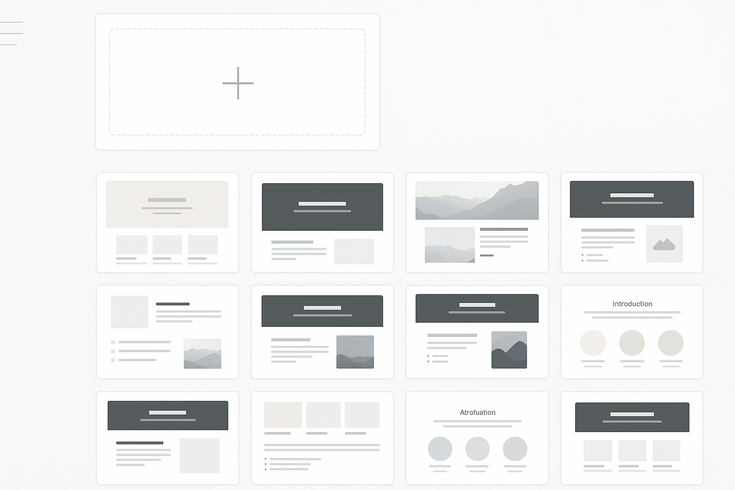
The interface presents you with several template options and a blank slate option. Take a moment to familiarize yourself with the layout. The main dashboard shows your recent sites, shared sites from collaborators, and templates to help you get started quickly. Google regularly updates these templates to reflect modern design trends and common use cases, so you’ll find options for portfolios, project sites, help centers, and more.
Before proceeding, consider creating a dedicated folder in your Google Drive for website assets. This organization will prove valuable as you add images, documents, and other media to your site. Having everything in one place makes updates easier and ensures you don’t lose important files.
Step 2: Choose Your Template
When exploring “can I create a website for free on Google,” template selection represents a crucial decision that impacts your site’s initial structure and appearance. Google Sites offers various professionally designed templates that cater to different industries and purposes. These templates provide pre-built layouts, color schemes, and content sections that you can customize to match your specific needs.
Examine each template carefully, considering how its structure aligns with your content plans. Portfolio templates work well for creative professionals, featuring image galleries and project showcases. Business templates include sections for services, team members, and contact information. Educational templates provide layouts optimized for course information, resources, and announcements. Even if you choose to start with a blank template, reviewing these options helps you understand effective website structures.
Remember that templates serve as starting points, not rigid frameworks. Every element within a template can be modified, moved, or removed. Choose the template that most closely matches your vision, knowing you can transform it completely during the customization process. This flexibility ensures that your answer to “can I create a website for free on Google” results in a unique website that stands out from others using the same platform.
Step 3: Customize Your Design
Design customization transforms a generic template into your unique web presence. Google Sites provides intuitive tools for adjusting colors, fonts, and layouts without requiring any coding knowledge. Start by accessing the themes panel, where you can modify your site’s overall appearance. The platform offers pre-set color combinations, or you can create custom color schemes that match your brand identity.
Typography plays a crucial role in your website’s readability and personality. Google Sites integrates with Google Fonts, providing access to hundreds of professional typefaces. Choose fonts that reflect your brand while maintaining excellent readability across devices. Generally, limiting yourself to two or three font families creates a cohesive, professional appearance. Use different font weights and sizes to establish visual hierarchy, guiding visitors through your content naturally.
Layout customization in Google Sites follows a section-based approach. Each section can have different column configurations, backgrounds, and spacing. Experiment with various layouts to find what best showcases your content. The platform’s responsive design ensures your customizations look great on all devices, but preview your changes on different screen sizes to ensure optimal presentation everywhere.
Step 4: Add Your Content
Content creation represents the heart of building your website. When people ask “can I create a website for free on Google,” they’re often most concerned about how to add and organize their content effectively. Google Sites excels in this area, offering multiple content blocks that you can drag and drop into your pages. These blocks include text, images, embedded files, YouTube videos, maps, and more.
Start by creating your main pages using the navigation menu. Common pages include Home, About, Services or Products, Blog or News, and Contact. Each page should serve a clear purpose and contain relevant, valuable information for your visitors. Write compelling headlines that grab attention and clearly communicate what each section offers. Your body text should be concise yet informative, broken into scannable paragraphs with subheadings for easy reading.
Leverage Google Sites’ integration capabilities to enhance your content. Embed Google Docs for detailed guides that update automatically when you edit the source document. Include Google Sheets for dynamic data presentations or pricing tables. Add Google Forms for contact forms, surveys, or registration systems. These integrations create interactive, functional websites that go beyond static information display. Remember to optimize your images before uploading – while Google Sites handles basic optimization, starting with properly sized images ensures faster loading times.
Step 5: Configure Settings
Proper configuration ensures your website functions correctly and appears professionally to visitors. Access the settings menu to configure essential elements like your site name, favicon (the small icon appearing in browser tabs), and search engine visibility. These settings significantly impact how users discover and perceive your website, making them crucial for anyone learning “can I create a website for free on Google.”
Navigation settings deserve special attention as they determine how visitors move through your site. Google Sites allows you to create multi-level navigation menus, organizing pages hierarchically. Consider your site’s information architecture carefully – group related pages together and use clear, descriptive labels. You can also hide pages from navigation while keeping them accessible via direct links, useful for thank you pages or special promotions.
Configure your site’s sharing and visibility settings based on your goals. You can keep your site private during development, share it with specific people for feedback, or make it public for anyone to access. Google Sites also provides analytics integration, allowing you to add Google Analytics tracking codes to monitor visitor behavior and improve your site over time. These insights prove invaluable for understanding what content resonates with your audience.
Step 6: Preview Your Site

Before publishing, thoroughly preview your website across different devices and scenarios. Google Sites’ preview function shows how your site appears on desktop computers, tablets, and smartphones. This step is crucial for ensuring that your answer to “can I create a website for free on Google” results in a professional, functional website that serves all visitors well.
During preview, check every page and interactive element. Click all links to ensure they lead to the correct destinations. Test any embedded forms or documents to confirm they function properly. Pay attention to image loading times and text readability on smaller screens. If you’ve embedded videos or other media, verify they play correctly and don’t overwhelm mobile users with large file sizes.
Ask friends, family, or colleagues to preview your site and provide feedback. Fresh eyes often catch issues or confusion points you might have overlooked. Consider their suggestions carefully, especially regarding navigation clarity and content organization. This collaborative approach often leads to significant improvements in user experience and helps ensure your website effectively communicates your intended message.
Step 7: Publish Your Website
Publishing represents the exciting culmination of your work. When you’re ready to make your site live, click the publish button and choose your web address. Google Sites provides a free subdomain under sites.google.com, answering definitively that yes, you can create a website for free on Google. You can also connect a custom domain if you own one, though this requires separate domain registration through a domain registrar.
The publishing process includes several options for customization. You can edit your web address (within the sites.google.com domain) to create a memorable URL. Choose something short, descriptive, and easy to remember. Avoid special characters or numbers unless they’re part of your brand name. Once published, your site becomes immediately accessible to anyone with the link, though it may take some time to appear in search engine results.
After publishing, your work isn’t complete. Monitor your site regularly for needed updates or improvements. Google Sites makes it easy to edit your published site – simply make changes and republish to update the live version. Create a maintenance schedule to keep content fresh, check for broken links, and ensure all information remains current. This ongoing attention helps maintain a professional web presence that continues serving your goals effectively.
Limitations and Considerations
While the answer to “can I create a website for free on Google” is definitively yes, understanding the platform’s limitations helps set realistic expectations and plan accordingly. Every website builder has constraints, and Google Sites is no exception. Recognizing these limitations early allows you to work within them creatively or determine when alternative solutions might better serve your needs.
Storage and Bandwidth Limits
Google Sites operates within your Google account’s storage allocation, which provides 15GB free across all Google services including Gmail, Drive, and Photos. For most websites, this proves more than sufficient, especially when optimizing images and avoiding unnecessary large files. The platform doesn’t impose specific bandwidth limitations, meaning your site can handle significant traffic without additional costs or throttling. This generous approach answers “can I create a website for free on Google” with confidence for most users.
However, media-heavy websites might encounter storage challenges over time. High-resolution image galleries, video content, and free to use files consume storage quickly. Smart website owners address this by hosting videos on YouTube (then embedding them) and optimizing images before upload. Google’s image optimization happens automatically, but starting with reasonably sized files ensures better performance and storage efficiency. Consider using Google Photos for image galleries, as photos stored in “Storage saver” quality don’t count against your storage quota.
If you approach storage limits, several options exist. Purchasing additional Google One storage remains cost-effective compared to traditional web hosting. Alternatively, you can audit your existing content, removing outdated files or moving archives to external storage. Many users find that regular content maintenance not only preserves storage space but also keeps websites fresh and relevant. The key is planning your content strategy with storage considerations in mind from the beginning.
Customization Restrictions
When exploring “can I create a website for free on Google,” you’ll discover that design customization has boundaries. Google Sites doesn’t allow custom code injection, meaning you cannot add JavaScript, custom CSS, or HTML beyond what the platform provides. This restriction ensures security and stability but limits advanced customization options available in other website builders. For users seeking pixel-perfect designs or unique interactive features, these limitations might prove frustrating.
The template system, while user-friendly, operates within predetermined structures. You cannot create entirely custom layouts or modify the underlying framework significantly. Navigation menus follow specific formats, and widget placement adheres to column-based layouts. These constraints actually benefit most users by preventing design mistakes that could compromise usability or mobile responsiveness. However, brands with strict design guidelines might find it challenging to replicate exact specifications.
Despite these restrictions, creative users achieve impressive customization through available tools. Careful use of images, custom graphics created externally, and strategic content arrangement can produce unique-looking sites. Many limitations become less noticeable when focusing on content quality and user experience rather than complex design elements. The platform’s consistency ensures professional appearance across all sites, which often matters more than unlimited customization options.
SEO Capabilities
Search engine optimization represents a crucial consideration when determining if you can create a website for free on Google that actually gets found. Google Sites provides basic SEO features including custom page titles, descriptions, and URLs. The platform automatically generates mobile-responsive designs and fast-loading pages, both important ranking factors. Being hosted on Google’s infrastructure provides reliability and speed advantages that positively impact search rankings.
However, advanced SEO features found in dedicated website builders are notably absent. You cannot edit robots.txt files, create custom redirects, or implement schema markup. The platform doesn’t provide built-in SEO analysis tools or keyword optimization suggestions. Blog functionality remains basic without features like categories, tags, or automated post scheduling. These limitations mean serious content marketers might find Google Sites insufficient for competitive SEO strategies.
Working within these constraints requires focusing on SEO fundamentals. Create high-quality, original content that serves your audience’s needs. Use descriptive, keyword-rich titles and headings naturally throughout your content. Build quality backlinks through genuine outreach and valuable content creation. Many Google Sites rank well in search results by excelling at these basics rather than relying on advanced technical SEO. The platform’s simplicity forces focus on what matters most: serving users with valuable information.
When to Consider Upgrading
Understanding when Google Sites no longer meets your needs helps plan for potential growth. If you’re wondering whether you can create a website for free on Google that scales with your business, consider these upgrade triggers. E-commerce functionality represents the most common reason for upgrading, as Google Sites doesn’t support native shopping cart features, payment processing, or inventory management. Businesses ready to sell products online need dedicated e-commerce platforms.
Advanced functionality requirements often necessitate platform changes. If you need membership systems, advanced forms with conditional logic, database integration, or custom application development, Google Sites won’t suffice. How do i create my own website for free? becomes a different question when requirements exceed basic website capabilities. Marketing automation, A/B testing, and advanced analytics integration all require more sophisticated platforms.
Consider upgrading when branding requirements become paramount. While Google Sites creates professional-looking websites, achieving unique brand expressions might require custom development. High-traffic websites might also benefit from dedicated hosting optimized for performance. The transition from Google Sites to other platforms can preserve your content while unlocking new capabilities. Many successful websites begin on Google Sites before graduating to more advanced solutions as needs evolve.
Conclusion
The question “can I create a website for free on Google” has a resounding yes as its answer. Google Sites provides a robust, user-friendly platform that enables anyone to establish a professional web presence without financial investment or technical expertise. Throughout this guide, we’ve explored the comprehensive features, practical steps, and real-world applications that make Google Sites an excellent choice for many website projects.
From simple personal pages to complex business sites, Google Sites proves its versatility across diverse use cases. The platform’s integration with Google’s ecosystem, reliable hosting infrastructure, and intuitive interface remove traditional barriers to website creation. While limitations exist, they rarely prevent users from achieving their primary goals of sharing information, building brands, or connecting with audiences online.
Success with Google Sites comes from understanding its strengths and working creatively within its framework. Focus on quality content, clear navigation, and serving your audience’s needs rather than complex features or perfect customization. Many thriving websites demonstrate that when you can create a website for free on Google, the platform’s constraints often encourage better design decisions and clearer communication.
Whether you’re starting your first website or looking for a cost-effective solution for a new project, Google Sites offers compelling advantages. The platform continues evolving with regular updates and improvements, ensuring it remains relevant in the changing digital landscape. Take advantage of this powerful free tool to establish your online presence, share your message, and connect with your intended audience. Your professional website awaits, just a few clicks away in the Google Sites interface.

Juan is a Digital Advertising / SEM Specialist with over 10 years of experience with Google AdWords, Bing Ad Center, Facebook, LinkedIn, Google Analytics, HTML, and WordPress. He is a co-founder of Sheaf Media Group and has work in several online advertising projects for retail, automotive, and service industries. Additionally, Juan holds a bachelor’s degree in Psychology and has a deep interest in the science of human behavior which he attributes as the key factor for his success in the advertising world.